学边实战系列(九):ElasticSearch 集群规划与运维经验总结
ElasticSearch 基础概念 、技术原理、安装和基础使用、索引管理、 DSL 查询、聚合查询、索引文档与读取文档流程
、集群部署相关的知识点。今天我将详细的为大家介绍 ElasticSearch 集群规划与...
ElasticSearch 基础概念 、技术原理、安装和基础使用、索引管理、 DSL 查询、聚合查询、索引文档与读取文档流程
、集群部署相关的知识点。今天我将详细的为大家介绍 ElasticSearch 集群规划与运维经验总结相关知识
上一节,我们介绍了 ElasticSearch 集群的部署、分片以及故障转移相关的知识点,并结合实例学入学习。在实际的企业环境,对于一个集群的规划也是相当重要的,接下来我们将与大家一起来探讨一下这个问题。
ES 集群容量及索引规划
集群规模评估
评估什么
- 计算资源的CPU和内存
- 存储资源的类型及容量
- 节点数量
根据什么评估
- 业务场景:日志分析、指标监控、网站搜索
- 查询及写入QPS
- 索引数据总量
集群规模评估准则
- 32C64G单节点配置通常可承载5W次/s的写入;
- 写入量和数据量较大时,优先选择32C64G的节点配置;
- 1T的数据量预计需消耗2-4GB的内存空间;
- 实际存储空间通常为原始数据量2.8倍(1副本)
- 搜索场景优先选择大内存节点配置
索引配置评估
评估什么
- 怎么划分索引
- 索引的分片数如何设置
根据什么评估
- 业务场景:日志分析、指标监控、网站搜索
- 单日新增的数据量
索引配置评估准则
- 单个分片大小控制在30-50GB
- 集群总分片数量控制在3w以内
- 1GB的内存空间支持20-30个分片为佳
- 一个节点建议不超过1000个分片
- 索引分片数量建议和节点数量保持一致
- 集群规模较大时建议设置专用主节点
- 专用主节点配置建议在8C16G以上
- 如果是时序数据,建议结合ILM索引生命周期管理
ES 集群写入性能优化
- 写入性能优化
- 写入数据不指定doc_id,让 ES 自动生成
- 使用自定义 routing 功能,尽量将请求转发到较少的分片
- 对于规模较大的集群,建议提前创建好索引,且使用固定的 Index mapping
- 对于数据实时性要求不高的场景,可以将索引的 refresh_interval 设置为 30s
- 对于追求写入效率的场景,可以将正在写入的索引设置为单副本,写入完成后打开副本
- 使用 bulk 接口批量写入数据,每次 bulk 数据量大小控制在 10M 左右
- 尽量选择 SSD 磁盘类型,并且可选择挂载多块云硬盘(云上目前最大支持 3块盘)
ES 集群运维经验总结
常见分片未分配原因总结
磁盘满了:
the node is above the high watermark cluster setting [cluster.routing.allocation.disk.watermark.high=95%], using more disk space than the maximum allowed [95.0%], actual free: [4.055101177689788%]
解决方法:扩容磁盘或者删除数据
分配文档数超过最大值限制:
failure IllegalArgumentException[number of documents in the index cannot exceed 2147483519
解决方法:向新索引中写入数据,并合理设置分片大小
主分片所在节点掉线
cannot allocate because a previous copy of the primary shard existed but can no longer be found on the nodes in the cluster
解决方法:找到节点掉线原因并重新启动节点加入集群,等待分片恢复。
索引属性与节点属性不匹配
node does not match index setting [index.routing.allocation.require] filters [temperature:“warm”,_id:“comdNq4ZSd2Y6ycB9Oubsg”]
解决方法:重新设置索引的属性,和节点保持一致,若要修改节点属性,则需要重启节点
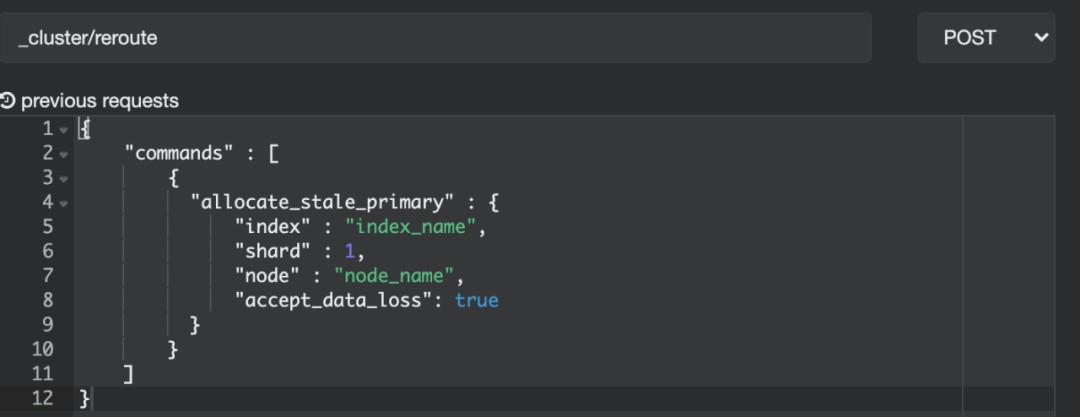
节点长时间掉线后再次加入集群,导致引入脏数据
cannot allocate because all found copies of the shard are either stale or corrupt
解决方法:使用reroute API:
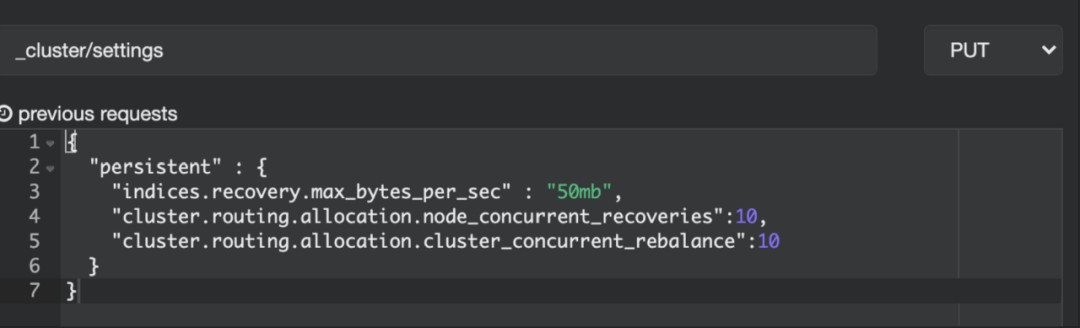
未分配的分片太多,导致达到了分片恢复的最大阈值,其他分片需要排队等待
reached the limit of incoming shard recoveries [2], cluster setting [cluster.routing.allocation.node_concurrent_incoming_recoveries=2] (can also be set via [cluster.routing.allocation.node_concurrent_recoveries])
解决方法:使用cluster/settings调大分片恢复的并发度和速度。
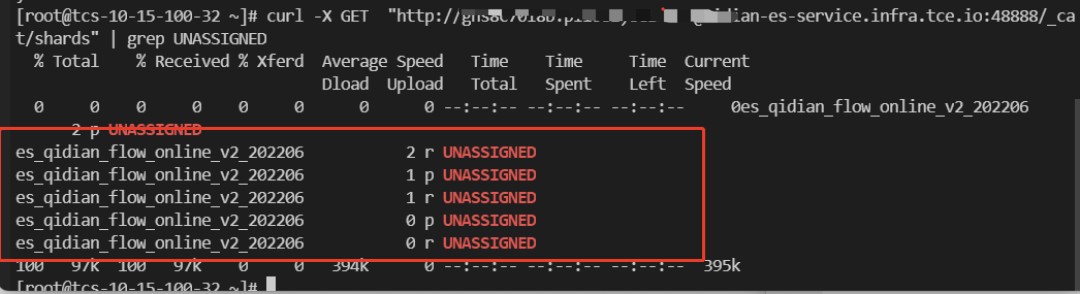
集群状态 shard unassigned 排查
事情起因很简单,同事对于我写的一个索引报了如下问题。出于学习目的排查下。
常见的ES集群有三种状态,如下:
- Green:主/副分片都已经分配好且可用;集群处于最健康的状态100%可用;
- Yellow:主分片可用,但是副分片不可用。这种情况ES集群所有的主分片都是已经分配好了的,但是至少有一个副本是未分配的。这种情况下数据也是完整的;但是集群的高可用性会被弱化。
- Red:存在不可用的主分片。此时只是部分数据可以查询,已经影响到了整体的读写,需要重点关注。这种情况ES集群至少一个主分片(以及它的全部副本)都缺失。
查看集群状态
如下图所示分别为green和red的样子。
GET /_cluster/health
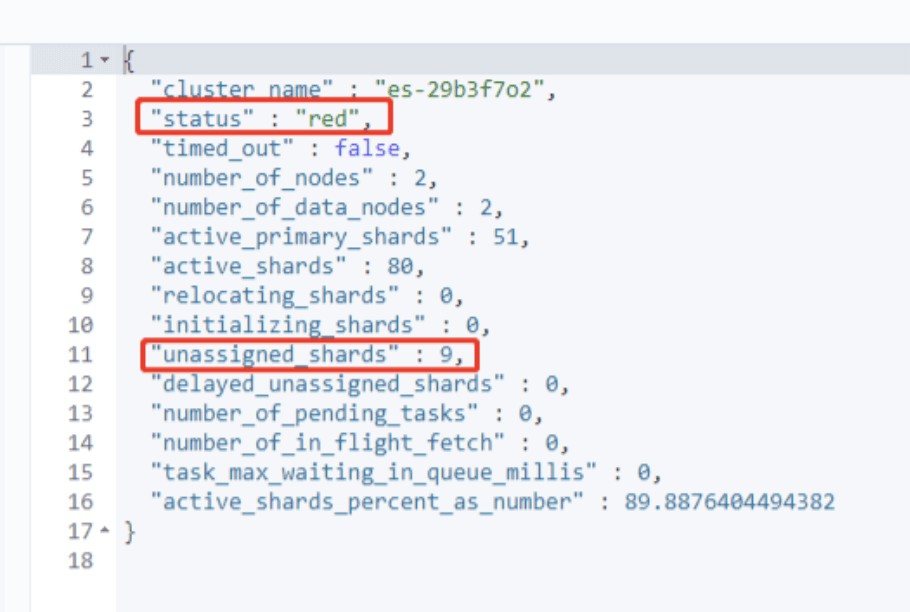
对于上述red的情况。需要重点关注unassigned_shards没有正常分配的分片。
找到异常索引
方法一:查看所有索引状况,如下就是有问题的。右侧查找 red 关键词。
GET /_cat/indices

方法二:直接查看unassigned的shard。
查找 unassigned 关键词。
GET /_cat/shards
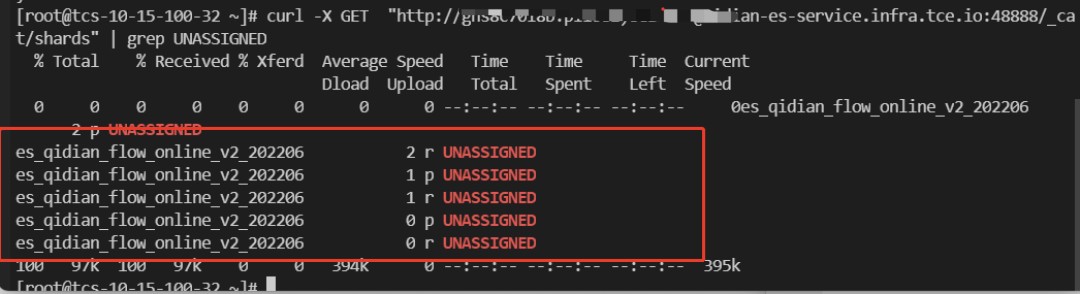
查看不分配原因
使用 Cluster Allocation Explain API ,返回集群为什么不分配分片的详细原因。
GET /_cluster/allocation/explain?pretty

curl -X GET "http://xxx.io:48888/_cluster/allocation/explain?pretty"
常见的 unassigned 原因,上一小节也具体描述过了。
- 发表于 2023-06-19 16:28
- 阅读 ( 36 )


