边学边实战系列(五):ElasticSearch DSL 查询原理与实践
前面介绍了 ElasticSearch 基础概念、生态与应用场景、技术原理、安装和基础使用、索引管理相关的知识点。今天我将详细的为大家介绍 ElasticSearch DSL 查询相关知识,希望大家能够从中收获多多!
DSL 查询之复合查询
在查询中会有多种条件组合的查询,在 ElasticSearch 中叫复合查询。它提供了5种复合查询方式:bool query(布尔查询)、boosting query(提高查询)、constant_score(固定分数查询)、dis_max(最佳匹配查询)、function_score(函数查询)。
复合查询引入
在前文中,我们使用bool查询来组合多个查询条件。比如之前介绍的语句:
GET /bank/_search
{
  "query": {
    "bool": {
      "must": [
        { "match": { "age": "40" } }
      ],
      "must_not": [
        { "match": { "state": "ID" } }
      ]
    }
  }
}
这种查询就是本文要介绍的复合查询,并且bool查询只是复合查询一种。
bool query(布尔查询)
通过布尔逻辑将较小的查询组合成较大的查询。
概念
Bool查询语法有以下特点
- 子查询可以任意顺序出现
- 可以嵌套多个查询,包括bool查询
- 如果bool查询中没有must条件,should中必须至少满足一条才会返回结果。
bool查询包含四种操作符,分别是must,should,must_not,filter。他们均是一种数组,数组里面是对应的判断条件。
- must: 必须匹配。贡献算分
- must_not:过滤子句,必须不能匹配,但不贡献算分
- should: 选择性匹配,至少满足一条。贡献算分
- filter: 过滤子句,必须匹配,但不贡献算分
一些例子
看下官方举例
- 例子1
POST _search
{
  "query": {
    "bool" : {
      "must" : {
        "term" : { "user.id" : "kimchy" }
      },
      "filter": {
        "term" : { "tags" : "production" }
      },
      "must_not" : {
        "range" : {
          "age" : { "gte" : 10, "lte" : 20 }
        }
      },
      "should" : [
        { "term" : { "tags" : "env1" } },
        { "term" : { "tags" : "deployed" } }
      ],
      "minimum_should_match" : 1,
      "boost" : 1.0
    }
  }
}
在filter元素下指定的查询对评分没有影响 , 评分返回为0。分数仅受已指定查询的影响。
- 例子2
GET _search
{
  "query": {
    "bool": {
      "filter": {
        "term": {
          "status": "active"
        }
      }
    }
  }
}
这个例子查询查询为所有文档分配0分,因为没有指定评分查询。
- 例子3
GET _search
{
  "query": {
    "bool": {
      "must": {
        "match_all": {}
      },
      "filter": {
        "term": {
          "status": "active"
        }
      }
    }
  }
}
此bool查询具有match_all查询,该查询为所有文档指定1.0分。
- 例子4
GET /_search
{
  "query": {
    "bool": {
      "should": [
        { "match": { "name.first": { "query": "shay", "_name": "first" } } },
        { "match": { "name.last": { "query": "banon", "_name": "last" } } }
      ],
      "filter": {
        "terms": {
          "name.last": [ "banon", "kimchy" ],
          "_name": "test"
        }
      }
    }
  }
}
每个query条件都可以有一个_name属性,用来追踪搜索出的数据到底match了哪个条件。
boosting query(提高查询)
不同于bool查询,bool查询中只要一个子查询条件不匹配那么搜索的数据就不会出现。而boosting query则是降低显示的权重/优先级(即score)。
概念
比如搜索逻辑是 name = 'apple' and type ='fruit',对于只满足部分条件的数据,不是不显示,而是降低显示的优先级(即score)。
例子
首先创建数据
POST /test-dsl-boosting/_bulk
{ "index": { "_id": 1 }}
{ "content":"Apple Mac" }
{ "index": { "_id": 2 }}
{ "content":"Apple Fruit" }
{ "index": { "_id": 3 }}
{ "content":"Apple employee like Apple Pie and Apple Juice" }
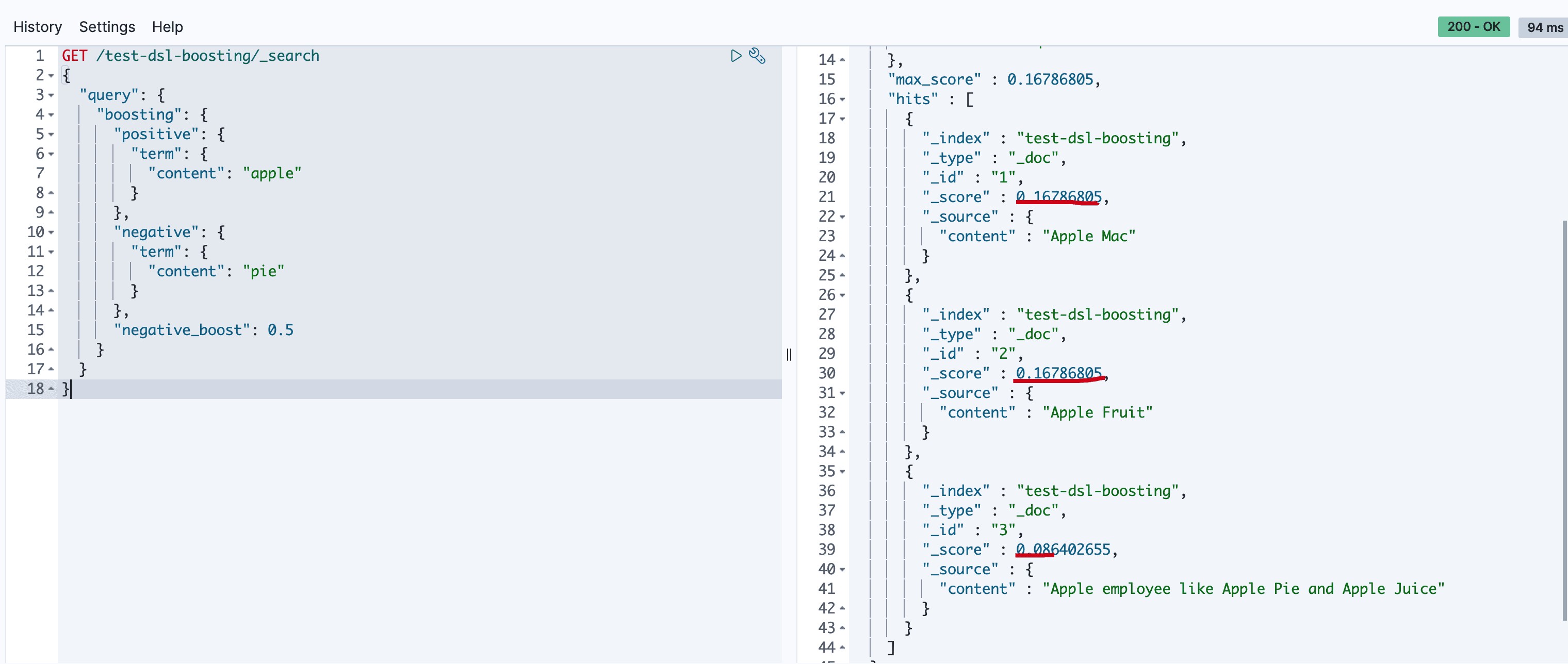
对匹配pie的做降级显示处理
GET /test-dsl-boosting/_search
{
  "query": {
    "boosting": {
      "positive": {
        "term": {
          "content": "apple"
        }
      },
      "negative": {
        "term": {
          "content": "pie"
        }
      },
      "negative_boost": 0.5
    }
  }
}
执行结果如下
constant_score(固定分数查询)
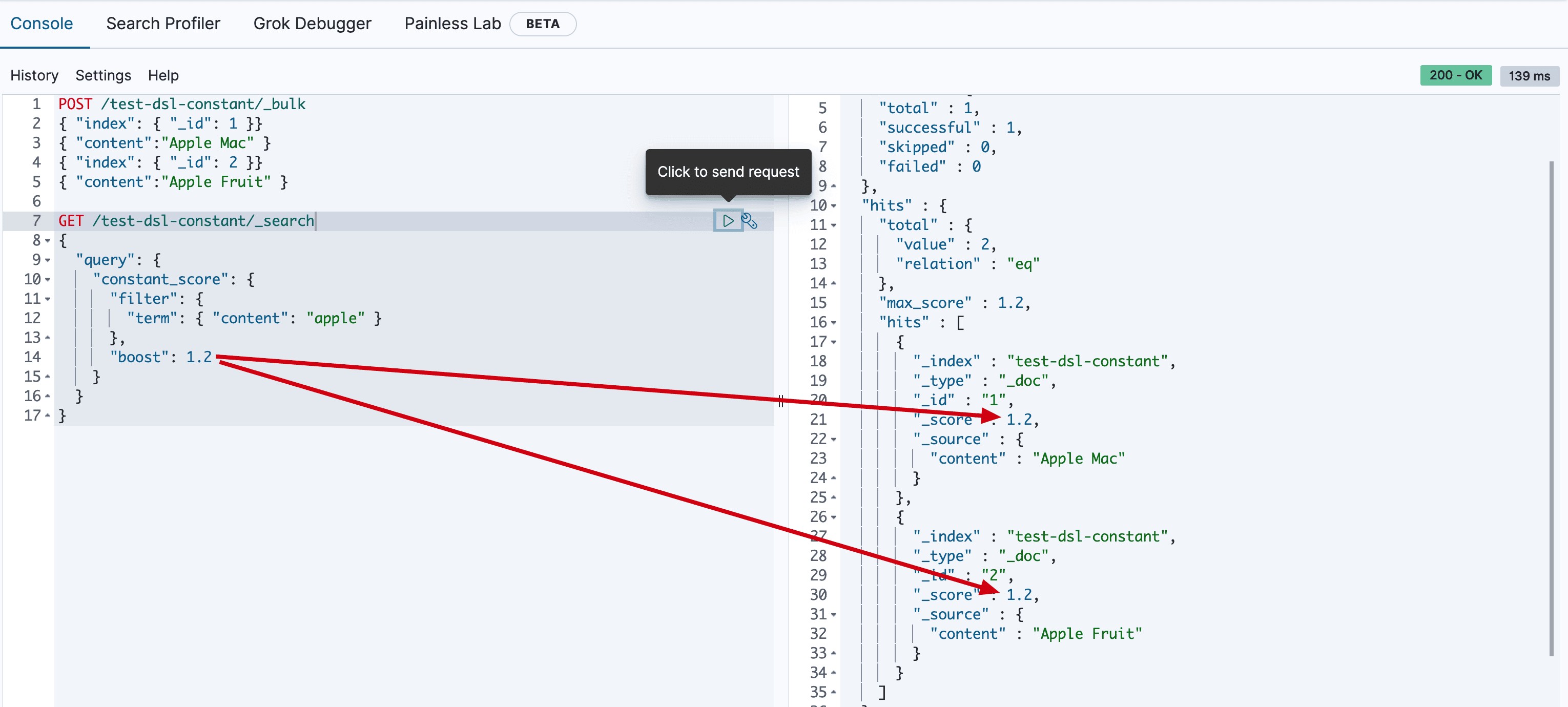
查询某个条件时,固定的返回指定的score;显然当不需要计算score时,只需要filter条件即可,因为filter context忽略score。
例子
首先创建数据
POST /test-dsl-constant/_bulk
{ "index": { "_id": 1 }}
{ "content":"Apple Mac" }
{ "index": { "_id": 2 }}
{ "content":"Apple Fruit" }
查询apple
GET /test-dsl-constant/_search
{
  "query": {
    "constant_score": {
      "filter": {
        "term": { "content": "apple" }
      },
      "boost": 1.2
    }
  }
}
执行结果如下
dis_max(最佳匹配查询)
分离最大化查询(Disjunction Max Query)指的是: 将任何与任一查询匹配的文档作为结果返回,但只将最佳匹配的评分作为查询的评分结果返回。
例子
假设有个网站允许用户搜索博客的内容,以下面两篇博客内容文档为例:
POST /test-dsl-dis-max/_bulk
{ "index": { "_id": 1 }}
{"title": "Quick brown rabbits","body":  "Brown rabbits are commonly seen."}
{ "index": { "_id": 2 }}
{"title": "Keeping pets healthy","body":  "My quick brown fox eats rabbits on a regular basis."}
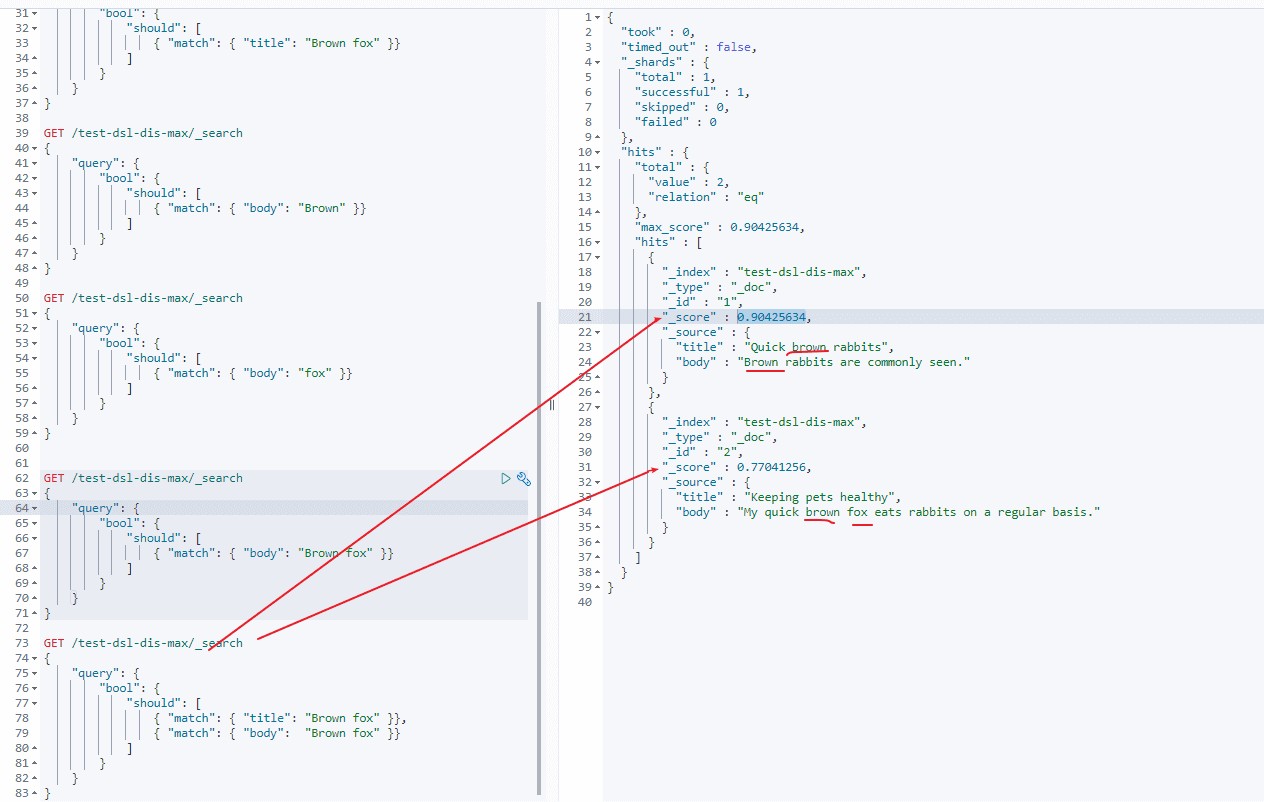
用户输入词组 “Brown fox” 然后点击搜索按钮。事先,我们并不知道用户的搜索项是会在 title 还是在 body 字段中被找到,但是,用户很有可能是想搜索相关的词组。用肉眼判断,文档 2 的匹配度更高,因为它同时包括要查找的两个词:
现在运行以下 bool 查询:
GET /test-dsl-dis-max/_search
{
    "query": {
        "bool": {
            "should": [
                { "match": { "title": "Brown fox" }},
                { "match": { "body":  "Brown fox" }}
            ]
        }
    }
}
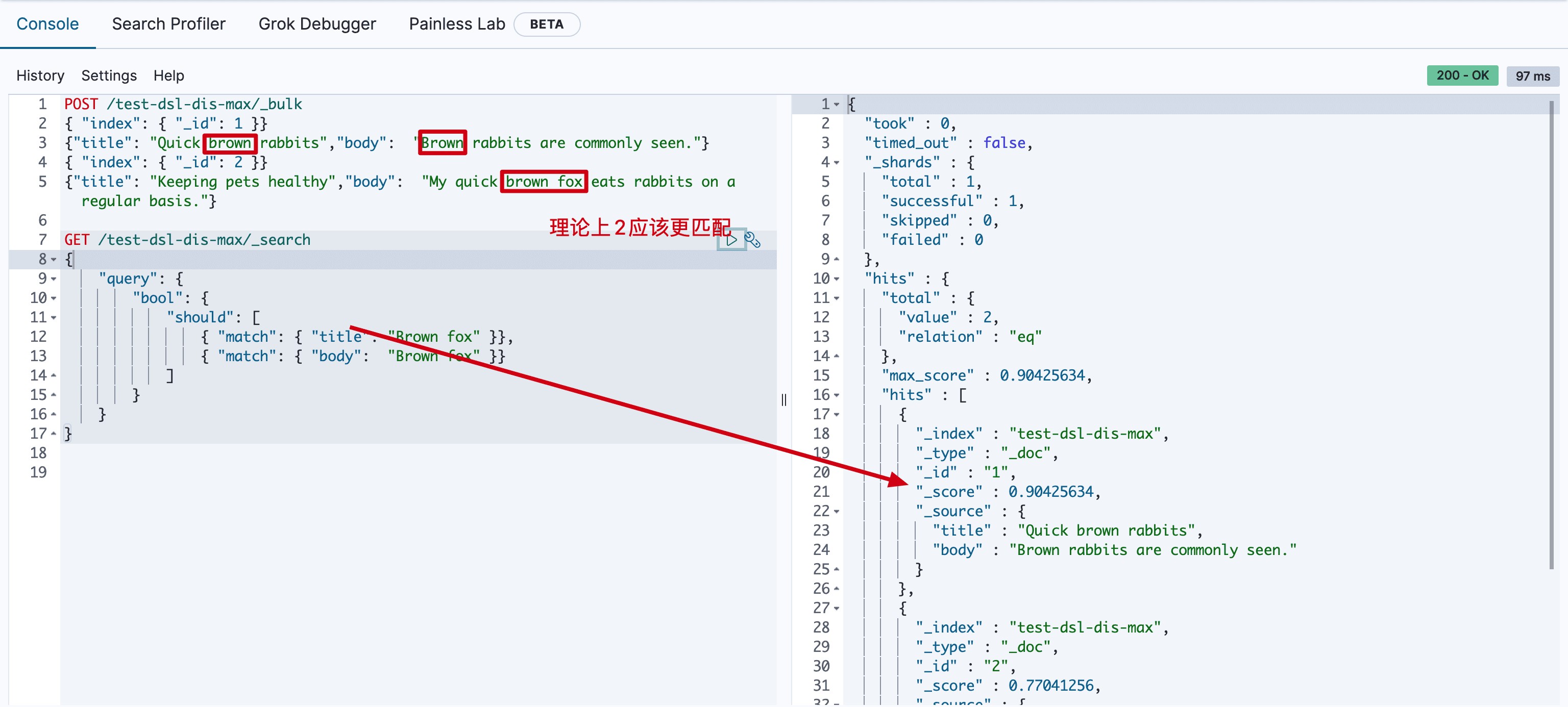
为了理解导致这样的原因,需要看下如何计算评分的。
- should 条件的计算分数
GET /test-dsl-dis-max/_search
{
    "query": {
        "bool": {
            "should": [
                { "match": { "title": "Brown fox" }},
                { "match": { "body":  "Brown fox" }}
            ]
        }
    }
}
要计算上述分数,首先要计算match的分数
- 1.第一个match 中 brown的分数
doc 1 分数 = 0.6931471
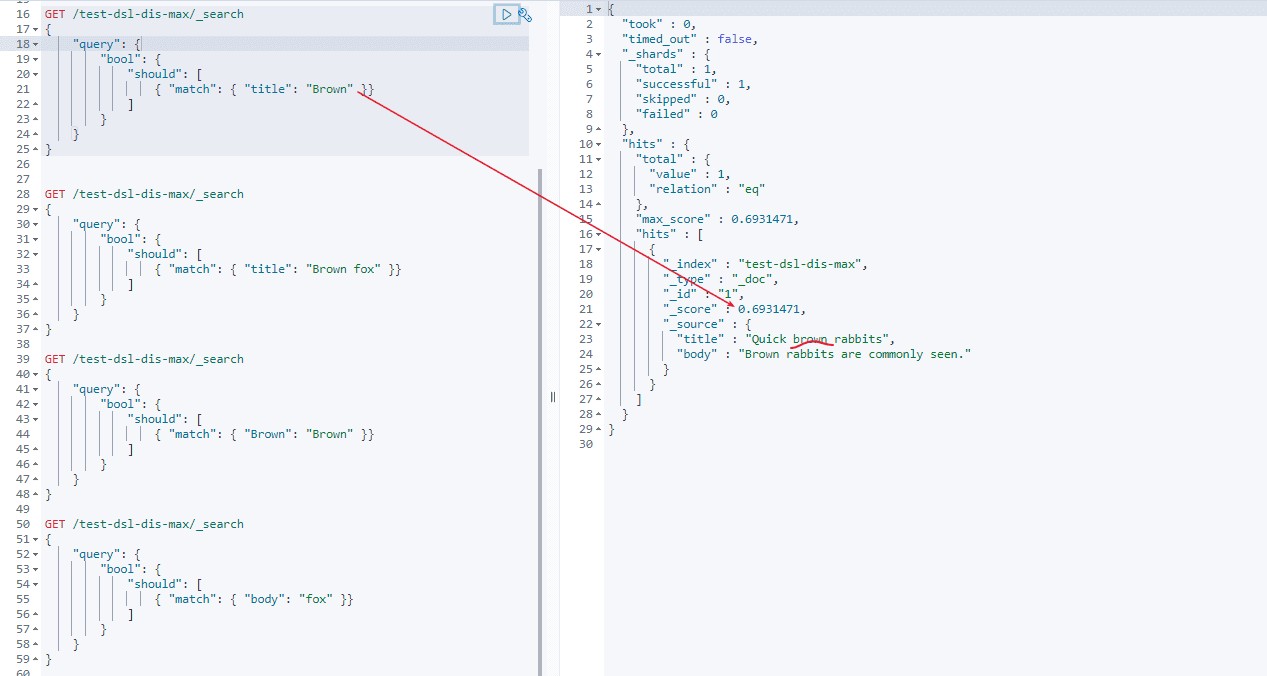
- 2.title中没有fox,所以第一个match 中 brown fox 的分数 = brown分数 + 0 = 0.6931471
doc 1 分数 = 0.6931471 + 0 = 0.6931471
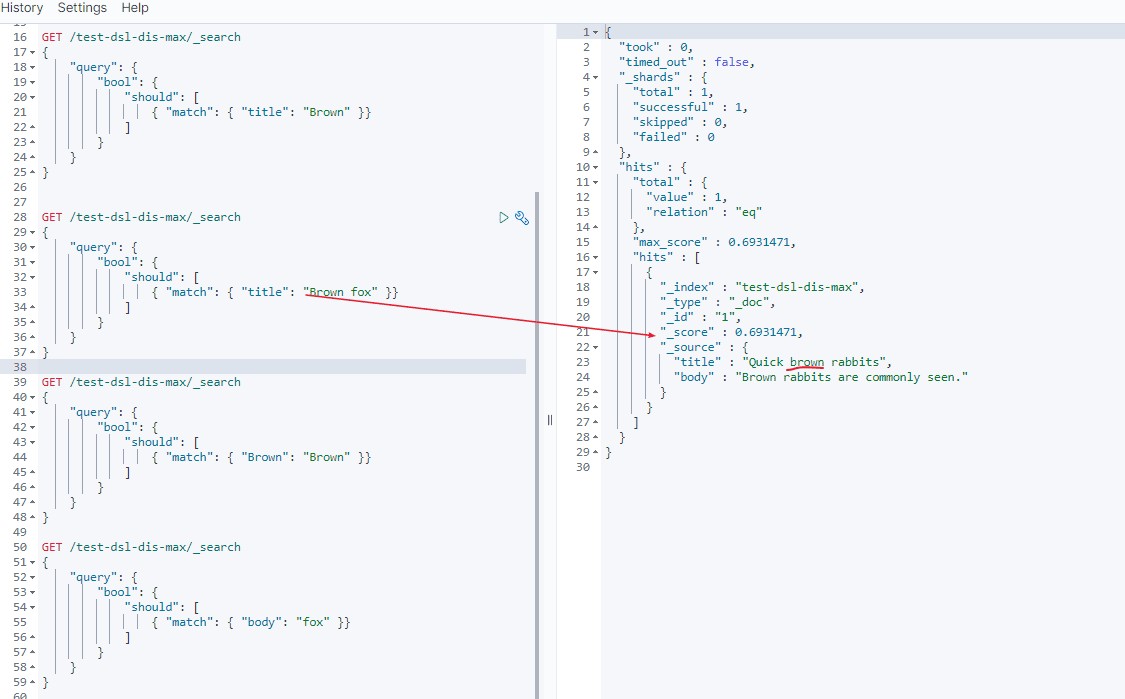
- 3.第二个 match 中 brown分数
doc 1 分数 = 0.21110919
doc 2 分数 = 0.160443
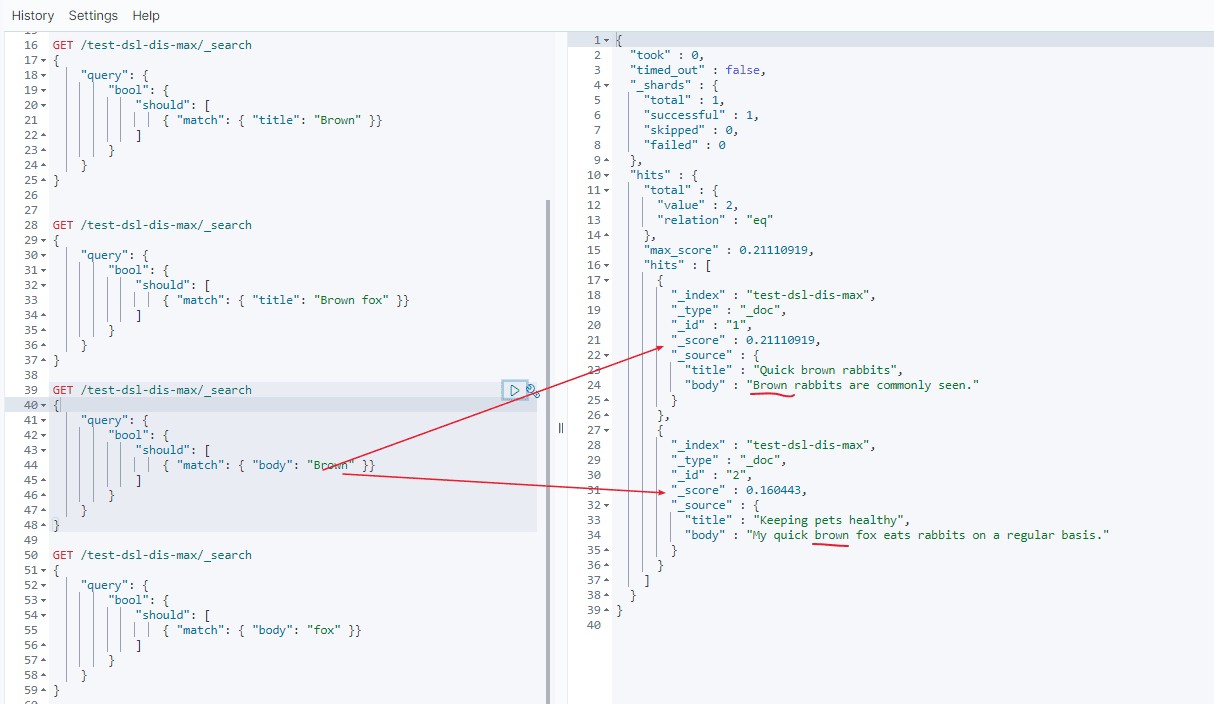
- 4.第二个 match 中 fox分数
doc 1 分数 = 0
doc 2 分数 = 0.60996956
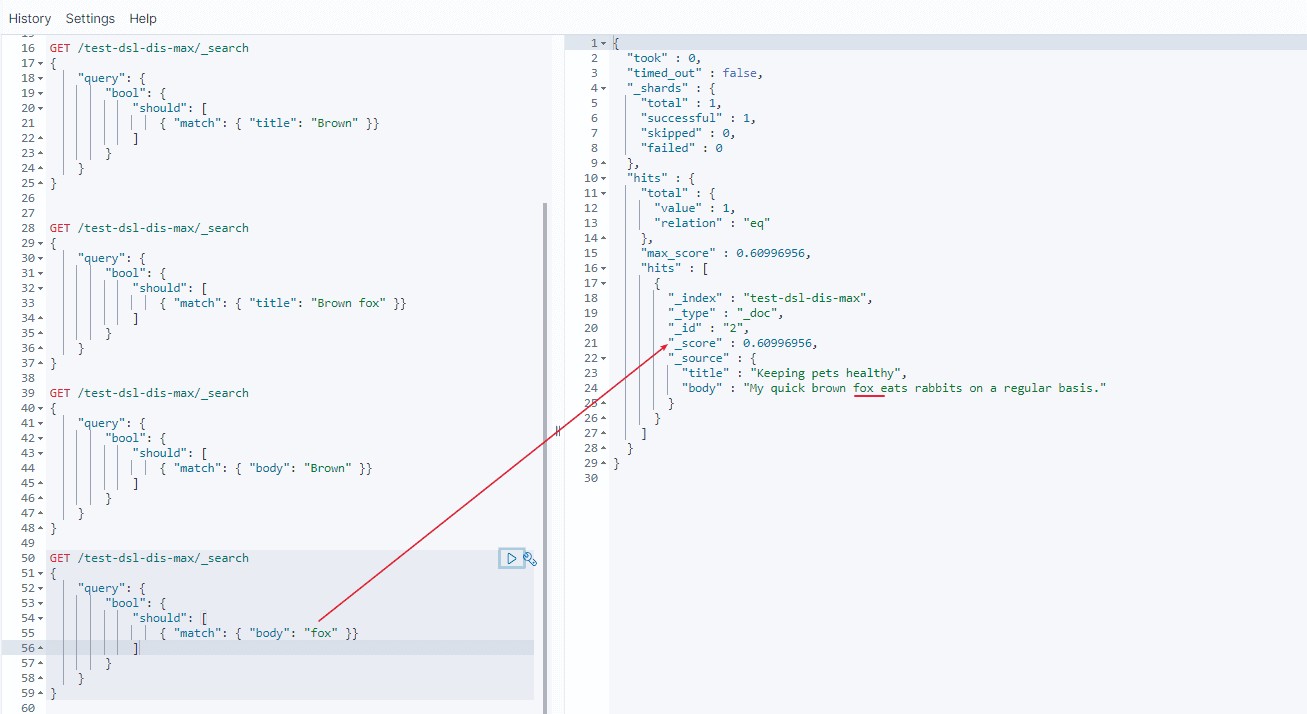
- 5.所以第二个 match 中 brown fox分数 = brown分数 + fox分数
doc 1 分数 = 0.21110919 + 0 = 0.21110919
doc 2 分数 = 0.160443 + 0.60996956 = 0.77041256
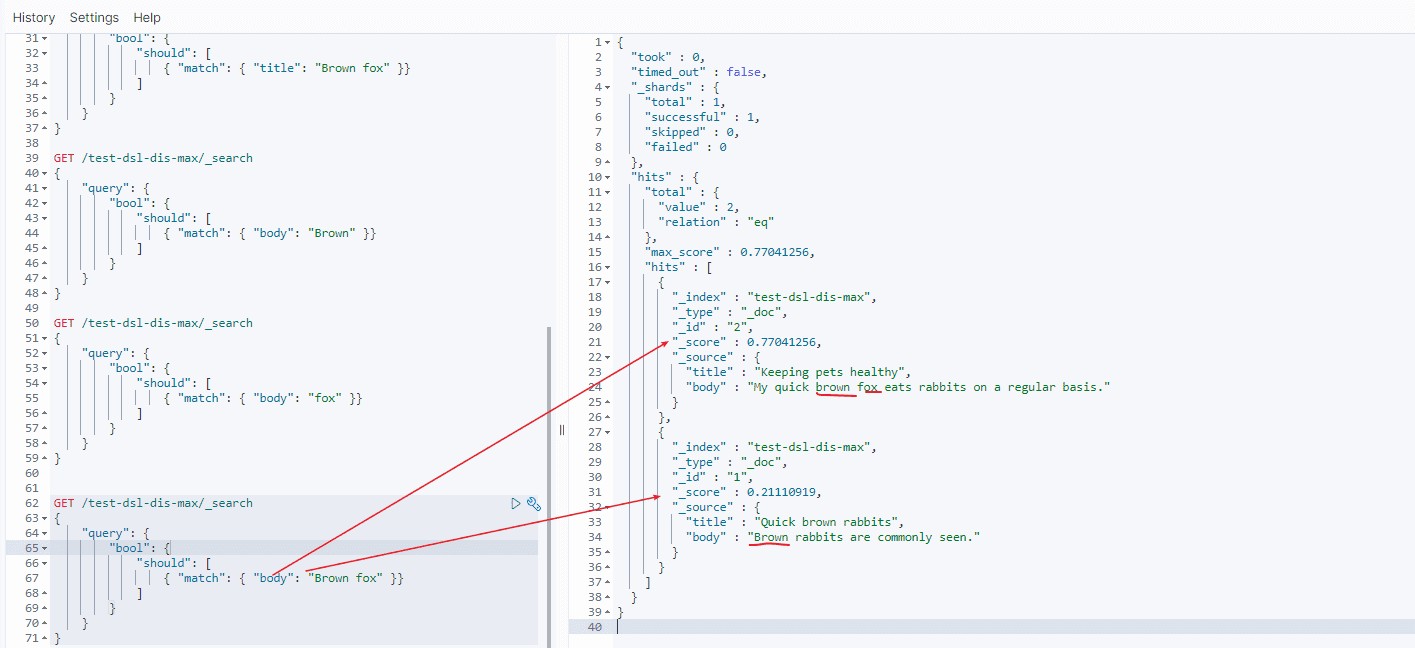
- 6.所以整个语句分数, should分数 = 第一个match + 第二个match分数
doc 1 分数 = 0.6931471 + 0.21110919 = 0.90425634
doc 2 分数 = 0 + 0.77041256 = 0.77041256
- 引入了dis_max
不使用 bool 查询,可以使用 dis_max 即分离 最大化查询(Disjunction Max Query) 。分离(Disjunction)的意思是 或(or) ,这与可以把结合(conjunction)理解成 与(and) 相对应。分离最大化查询(Disjunction Max Query)指的是: 将任何与任一查询匹配的文档作为结果返回,但只将最佳匹配的评分作为查询的评分结果返回 :
GET /test-dsl-dis-max/_search
{
    "query": {
        "dis_max": {
            "queries": [
                { "match": { "title": "Brown fox" }},
                { "match": { "body":  "Brown fox" }}
            ],
            "tie_breaker": 0
        }
    }
}
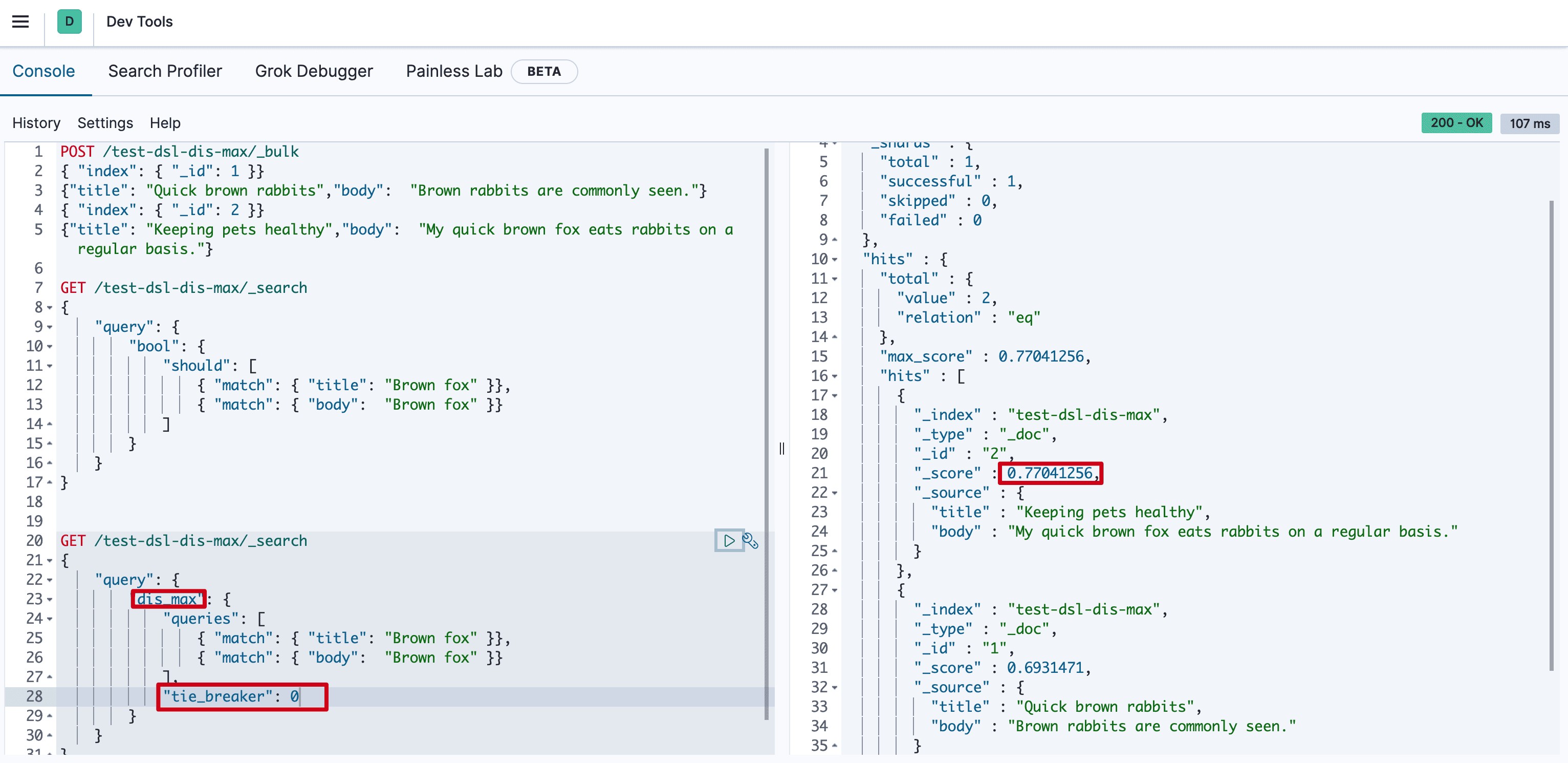
0.77041256怎么来的呢? 下文给你解释它如何计算出来的。
- dis_max 条件的计算分数
分数 = 第一个匹配条件分数+ tie_breaker *第二个匹配的条件的分数 ...
GET /test-dsl-dis-max/_search
{
    "query": {
        "dis_max": {
            "queries": [
                { "match": { "title": "Brown fox" }},
                { "match": { "body":  "Brown fox" }}
            ],
            "tie_breaker": 0
        }
    }
}
doc 1 分数 = 0.6931471 + 0.21110919 \* 0 = 0.6931471
doc 2 分数 = 0.77041256 = 0.77041256
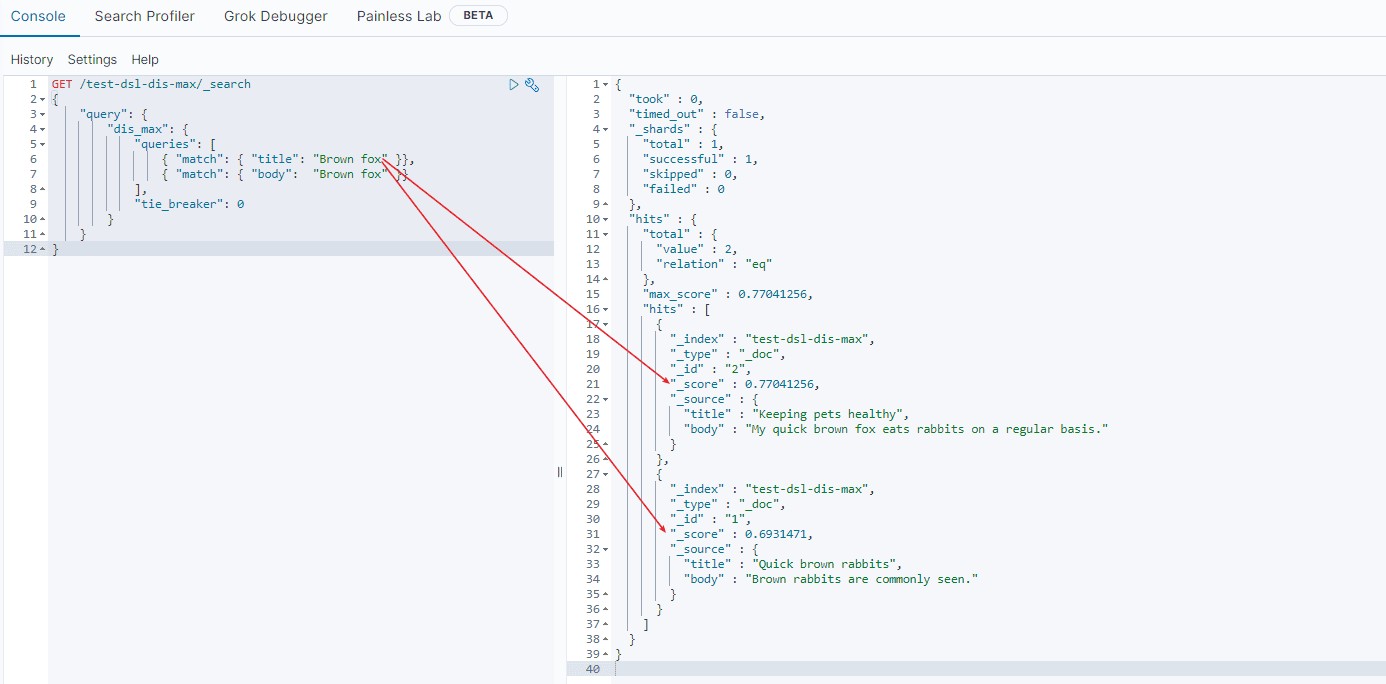
这样你就能理解通过dis_max将doc 2 置前了, 当然这里如果缺省tie_breaker字段的话默认就是0,你还可以设置它的比例(在0到1之间)来控制排名。(显然值为1时和should查询是一致的)。
function_score(函数查询)
简而言之就是用自定义function的方式来计算_score。可以ES有哪些自定义function呢?
- script_score 使用自定义的脚本来完全控制分值计算逻辑。如果你需要以上预定义函数之外的功能,可以根据需要通过脚本进行实现。
- weight 对每份文档适用一个简单的提升,且该提升不会被归约:当weight为2时,结果为2 * _score。
- random_score 使用一致性随机分值计算来对每个用户采用不同的结果排序方式,对相同用户仍然使用相同的排序方式。
- field_value_factor 使用文档中某个字段的值来改变_score,比如将受欢迎程度或者投票数量考虑在内。
- 衰减函数(Decay Function) - linear,exp,gauss
以最简单的random_score 为例。
GET /_search
{
  "query": {
    "function_score": {
      "query": { "match_all": {} },
      "boost": "5",
      "random_score": {},
      "boost_mode": "multiply"
    }
  }
}
进一步的,它还可以使用上述function的组合(functions)。
GET /_search
{
  "query": {
    "function_score": {
      "query": { "match_all": {} },
      "boost": "5",
      "functions": [
        {
          "filter": { "match": { "test": "bar" } },
          "random_score": {},
          "weight": 23
        },
        {
          "filter": { "match": { "test": "cat" } },
          "weight": 42
        }
      ],
      "max_boost": 42,
      "score_mode": "max",
      "boost_mode": "multiply",
      "min_score": 42
    }
  }
}
script_score 可以使用如下方式。
GET /_search
{
  "query": {
    "function_score": {
      "query": {
        "match": { "message": "elasticsearch" }
      },
      "script_score": {
        "script": {
          "source": "Math.log(2 + doc['my-int'].value)"
        }
      }
    }
  }
}
更多相关内容,可以参考官方文档,PS: 形成体系化认知以后,具体用的时候查询下即可。
DSL 查询之全文搜索
DSL查询极为常用的是对文本进行搜索,我们叫全文搜索,本文主要对全文搜索进行详解。
谈谈如何从官网学习
很多读者在看官方文档学习时存在一个误区,以DSL中full text查询为例,其实内容是非常多的, 没有取舍/没重点去阅读,要么需要花很多时间,要么头脑一片浆糊。所以这里重点谈谈我的理解。
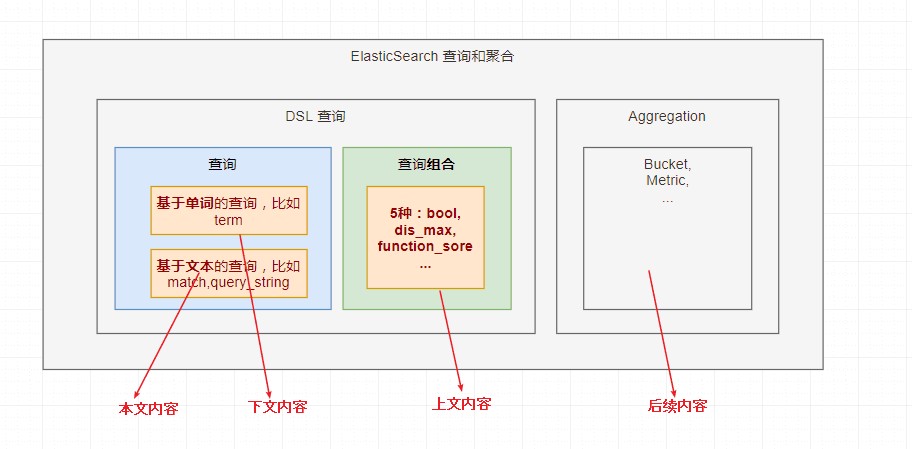
- 第一点:全局观,即我们现在学习内容在整个体系的哪个位置?
如下图,可以很方便的帮助你构筑这种体系:
- 第二点: 分类别,从上层理解,而不是本身
比如Full text Query中,我们只需要把如下的那么多点分为3大类,你的体系能力会大大提升。
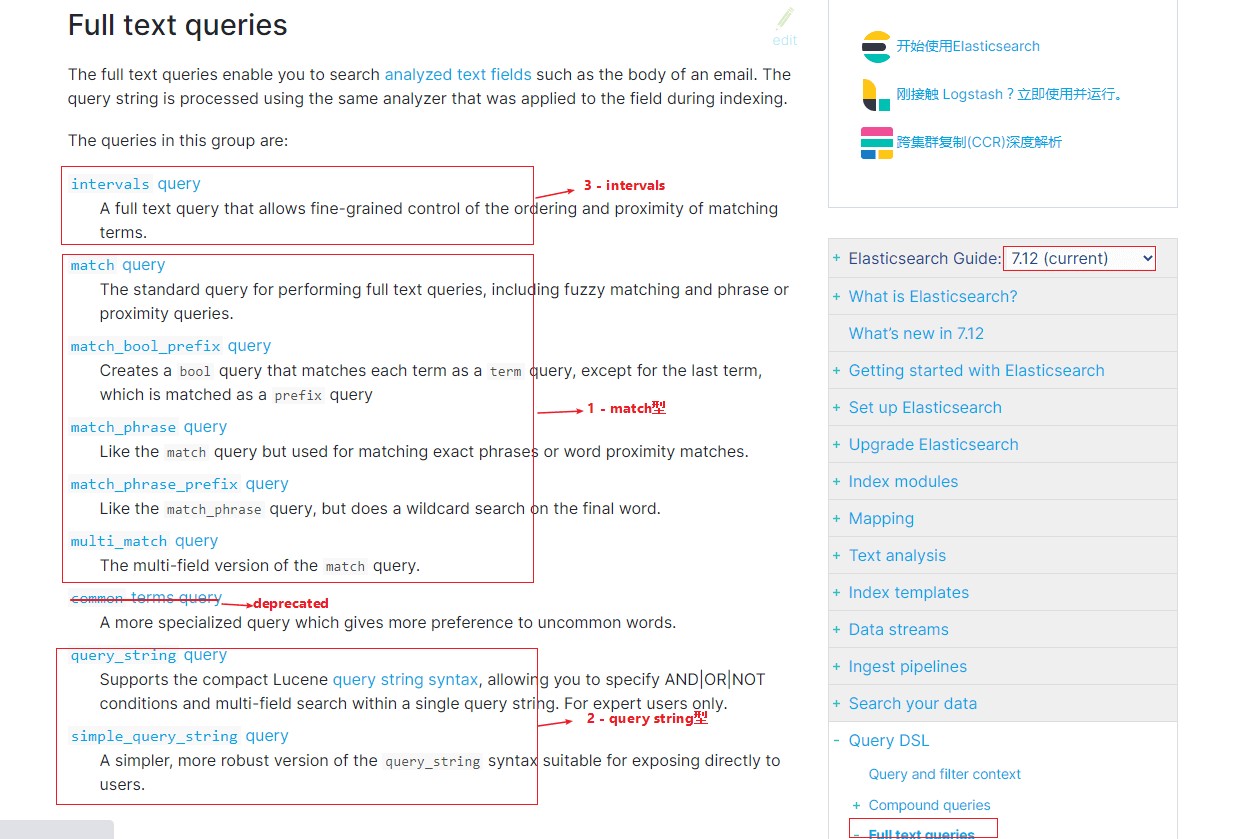
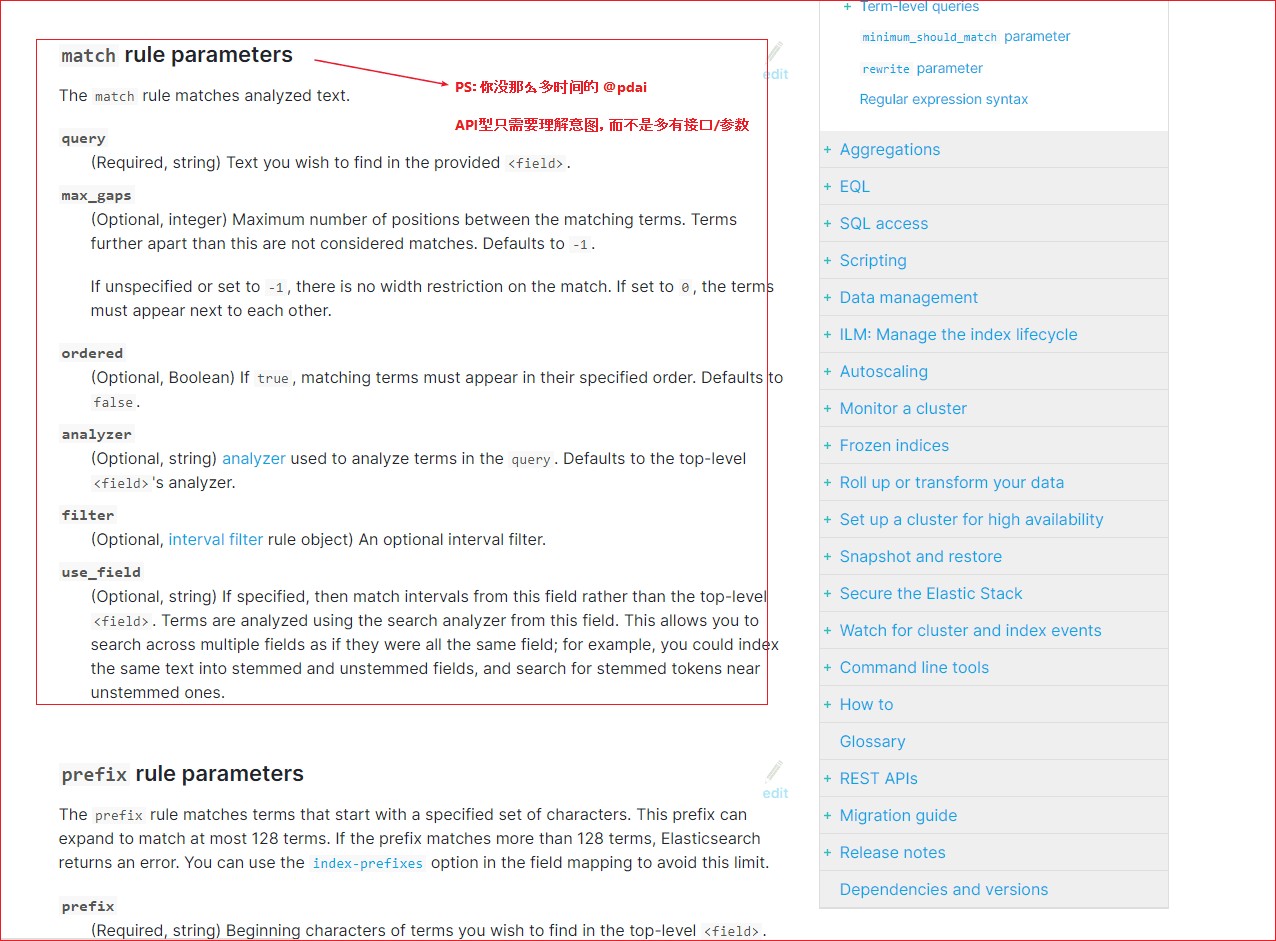
第三点: 知识点还是API? API类型的是可以查询的,只需要知道大致有哪些功能就可以了。
Match类型
第一类:match 类型
match 查询的步骤在前文中我们已经介绍了match查询。
- 准备一些数据
这里我们准备一些数据,通过实例看match 查询的步骤。
PUT /test-dsl-match
{ "settings": { "number_of_shards": 1 }}

POST /test-dsl-match/_bulk
{ "index": { "_id": 1 }}
{ "title": "The quick brown fox" }
{ "index": { "_id": 2 }}
{ "title": "The quick brown fox jumps over the lazy dog" }
{ "index": { "_id": 3 }}
{ "title": "The quick brown fox jumps over the quick dog" }
{ "index": { "_id": 4 }}
{ "title": "Brown fox brown dog" }
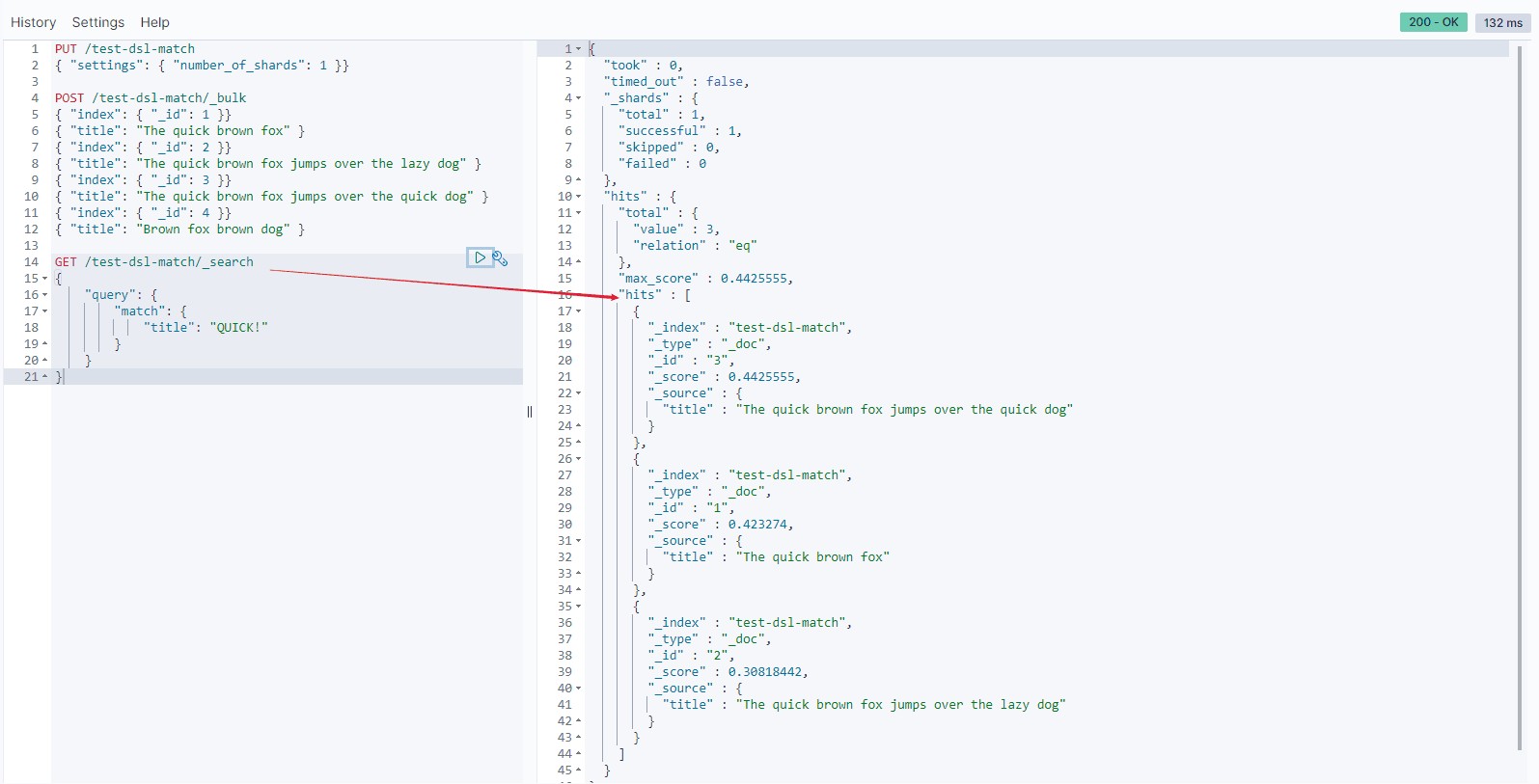
- 查询数据
GET /test-dsl-match/_search
{
    "query": {
        "match": {
            "title": "QUICK!"
        }
    }
}
Elasticsearch 执行上面这个 match 查询的步骤是:
1.检查字段类型 。
标题 title 字段是一个 string 类型( analyzed )已分析的全文字段,这意味着查询字符串本身也应该被分析。
2.分析查询字符串 。
将查询的字符串 QUICK! 传入标准分析器中,输出的结果是单个项 quick 。因为只有一个单词项,所以 match 查询执行的是单个底层 term 查询。
3.查找匹配文档 。
用 term 查询在倒排索引中查找 quick 然后获取一组包含该项的文档,本例的结果是文档:1、2 和 3 。
4.为每个文档评分 。
用 term 查询计算每个文档相关度评分 _score ,这是种将词频(term frequency,即词 quick 在相关文档的 title 字段中出现的频率)和反向文档频率(inverse document frequency,即词 quick 在所有文档的 title 字段中出现的频率),以及字段的长度(即字段越短相关度越高)相结合的计算方式。
- 验证结果
- match多个词深入
我们在上文中复合查询中已经使用了match多个词,比如“Quick pets”; 这里我们通过例子带你更深入理解match多个词。
- match多个词的本质
查询多个词"BROWN DOG!"
GET /test-dsl-match/_search
{
    "query": {
        "match": {
            "title": "BROWN DOG"
        }
    }
}
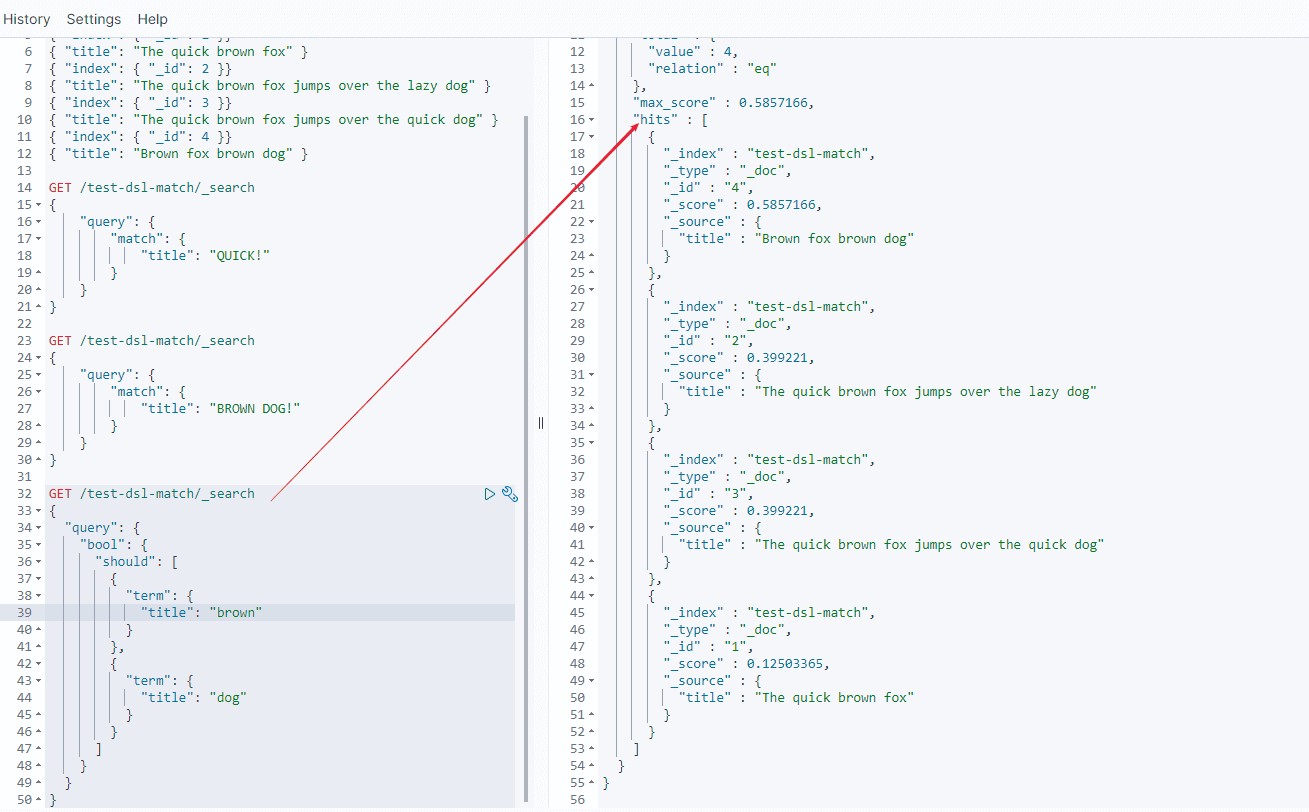
因为 match 查询必须查找两个词(["brown","dog"]),它在内部实际上先执行两次 term 查询,然后将两次查询的结果合并作为最终结果输出。为了做到这点,它将两个 term 查询包入一个 bool 查询中。
所以上述查询的结果,和如下语句查询结果是等同的。
GET /test-dsl-match/_search
{
  "query": {
    "bool": {
      "should": [
        {
          "term": {
            "title": "brown"
          }
        },
        {
          "term": {
            "title": "dog"
          }
        }
      ]
    }
  }
}- match多个词的逻辑
上面等同于should(任意一个满足),是因为 match还有一个operator参数,默认是or, 所以对应的是should。
所以上述查询也等同于:
GET /test-dsl-match/_search
{
  "query": {
    "match": {
      "title": {
        "query": "BROWN DOG",
        "operator": "or"
      }
    }
  }
}
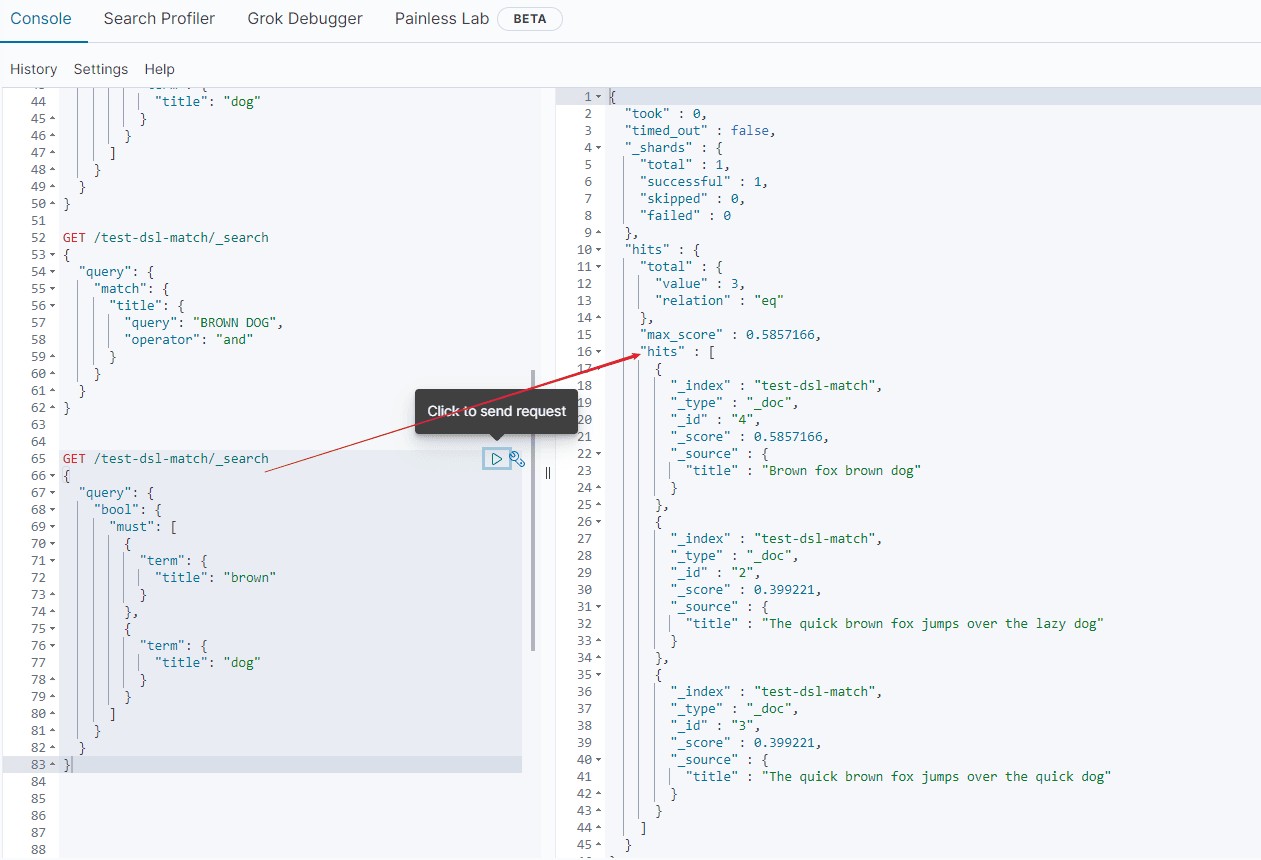
那么我们如果是需要and操作呢,即同时满足呢?
GET /test-dsl-match/_search
{
  "query": {
    "match": {
      "title": {
        "query": "BROWN DOG",
        "operator": "and"
      }
    }
  }
}
等同于
GET /test-dsl-match/_search
{
  "query": {
    "bool": {
      "must": [
        {
          "term": {
            "title": "brown"
          }
        },
        {
          "term": {
            "title": "dog"
          }
        }
      ]
    }
  }
}
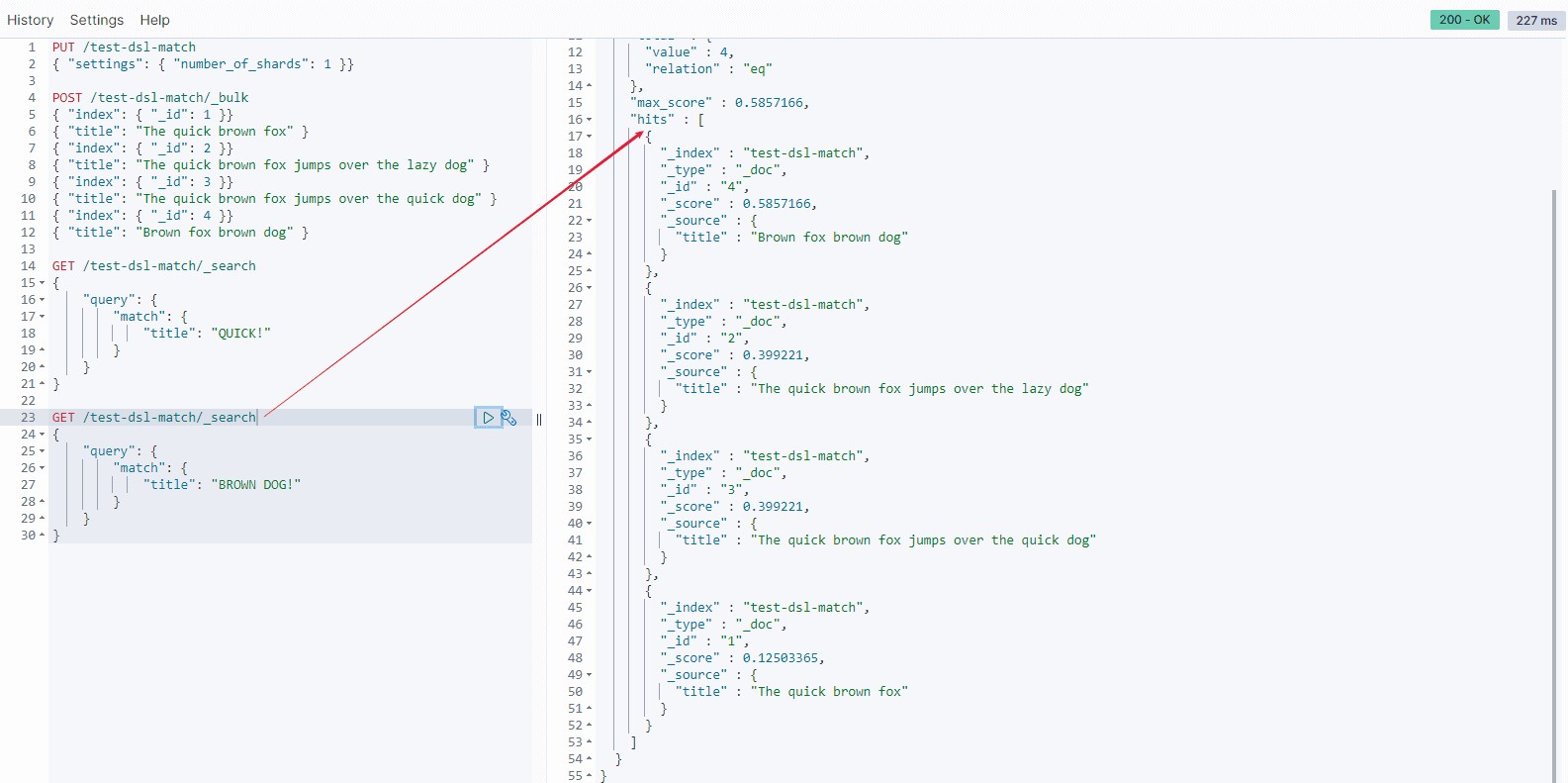
如果用户给定 3 个查询词,想查找至少包含其中 2 个的文档,该如何处理?将 operator 操作符参数设置成 and 或者 or 都是不合适的。
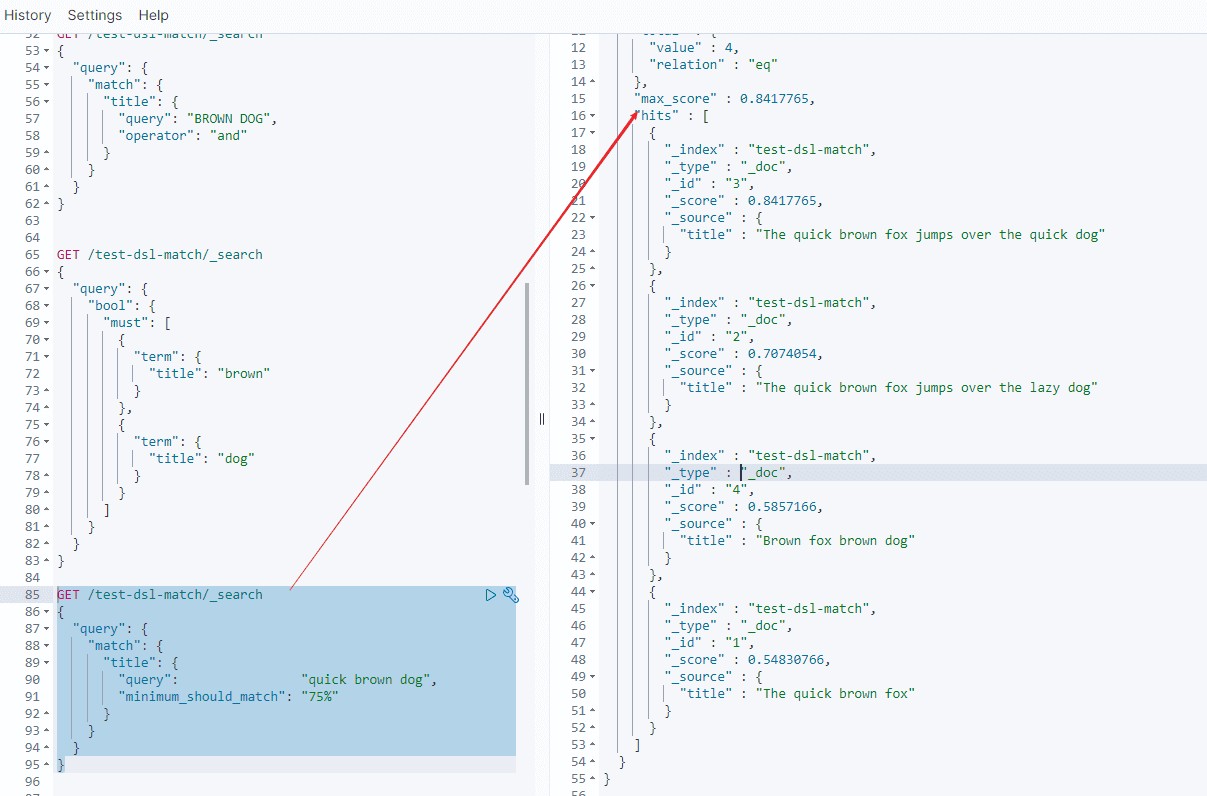
match 查询支持 minimum_should_match 最小匹配参数,这让我们可以指定必须匹配的词项数用来表示一个文档是否相关。我们可以将其设置为某个具体数字,更常用的做法是将其设置为一个百分数,因为我们无法控制用户搜索时输入的单词数量:
GET /test-dsl-match/_search
{
  "query": {
    "match": {
      "title": {
        "query":                "quick brown dog",
        "minimum_should_match": "75%"
      }
    }
  }
}
当给定百分比的时候, minimum_should_match 会做合适的事情:在之前三词项的示例中,75% 会自动被截断成 66.6% ,即三个里面两个词。无论这个值设置成什么,至少包含一个词项的文档才会被认为是匹配的。
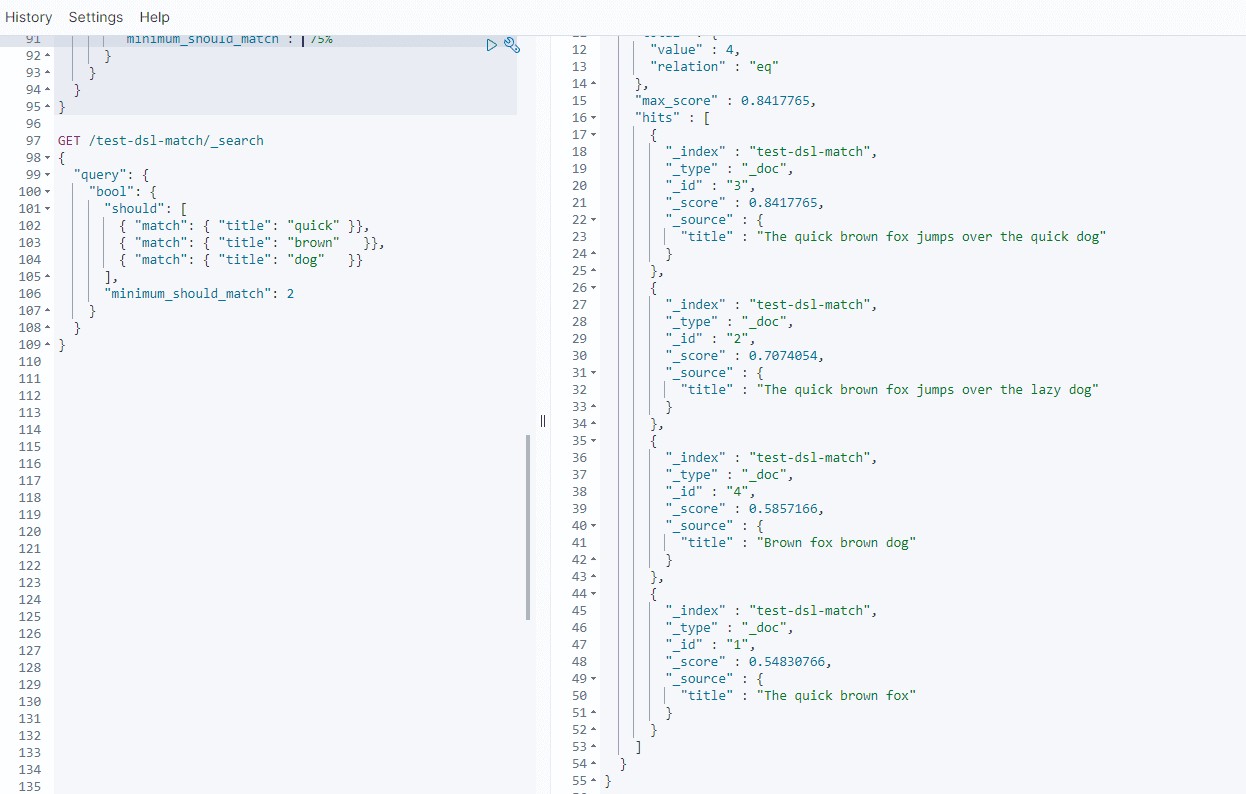
当然也等同于:
GET /test-dsl-match/_search
{
  "query": {
    "bool": {
      "should": [
        { "match": { "title": "quick" }},
        { "match": { "title": "brown"   }},
        { "match": { "title": "dog"   }}
      ],
      "minimum_should_match": 2
    }
  }
}
- match_pharse
match_phrase在前文中我们已经有了解,我们再看下另外一个例子。
GET /test-dsl-match/_search
{
  "query": {
    "match_phrase": {
      "title": {
        "query": "quick brown"
      }
    }
  }
}
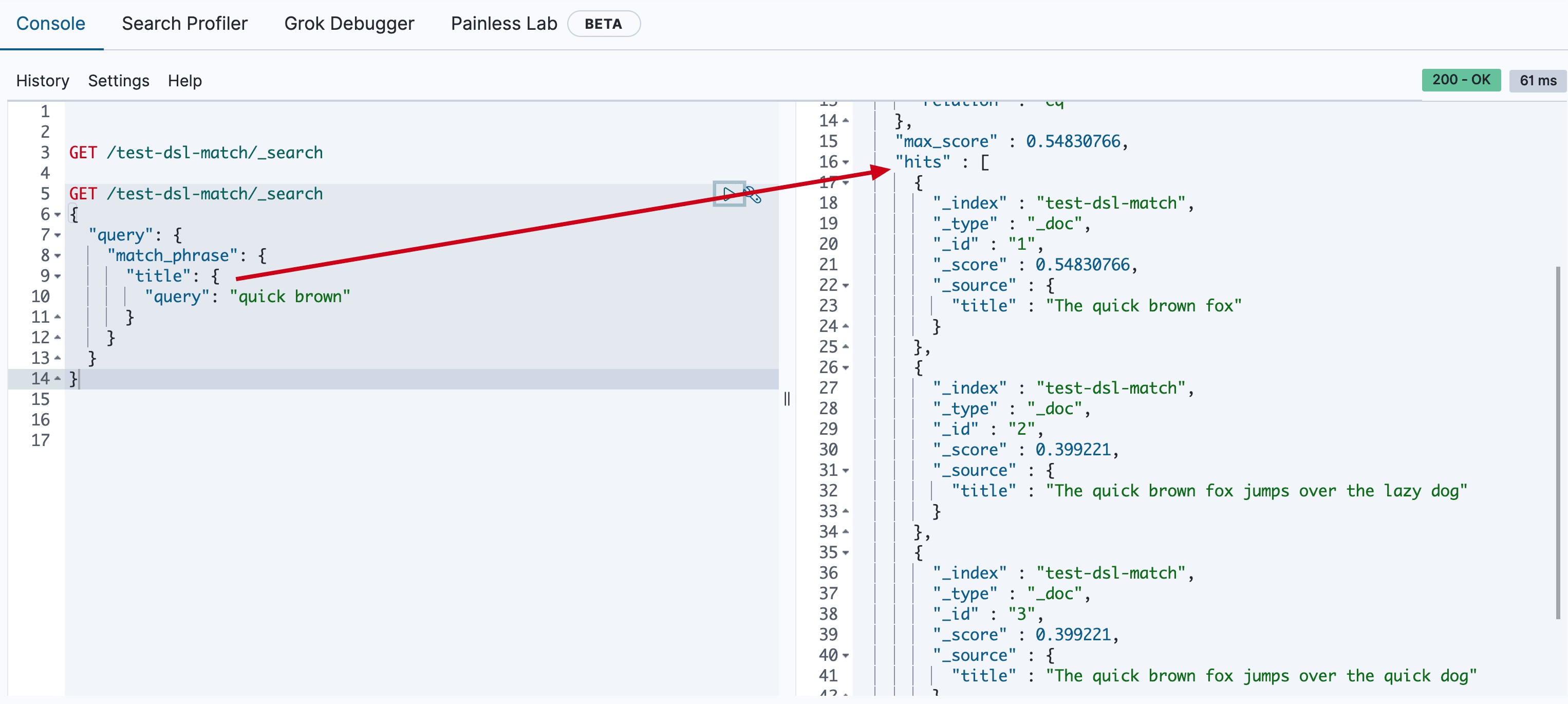
很多人对它仍然有误解的,比如如下例子:
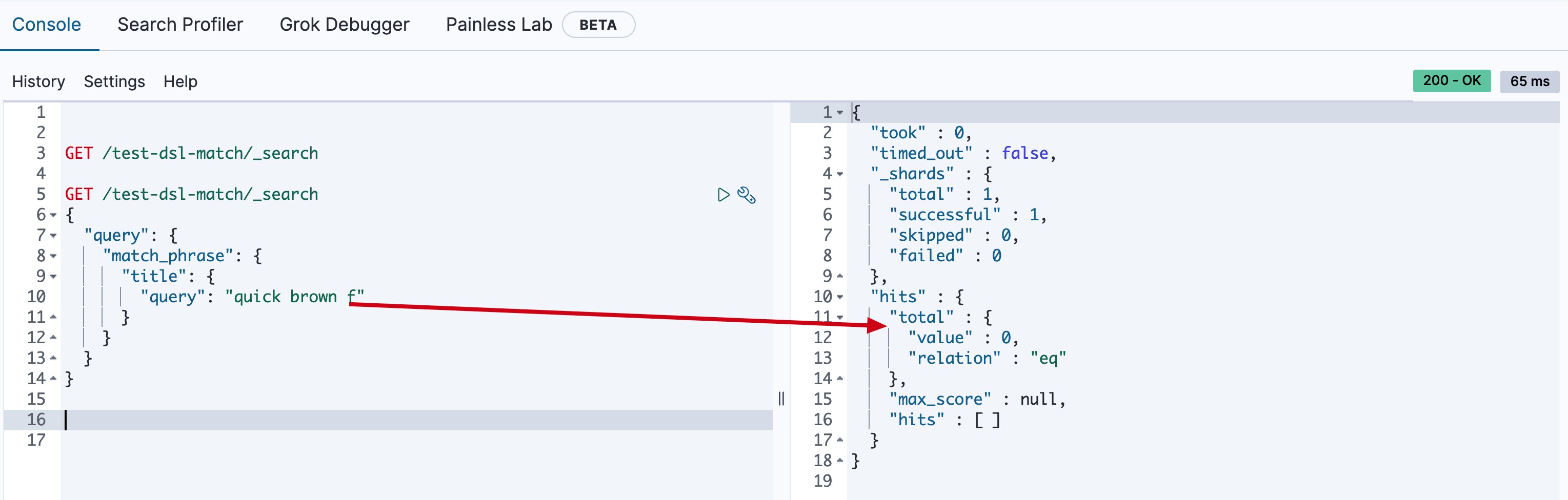
GET /test-dsl-match/_search
{
  "query": {
    "match_phrase": {
      "title": {
        "query": "quick brown f"
      }
    }
  }
}
这样的查询是查不出任何数据的,因为前文中我们知道了match本质上是对term组合,match_phrase本质是连续的term的查询,所以f并不是一个分词,不满足term查询,所以最终查不出任何内容了。
- match_pharse_prefix
那有没有可以查询出quick brown f的方式呢?ELasticSearch在match_phrase基础上提供了一种可以查最后一个词项是前缀的方法,这样就可以查询quick brown f了
GET /test-dsl-match/_search
{
  "query": {
    "match_phrase_prefix": {
      "title": {
        "query": "quick brown f"
      }
    }
  }
}
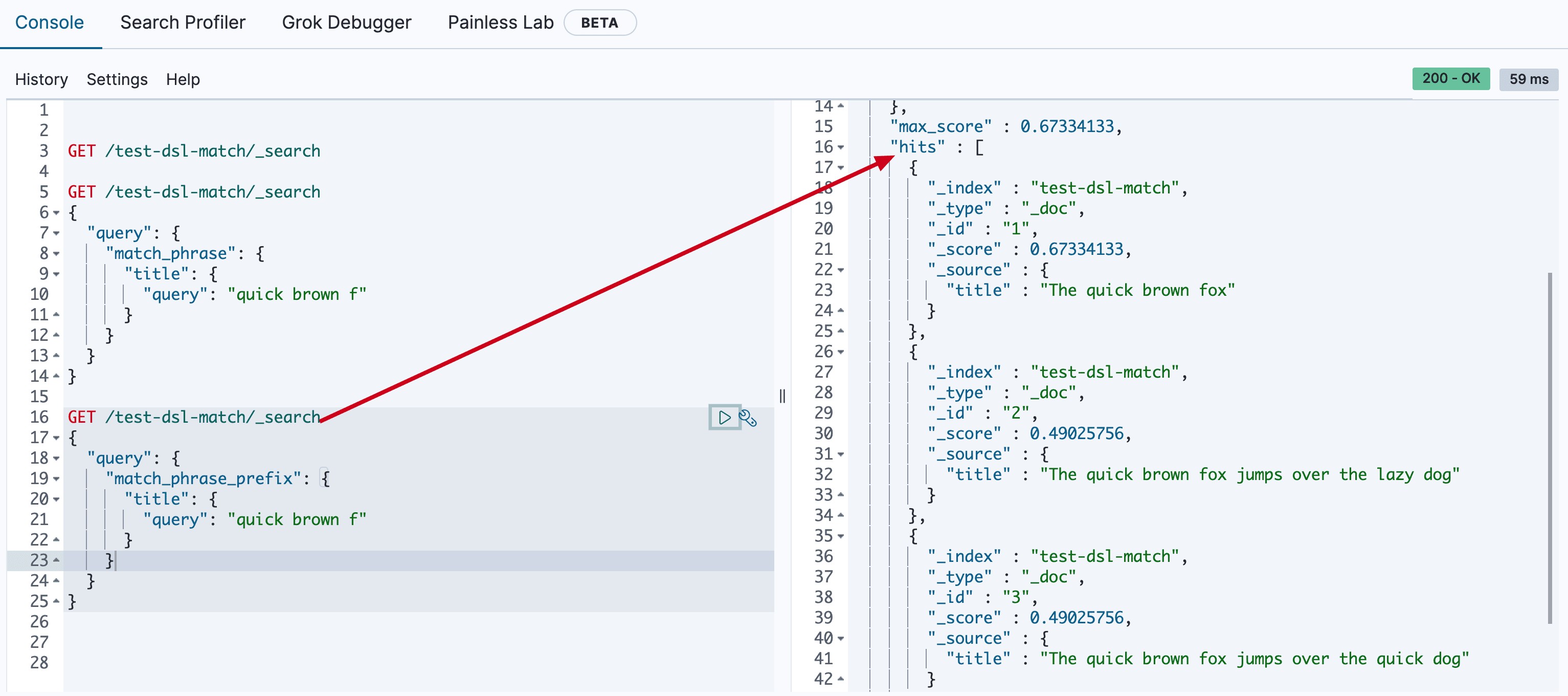
(ps: prefix的意思不是整个text的开始匹配,而是最后一个词项满足term的prefix查询而已)。
- match_bool_prefix
除了match_phrase_prefix,ElasticSearch还提供了match_bool_prefix查询
GET /test-dsl-match/_search
{
  "query": {
    "match_bool_prefix": {
      "title": {
        "query": "quick brown f"
      }
    }
  }
}
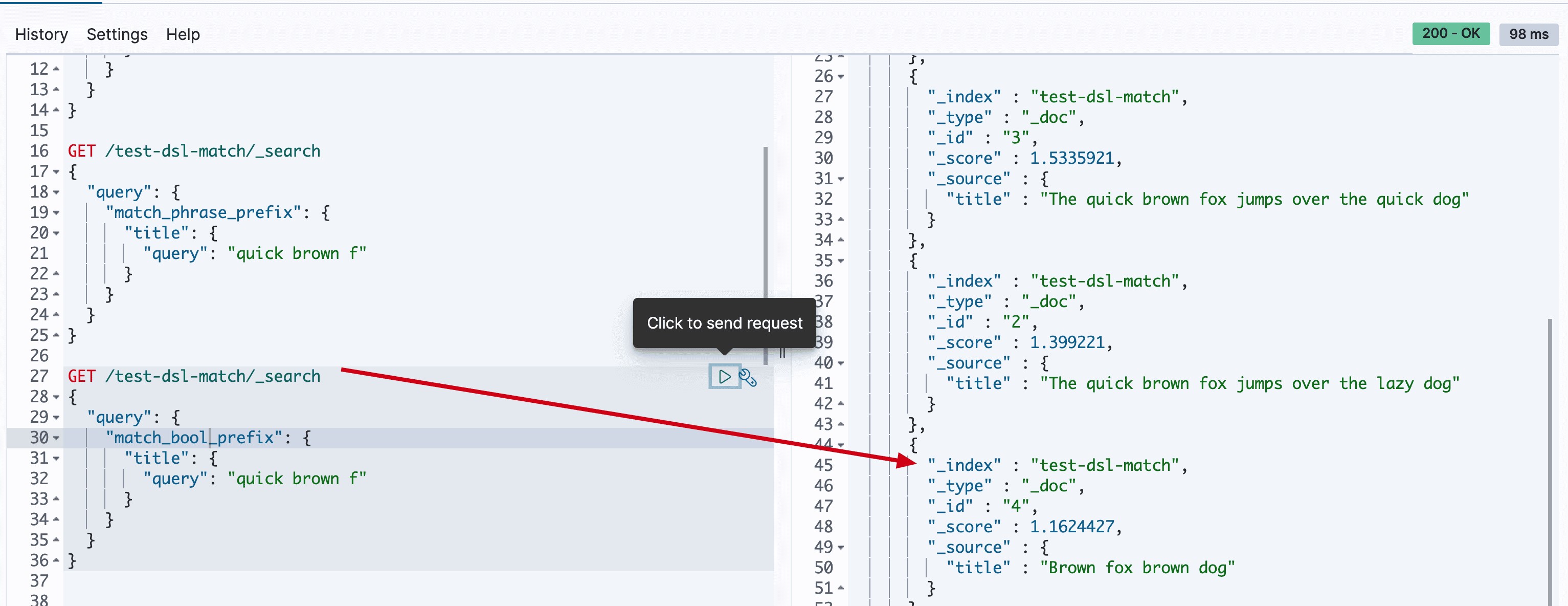
它们两种方式有啥区别呢?match_bool_prefix本质上可以转换为:
GET /test-dsl-match/_search
{
  "query": {
    "bool" : {
      "should": [
        { "term": { "title": "quick" }},
        { "term": { "title": "brown" }},
        { "prefix": { "title": "f"}}
      ]
    }
  }
}
所以这样你就能理解,match_bool_prefix查询中的quick,brown,f是无序的。
- multi_match
如果我们期望一次对多个字段查询,怎么办呢?ElasticSearch提供了multi_match查询的方式
{
  "query": {
    "multi_match" : {
      "query":    "Will Smith",
      "fields": [ "title", "*_name" ]
    }
  }
}
*表示前缀匹配字段。
query string类型
第二类:query string 类型
query_string此查询使用语法根据运算符(例如AND或)来解析和拆分提供的查询字符串NOT。然后查询在返回匹配的文档之前独立分析每个拆分的文本。
可以使用该query_string查询创建一个复杂的搜索,其中包括通配符,跨多个字段的搜索等等。尽管用途广泛,但查询是严格的,如果查询字符串包含任何无效语法,则返回错误。
例如:
GET /test-dsl-match/_search
{
  "query": {
    "query_string": {
      "query": "(lazy dog) OR (brown dog)",
      "default_field": "title"
    }
  }
}
这里查询结果,你需要理解本质上查询这四个分词(term)or的结果而已,所以doc 3和4也在其中。
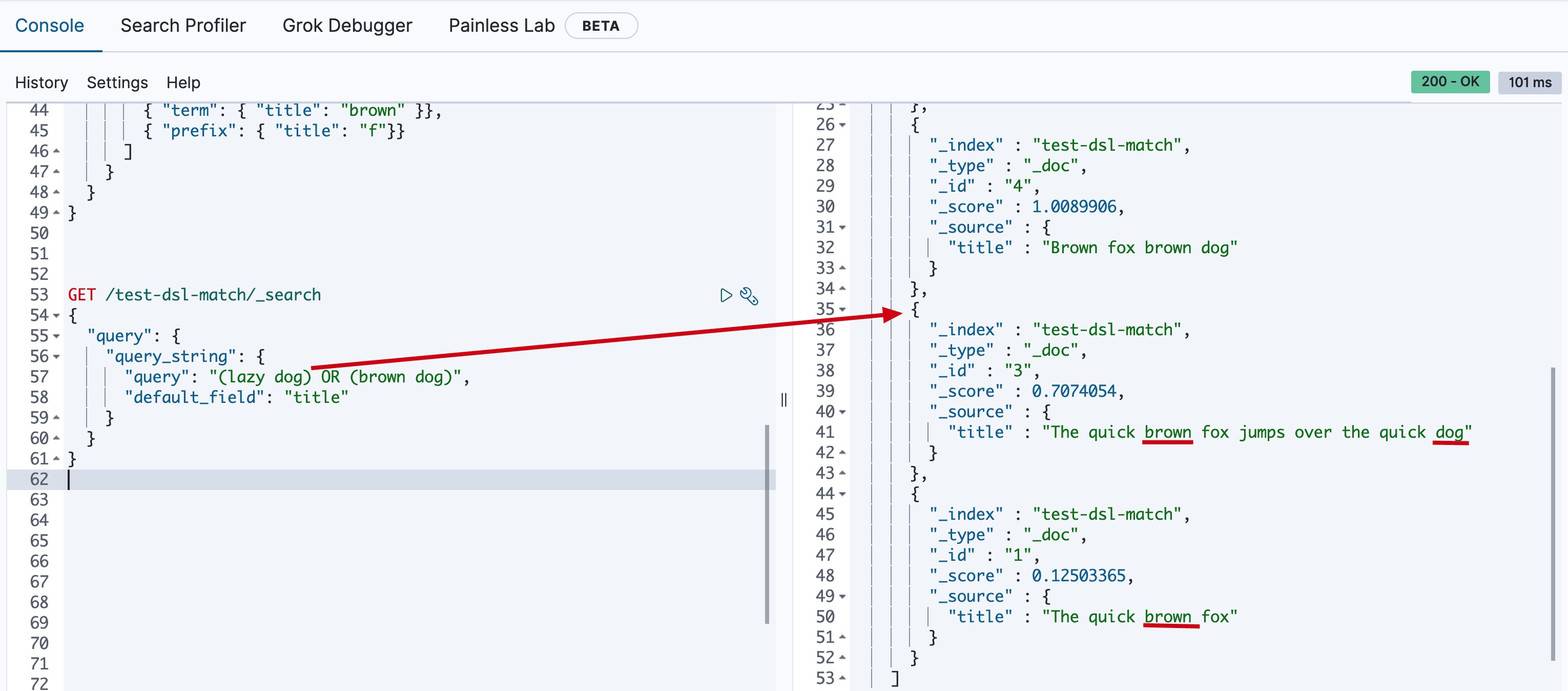
对构筑知识体系已经够了,但是它其实还有很多参数和用法。
query_string_simple该查询使用一种简单的语法来解析提供的查询字符串并将其拆分为基于特殊运算符的术语。然后查询在返回匹配的文档之前独立分析每个术语。
尽管其语法比query_string查询更受限制 ,但simple_query_string 查询不会针对无效语法返回错误。而是,它将忽略查询字符串的任何无效部分。
举例:
GET /test-dsl-match/_search
{
  "query": {
    "simple_query_string" : {
        "query": "\"over the\" + (lazy | quick) + dog",
        "fields": ["title"],
        "default_operator": "and"
    }
  }
}
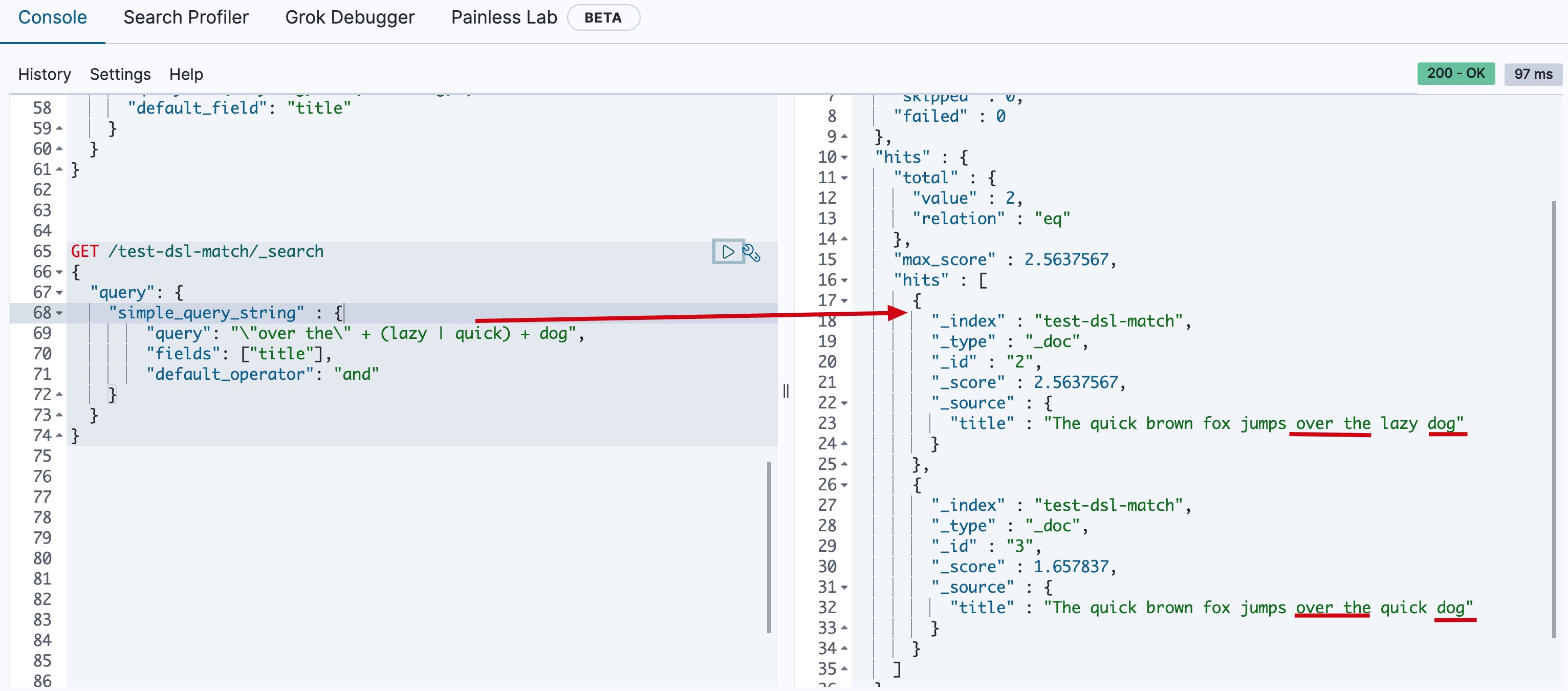
Interval类型
第三类:interval类型
Intervals是时间间隔的意思,本质上将多个规则按照顺序匹配。比如:
GET /test-dsl-match/_search
{
  "query": {
    "intervals" : {
      "title" : {
        "all_of" : {
          "ordered" : true,
          "intervals" : [
            {
              "match" : {
                "query" : "quick",
                "max_gaps" : 0,
                "ordered" : true
              }
            },
            {
              "any_of" : {
                "intervals" : [
                  { "match" : { "query" : "jump over" } },
                  { "match" : { "query" : "quick dog" } }
                ]
              }
            }
          ]
        }
      }
    }
  }
}
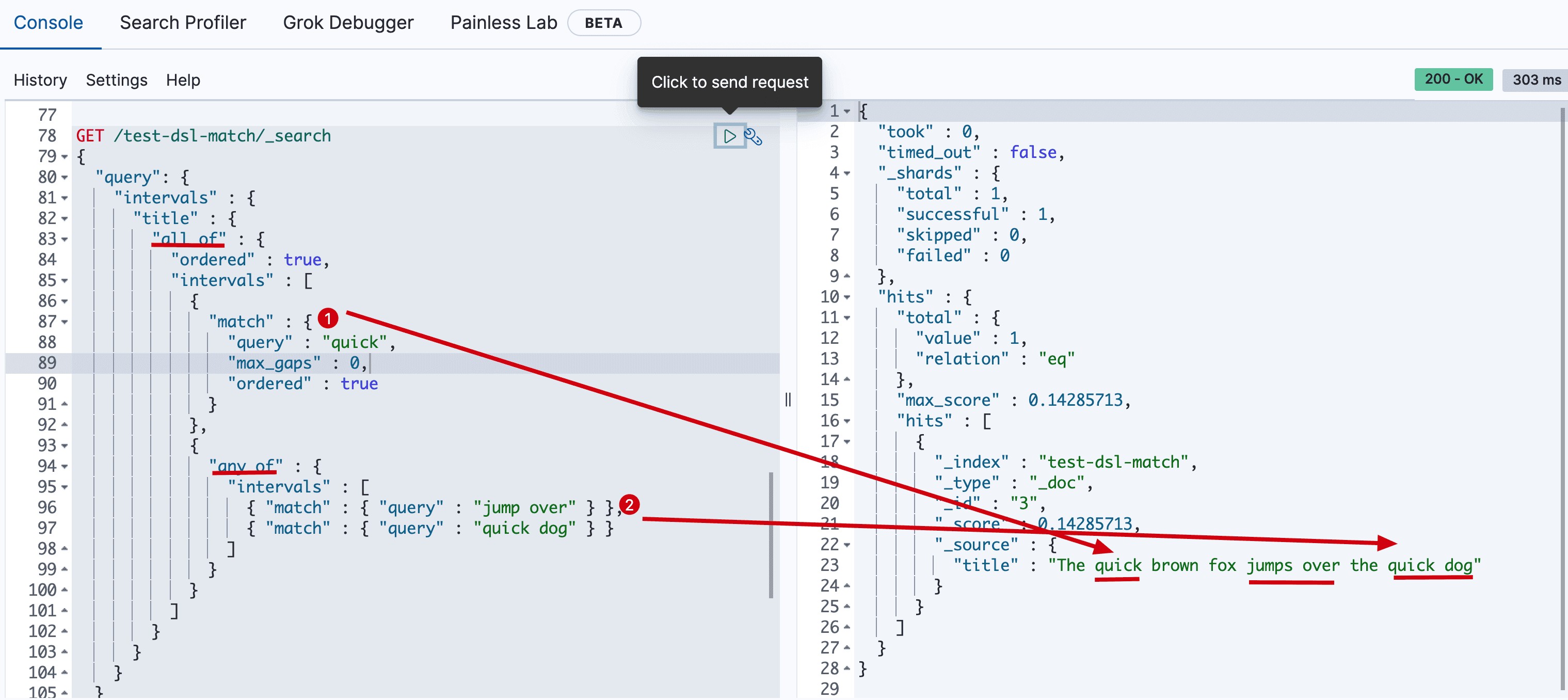
因为interval之间是可以组合的,所以它可以表现的很复杂。
DSL 查询之 Term
DSL查询另一种极为常用的是对词项进行搜索,官方文档中叫”term level“查询,本文主要对term level搜索进行详解。
Term查询引入
如前文所述,查询分基于文本查询和基于词项的查询:
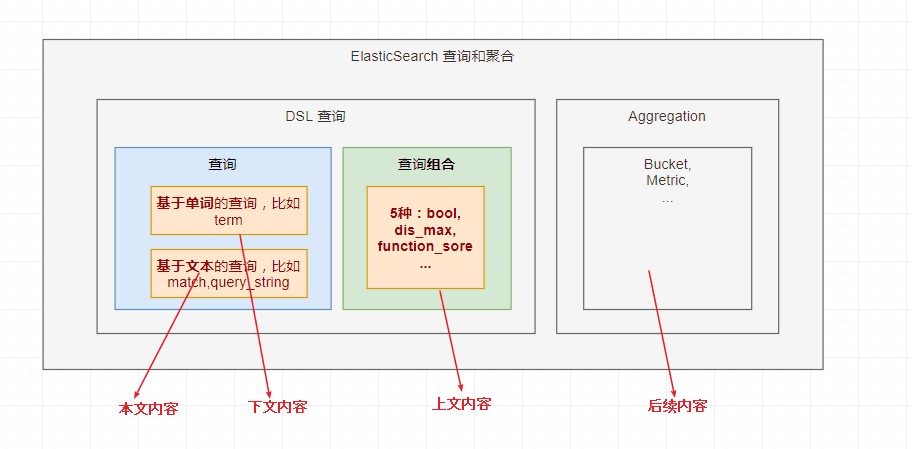
本文主要讲基于词项的查询。
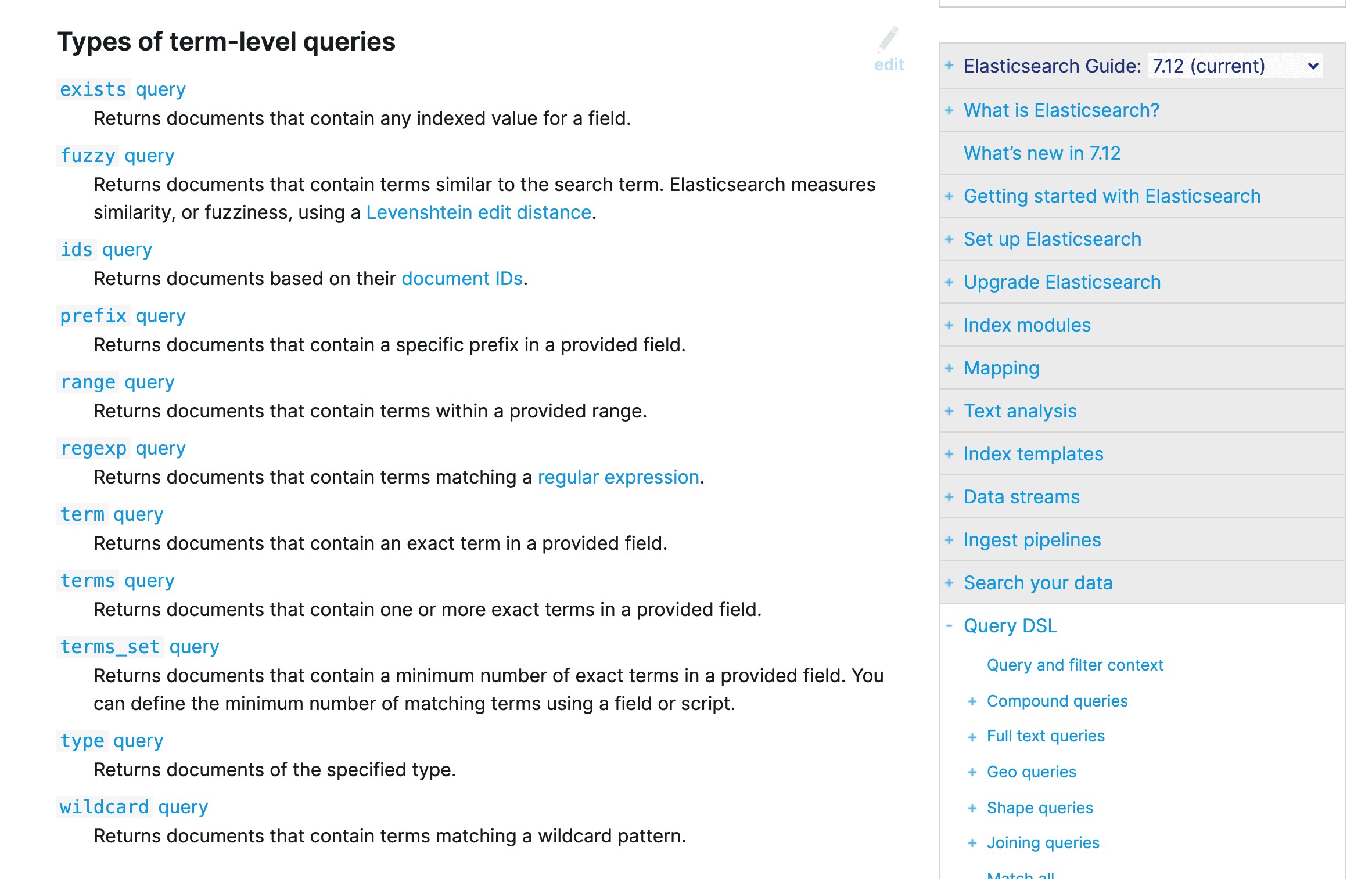
Term查询
很多比较常用,也不难,就是需要结合实例理解。这里综合官方文档的内容,我设计一个测试场景的数据,以覆盖所有例子。
准备数据
PUT /test-dsl-term-level字段是否存在:exist
{
"mappings": {
"properties": {
"name": {
"type": "keyword"
},
"programming_languages": {
"type": "keyword"
},
"required_matches": {
"type": "long"
}
}
}
}
POST /test-dsl-term-level/_bulk
{ "index": { "_id": 1 }}
{"name": "Jane Smith", "programming_languages": [ "c++", "java" ], "required_matches": 2}
{ "index": { "_id": 2 }}
{"name": "Jason Response", "programming_languages": [ "java", "php" ], "required_matches": 2}
{ "index": { "_id": 3 }}
{"name": "Dave Pdai", "programming_languages": [ "java", "c++", "php" ], "required_matches": 3, "remarks": "hello world"}
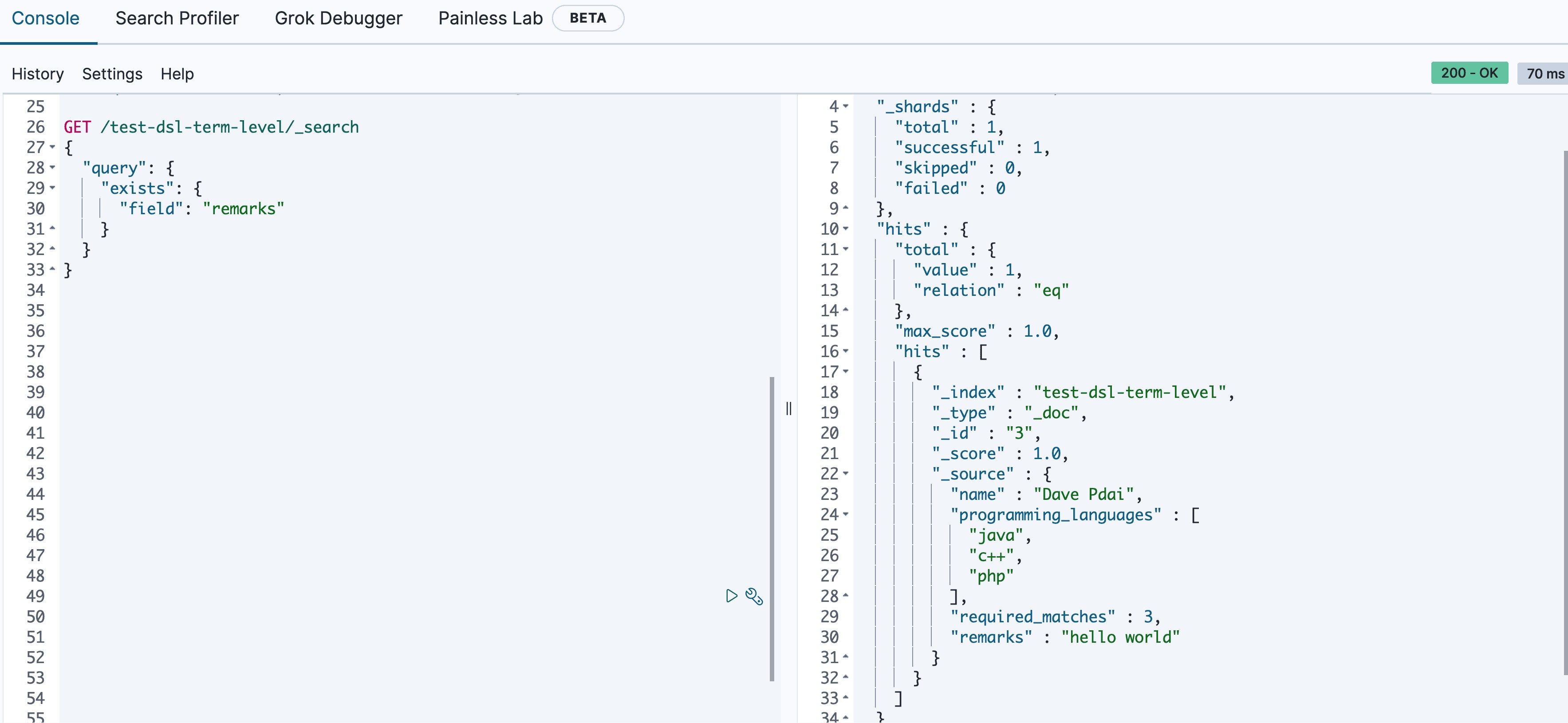
由于多种原因,文档字段的索引值可能不存在:
- 源JSON中的字段是null或[]
- 该字段已"index" : false在映射中设置
- 字段值的长度超出ignore_above了映射中的设置
- 字段值格式错误,并且ignore_malformed已在映射中定义
所以exist表示查找是否存在字段。
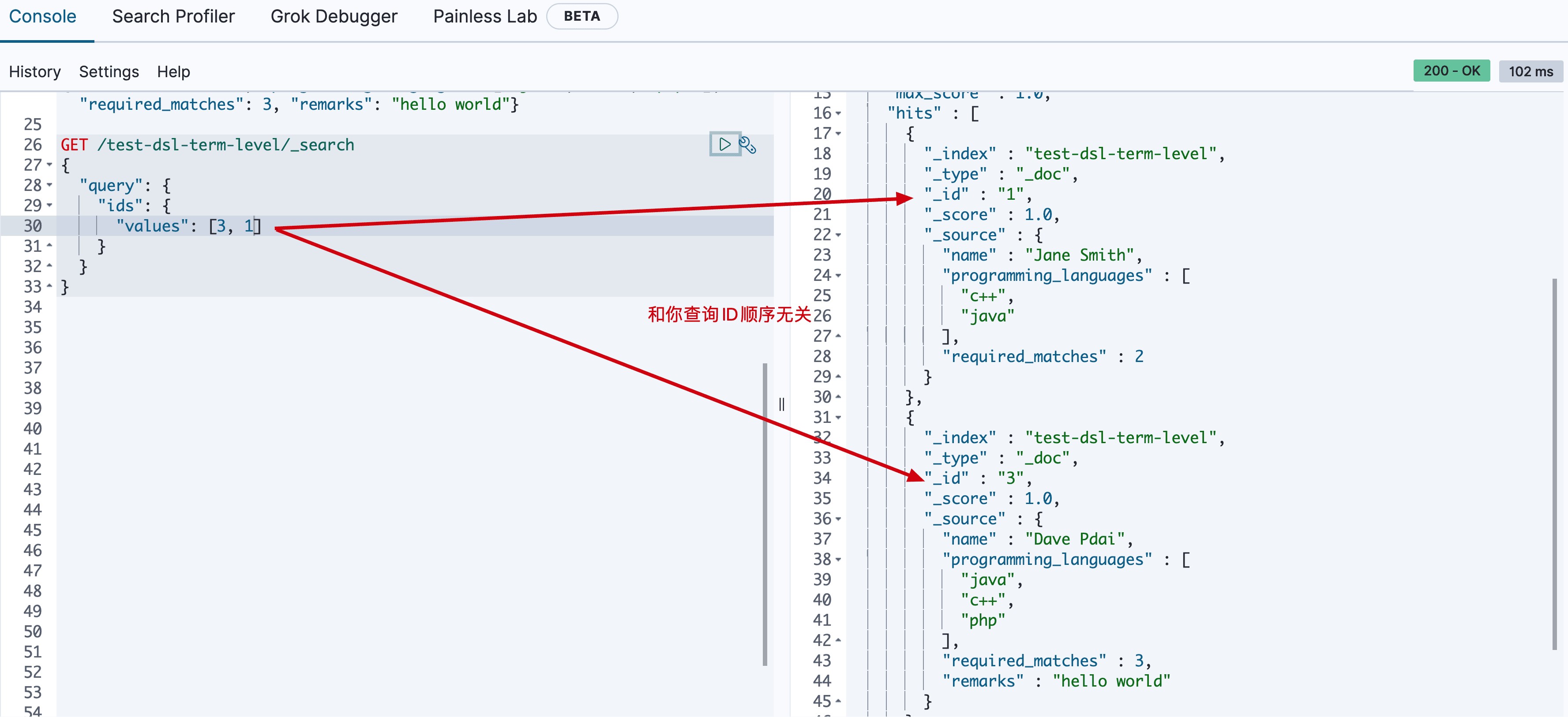
ids 即对id查找
GET /test-dsl-term-level/_search
{
  "query": {
    "ids": {
      "values": [3, 1]
    }
  }
}
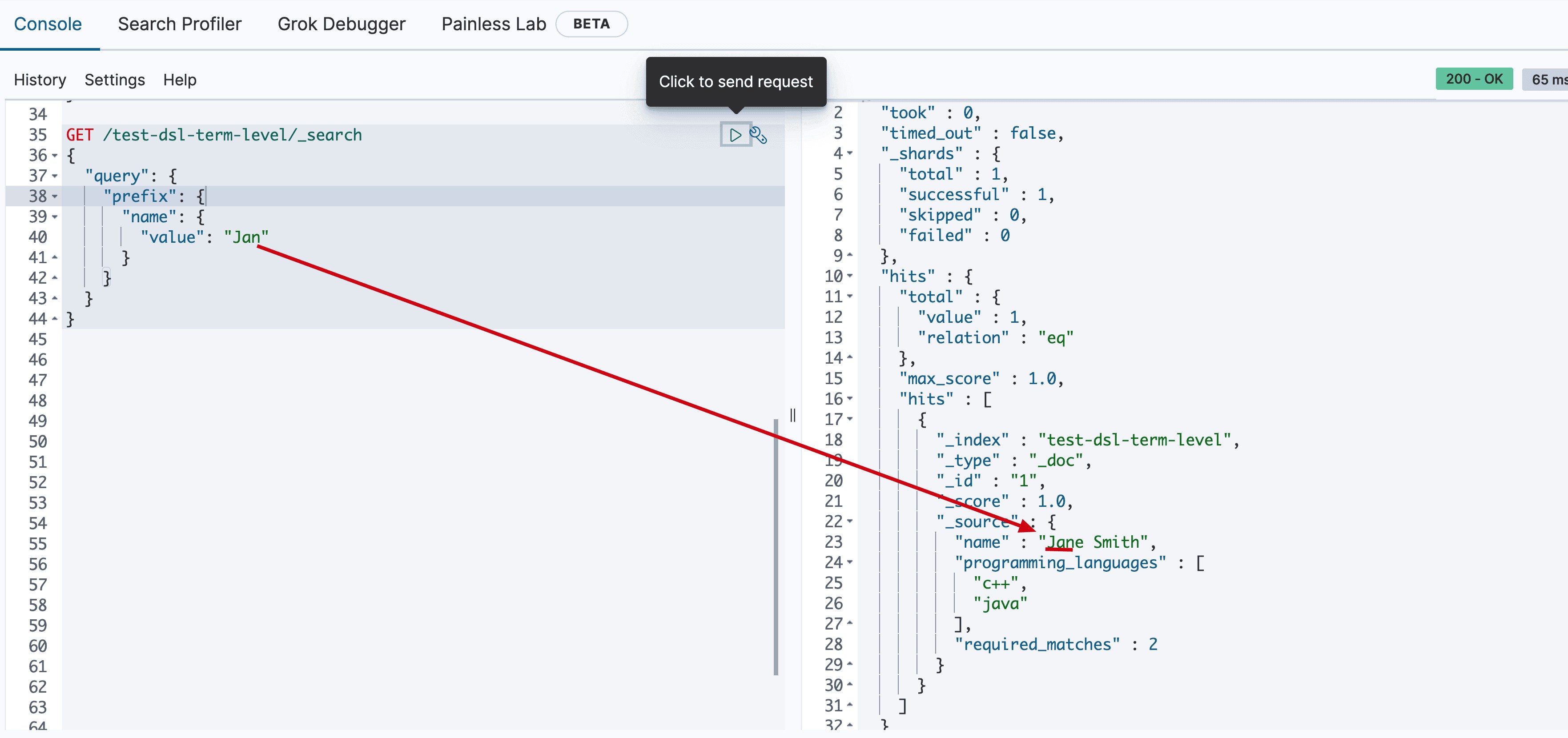
通过前缀查找某个字段
GET /test-dsl-term-level/_search
{
  "query": {
    "prefix": {
      "name": {
        "value": "Jan"
      }
    }
  }
}
前文最常见的根据分词查询
GET /test-dsl-term-level/_search
{
  "query": {
    "term": {
      "programming_languages": "php"
    }
  }
}
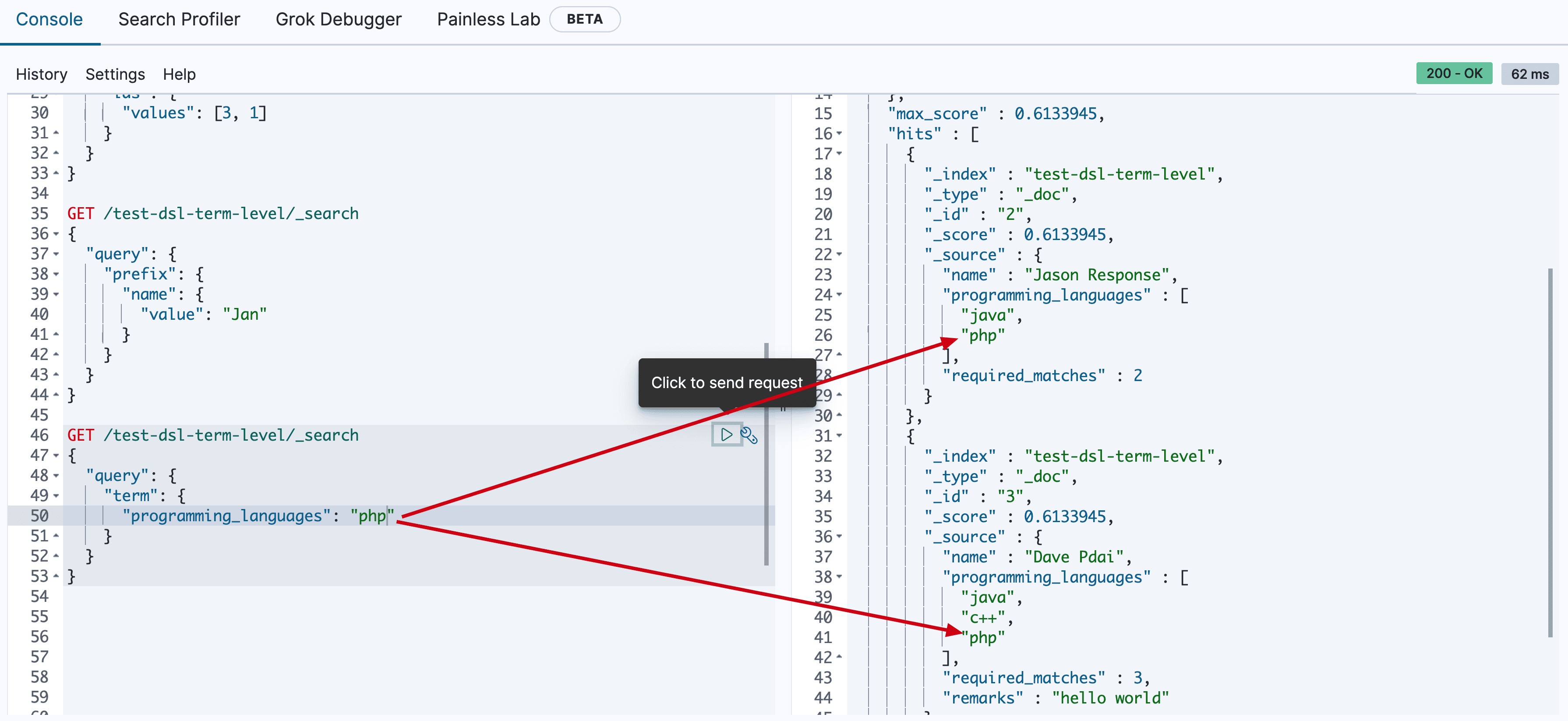
按照读个分词term匹配,它们是or的关系。
GET /test-dsl-term-level/_search
{
  "query": {
    "terms": {
      "programming_languages": ["php","c++"]
    }
  }
}
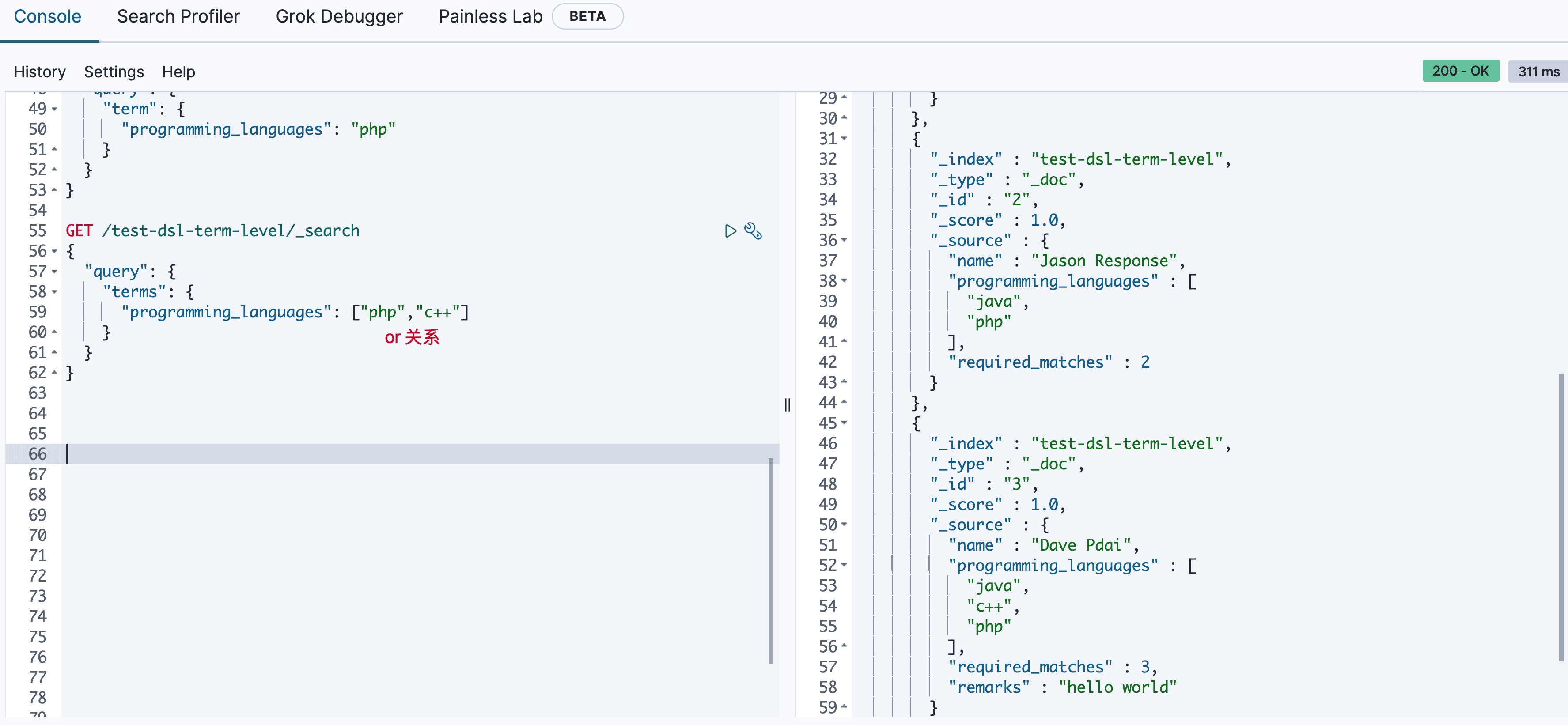
设计这种方式查询的初衷是用文档中的数字字段动态匹配查询满足term的个数。
GET /test-dsl-term-level/_search
{
  "query": {
    "terms_set": {
      "programming_languages": {
        "terms": [ "java", "php" ],
        "minimum_should_match_field": "required_matches"
      }
    }
  }
}
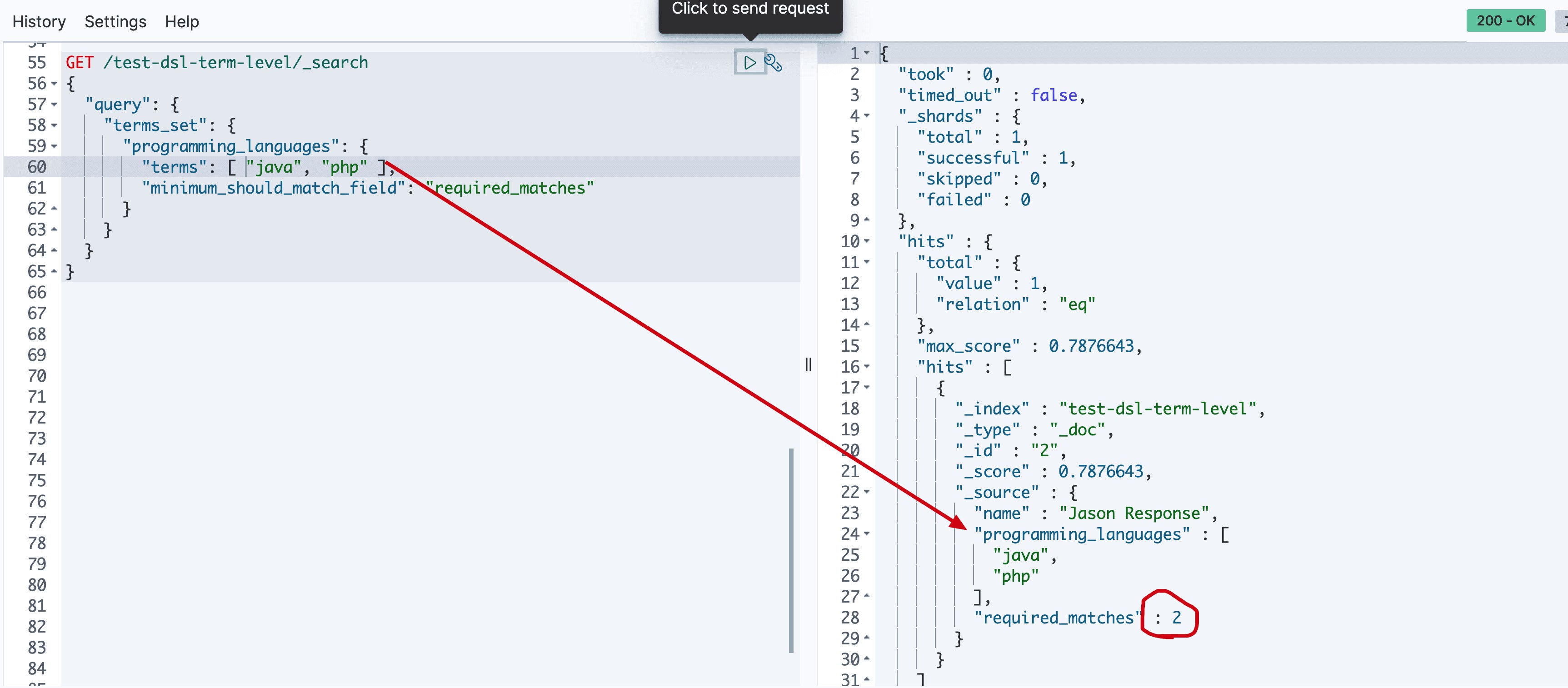
通配符匹配,比如*
GET /test-dsl-term-level/_search
{
  "query": {
    "wildcard": {
      "name": {
        "value": "D*ai",
        "boost": 1.0,
        "rewrite": "constant_score"
      }
    }
  }
}
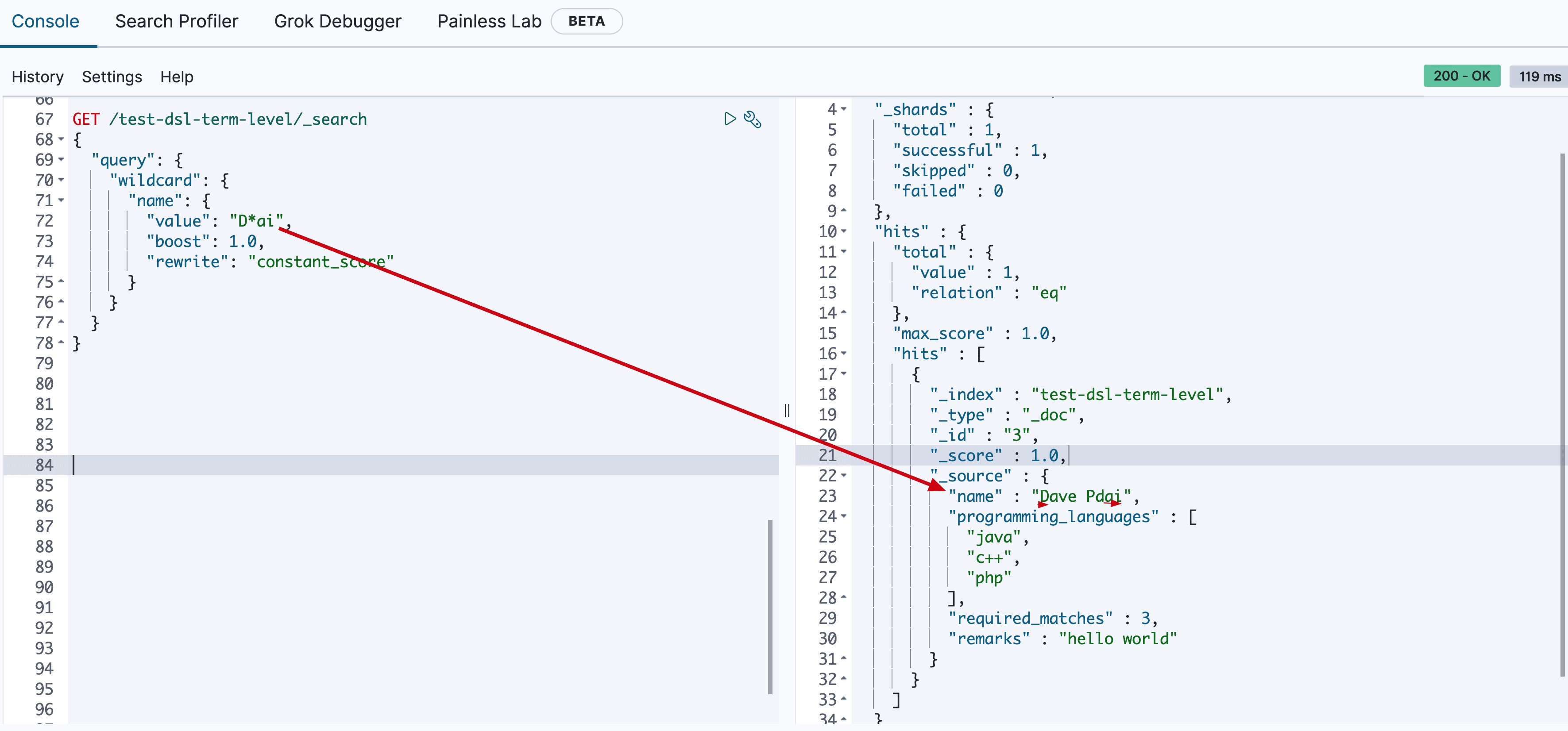
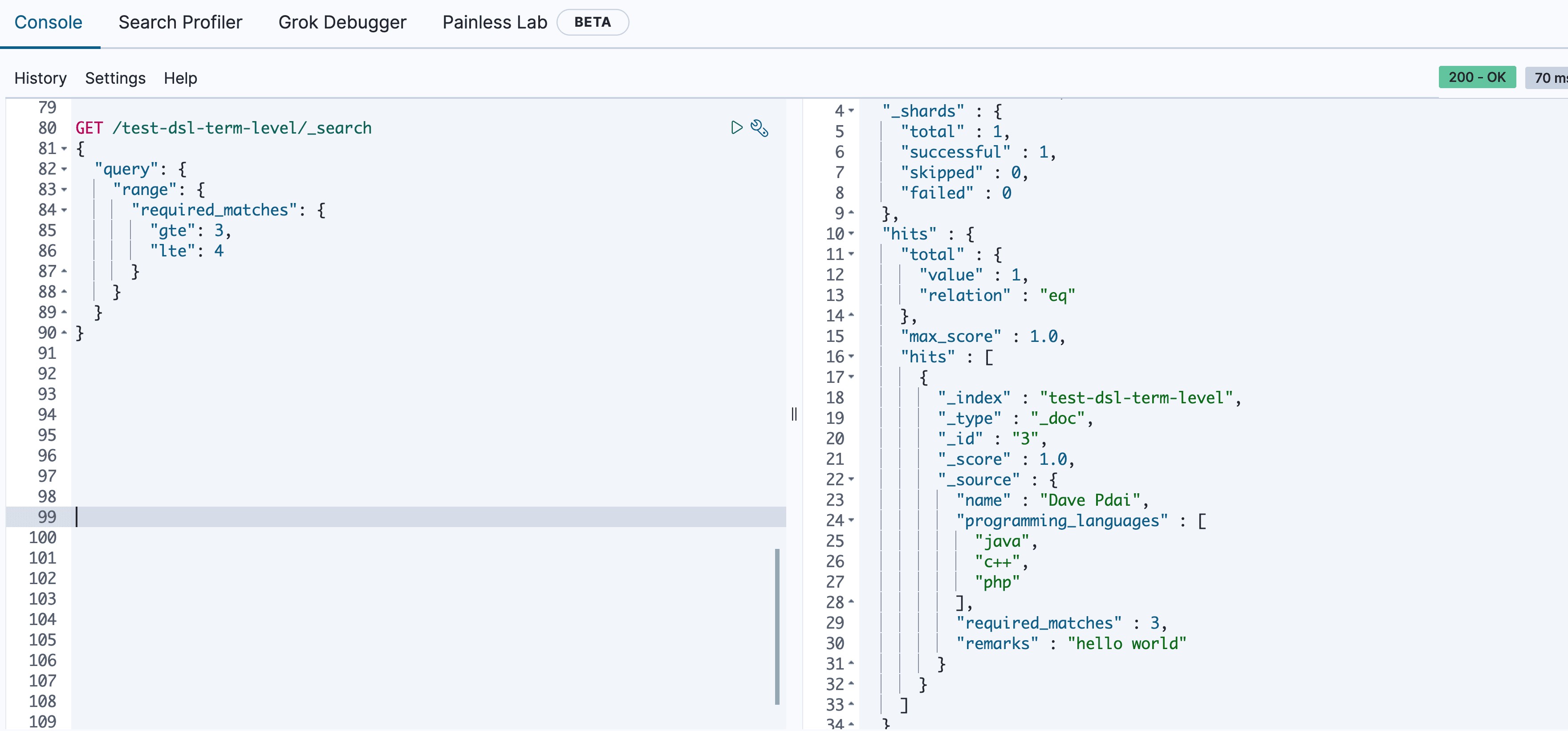
常常被用在数字或者日期范围的查询。
GET /test-dsl-term-level/_search
{
  "query": {
    "range": {
      "required_matches": {
        "gte": 3,
        "lte": 4
      }
    }
  }
}
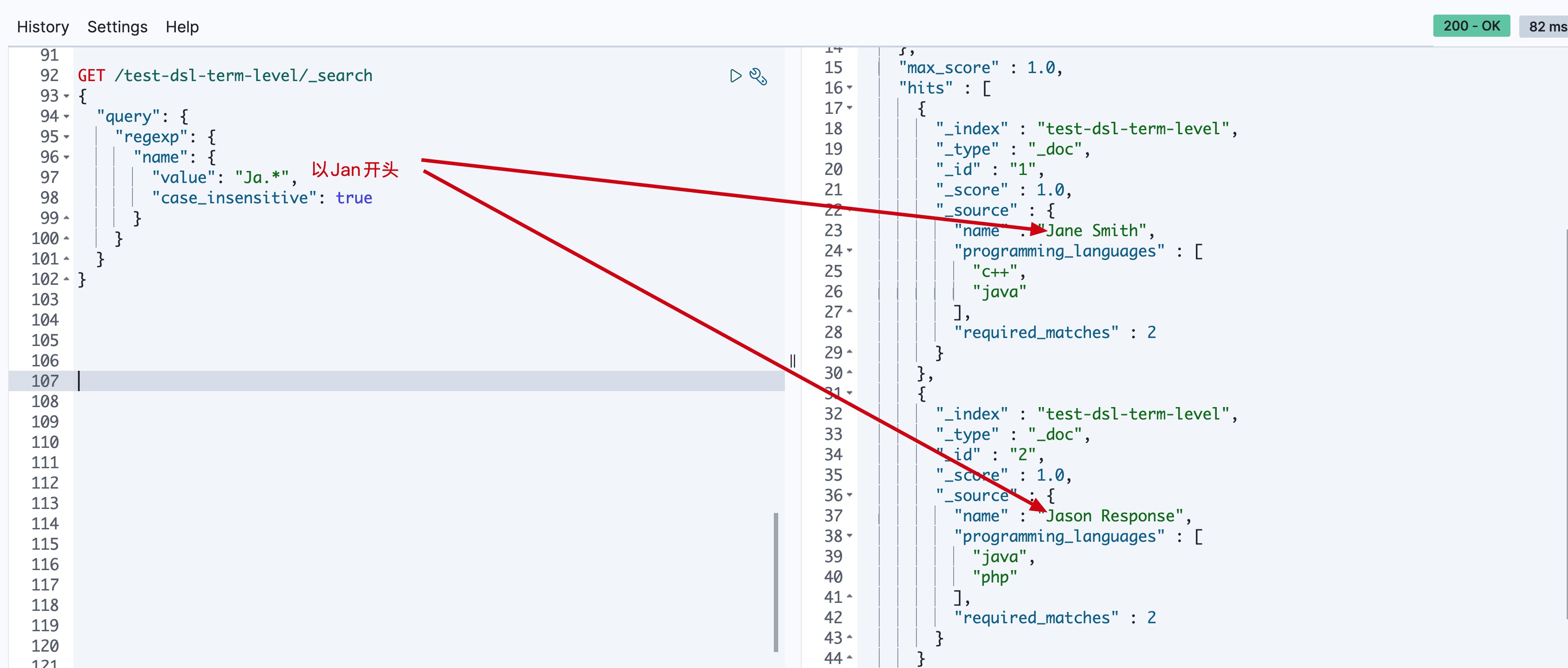
通过正则表达式查询。以"Jan"开头的name字段。
GET /test-dsl-term-level/_search
{
  "query": {
    "regexp": {
      "name": {
        "value": "Ja.*",
        "case_insensitive": true
      }
    }
  }
}
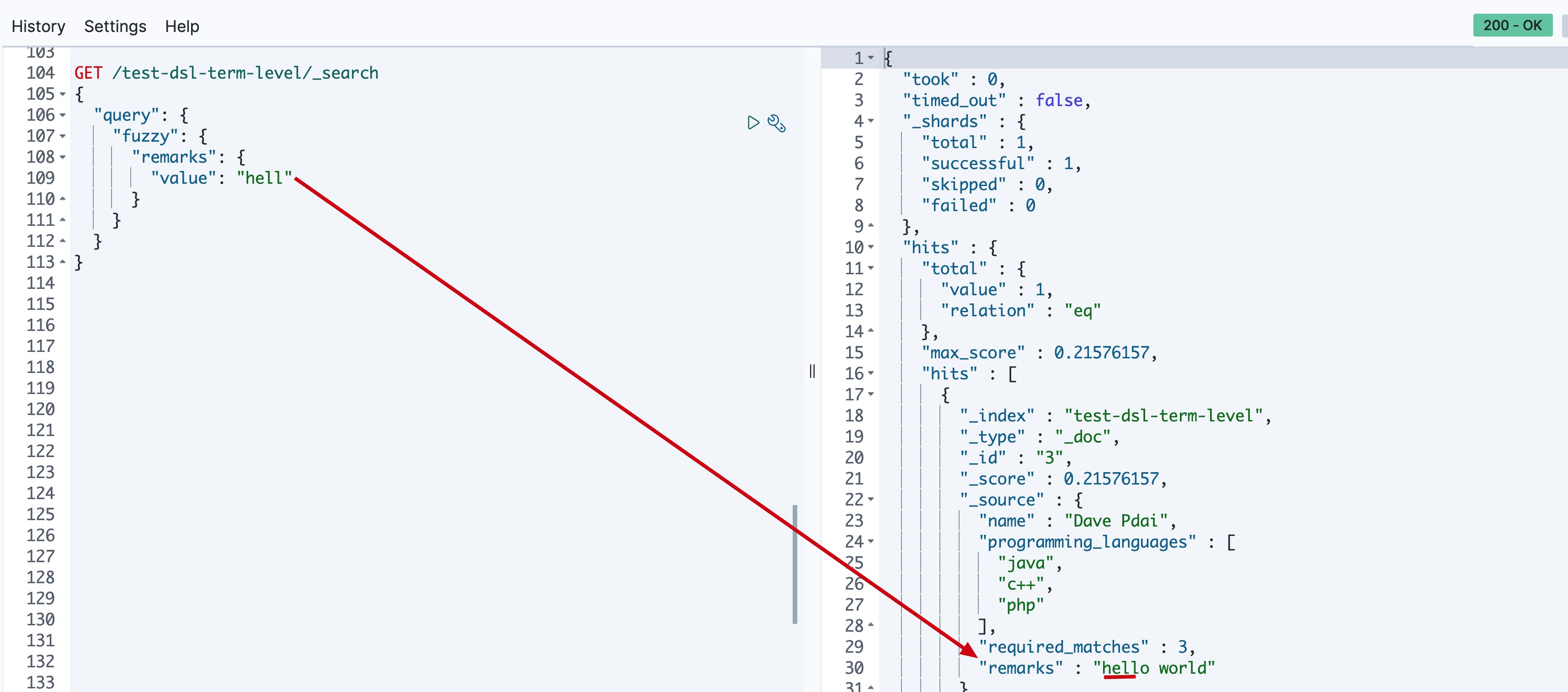
官方文档对模糊匹配:编辑距离是将一个术语转换为另一个术语所需的一个字符更改的次数。这些更改可以包括:
- 更改字符(box→ fox)
- 删除字符(black→ lack)
- 插入字符(sic→ sick)
- 转置两个相邻字符(act→ cat)
GET /test-dsl-term-level/_search
{
  "query": {
    "fuzzy": {
      "remarks": {
        "value": "hell"
      }
    }
  }
}
- 发表于 2023-06-16 20:39
- 阅读 ( 69 )


