使用tengine-3.1.0编译最新lua模块。
我在服务器上在nginx还是普遍使用tengine-2.3.3 (nginx版本是1.18.0这个是2019年发布在版本,时间过去很久了),今天有空看到tengine已经是3.1.0版本了(这个nginx版本是1.24.0)于是试着重新编译了了下,中间也出现了不少问题。查了很多资料,这里记录下。
一:tengine-3.1.0版本是对应nginx 1.24.0 这个版本中阿里自己实现了一套http3(quic)支持,原生的nginx在1.25.0版本也已经实现了http3了,这个版本的tengine不支持原生的QUIC协议。
http3的工作原理,我接下来写文章详细介绍。
我在2019年写过一篇文章,当时最新的tengine支持lua的编译,其实编译支持lua是不完整的,只支持最基础的lua(字符串操作),并不支持json操作【lua-cjson扩展】和ngx_devel_kit【在配置里自定义变量/指令】
可以把它们的关系理解为:
你要用Lua语言为Tengine(Nginx)编写扩展程序(Module),你需要一个语言编译器(LuaJIT)、一个软件开发工具包(NDK)和一个官方的运行时环境/框架(lua-nginx-module)。
下面我们来详细拆解每个组件的作用:
1. LuaJIT:语言的“引擎” (The Engine)
它是什么? LuaJIT 是 Lua 编程语言的一个高性能即时编译器(JIT Compiler)。它比标准的 Lua 解释器速度快得多。
为什么需要它?
性能:Nginx/Tengine 以高性能著称。如果使用标准 Lua 解释器,执行 Lua 脚本会成为性能瓶颈,无法满足高性能场景的需求。LuaJIT 的性能可以接近 C 语言的程度,完美契合了 Nginx 的诉求。
必需依赖:lua-nginx-module 这个模块在设计上就强制依赖 LuaJIT,它不能使用标准的 Lua 解释器。模块的代码中直接调用了许多 LuaJIT 特有的 API 和功能。
类比:这就好比你想在电脑上运行一个用 C++ 编写的游戏,你首先需要安装 Visual C++ Redistributable 运行库一样。LuaJIT 就是 Tengine 运行 Lua 代码所必需的“运行时环境”。
2. lua-nginx-module:核心的“功能模块” (The Feature Module)
它是什么? 这是 OpenResty 项目的核心组件。它是一个 Nginx 模块,提供了将 Lua 语言嵌入到 Nginx HTTP 处理流程中的能力。
为什么需要它?
提供接口:它定义了诸如 content_by_lua, access_by_lua, rewrite_by_lua 等配置指令。没有这个模块,你在 nginx.conf 里写 content_by_lua 'ngx.say("hello")'; 是完全没有意义的,Tengine 根本不认识这些指令。
集成环境:它创建了 ngx、ndk 等 Lua 模块,提供了丰富的 API(如 ngx.say, ngx.redirect, ngx.req.get_headers),让 Lua 代码能够与 HTTP 请求的生命周期(如重写、访问、内容生成、日志记录等阶段)进行交互。
类比:这就是你真正想安装的“软件”,比如 Photoshop。它提供了所有的图像处理功能。
3. ngx_devel_kit (NDK):基础的“开发工具包” (The Toolkit)
它是什么? NDK 是一个基础的 Nginx 模块开发工具包。它本身不提供直接面向用户的功能,而是为其他更复杂的模块(如 lua-nginx-module)提供了一系列通用的、可重用的 C 语言宏和实用函数。
为什么需要它?
降低开发复杂度:它封装了 Nginx 模块开发中一些常见的、底层的、繁琐的操作,让模块开发者(比如 lua-nginx-module 的开发者)能更专注于业务逻辑,而不是重复造轮子。
依赖关系:lua-nginx-module 在实现其功能时,使用了 NDK 提供的工具。因此,NDK 是 lua-nginx-module 的必需依赖。编译 lua-nginx-module 时必须先声明 NDK 的路径。
类比:这就像是你开发软件时使用的 .NET Framework 或 JDK。它们提供了一系列基础库和工具,软件开发者基于这些基础库来开发具体的应用程序(如 lua-nginx-module)。
二:我的系统是ubuntu 24.04,系统的openssl本身是很新的,这里使用系统自带的安装openssl (sudo apt install -y libpcre3-dev libssl-dev libjemalloc-dev)
使用 sudo apt list 2>&1|grep jemalloc 查看依赖库是否安装。

系统安装的lib和include文件位于/usr/lib/x86_64-linux-gnu 实际上 nginx默认寻找路径为:/usr (不需要加路径路径比如/usr/lib)
sudo ln -s /usr/lib/x86_64-linux-gnu/libssl.a /usr/lib/libssl.a
sudo ln -s /usr/lib/x86_64-linux-gnu/libcrypto.a /usr/lib/libcrypto.a
这样就不会提示找不到libssl.a等库文件了
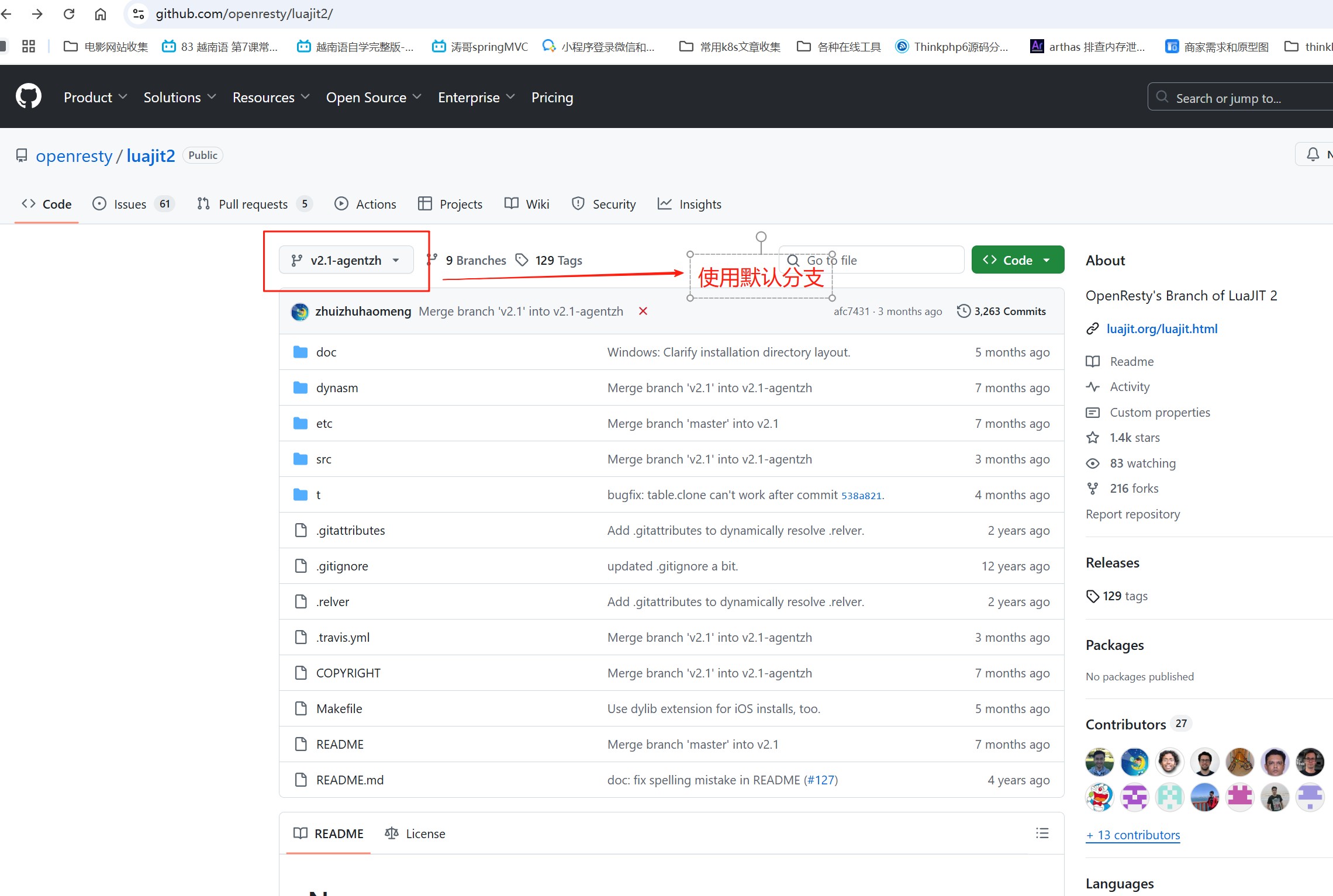
三:nginx如果支持lua模块需要luaJit支持,不能是官方的luajit【https://github.com/LuaJIT/LuaJIT】,必须是OpenResty的分支(https://github.com/openresty/luajit2),这个分支增加了对nginx支持
我编译多个luaJit版本和tengine-3.1.0适配,最后发现默认的当前分支luajit2-2.1-agentzh可以和tengine-3.1.0正常编译,我试过多个最新的luajit2的多个tags分支,都提示编译错误
四:编译lua模块还需要其他两个模块支持,luaJit只是运行环境,其他两个模块分别是:
lua-nginx-module(https://github.com/openresty/lua-nginx-module/tags) lua模块使用tengine自带的兼容性是做好的,configure的时候只需要打开 --with-http_lua_module 即可 使用了--with-http_lua_module 就不能再使用 --add-module 指定单独的lua模块了,否则会提示重复。
我开始使用tengine-3.1.0 自带的模块,但是这个模块太老了,和5.3 中的lua-resty-core和lua-resty-lrucache模块都是不兼容的,我只能使用当前最新的lua-nginx-module 模块
这个模块下载地址为:https://github.com/openresty/lua-nginx-module/releases/tag/v0.10.29
安装依赖包:sudo apt install -y build-essential ninja-build git bison libaio-dev libncurses-dev libssl-dev zlib1g-dev libnuma-dev liblz4-dev libzstd-dev pkg-config libsystemd-dev libjemalloc-dev make gcc gcc-c++
五:编译和安装
下载本文最后的附件中的文件到服务器,解压后可以看到有四个文件夹,分别是tengine-3.1.0 ,luajit2-2.1-agentzh, lua-cjson-2.1.0.10和ngx_devel_kit-0.3.4
其中 1,tengine-3.1.0 nginx源码文件,2,luajit2-2.1-agentzh是lua的Jit环境,3, lua-cjson-2.1.0.10 使lua支持json格式,4,ngx_devel_kit-0.3.4 配合其他扩展支持自定义变量和指令。这里特别说明,lua-cjson使用专门的patch包,其他的包编译会导致兼容性报错。
可以正常编译的lua-cjson下载地址:
https://github.com/openresty/lua-cjson/archive/refs/tags/2.1.0.10.tar.gz
ngx_devl_kit 下载地址:
https://github.com/vision5/ngx_devel_kit/releases
5.1:编译luaJIT环境
cd luajit2-2.1-agentzh
make && sudo make install PREFIX=/usr/local/luajit
5.2:编译openssl
cd openssl-1.1.1w
./config --prefix=/usr/local/openssl;make;make install
5.3: 编译nginx1.24(tengine-3.1.0)
cd tengine-3.1.0
./configure --prefix=/usr/local/nginx --user=www --group=www --with-jemalloc --with-pcre=../pcre-8.43 --with-http_v2_module --with-stream --with-stream_ssl_module --with-stream_ssl_preread_module --with-http_ssl_module --with-http_realip_module --add-module=modules/ngx_http_upstream_check_module --with-openssl=/usr/local/openssl --add-module=../nginx-sticky-module-ng-1.3.0 --add-module=../ngx_devel_kit-0.3.1 --with-luajit-lib=/usr/local/luajit/lib/ --with-luajit-inc=/usr/local/luajit/include/luajit-2.1/ --add-module=../lua-nginx-module-0.10.29 --with-ld-opt="-Wl,-E"
编辑
sudo make && make install
5.4 编译lua-cjson
cd lua-cjson-2.1.0.10
make CFLAGS="-I /usr/local/luajit/include/luajit-2.1"
##centos 上使用:make CFLAGS="-I/usr/local/luajit/include/luajit-2.1"
make install
5.5 安装 lua-resty-core和lua-resty-lrucache
lua-resty-core 我这里使用是当前最新版本v0.1.32:https://github.com/openresty/lua-resty-core/tags
lua-resty-lrucache 我这里使用的也是当前最新版本v0.15:https://github.com/openresty/lua-resty-lrucache/tags
cd lua-resty-core-0.1.32/
make install PREFIX=/usr/local/nginx/resty
cd lua-resty-lrucache-0.15/
make install PREFIX=/usr/local/nginx/resty
lua-resty-core 本身 = 性能提升
它把原来用 CFunction 实现的 ngx.re.* 、 ngx.md5 、 ngx.base64 等全部改用 LuaJIT FFI 重写,能被 JIT 编译,单核 QPS 可提高 20%~50%[^0^]。
OpenResty 1.15.8.1 之后默认就加载,官方推荐尽早开启[^2^]。
lua-resty-lrucache = 进程内高速缓存
纯 Lua 表实现,命中率高时比 shared.dict 快一个数量级;只在当前 worker 进程可见,无序列化开销
为什么要安装这些模块,一句话总结:
lua-nginx-module 只解决 “让 Lua 代码能在 Nginx 里跑”;
lua_package_path 只解决 “Lua 代码去哪儿找”;
lua-resty-core / lua-resty-lrucache 的 .lua 文件才是 真正的库源码,不会随 C 模块编译而自动生成,必须手动安装;
没有安装lua-resty-core和lua-resty-lrucache 两个模块,下面指令用不了,编写的lua脚本没有办法引用库文件(你编写的lua脚本
不可能把所有函数都自己写吧?)
lua_package_path "/usr/local/nginx/resty/lib/lua/?.lua;;"; 的作用?
这只是 纯字符串模板,告诉 Lua 虚拟机: “当我以后在配置里写 require "resty.core" 时,请依次把 ? 替换成模块名,然后去
/usr/local/nginx/resty/lib/lua/resty/core.lua 找源码。”
5.6 附件文件下载
- 发表于 2025-08-24 14:31
- 阅读 ( 51 )


