最新tengine 配合最新openssl,支持lua安装
上次安装tengine是两年前事情了,安装和配置文件都很稳定,都很稳定也就没有动,中间也试着编译了下最新的tengine,一直包ssl方面的错误,也就没有作罢,没有继续下去,这次帮扶沃科技安装堡垒机的时候,把mysql8和tengine最新版都重新做了下,这里把安装过程和配置做下记录(配置文件做了调整)。
ubuntu 20.04 下面安装的时候,回依赖
sudo apt-get install libpcre3-dev libzip-dev 两个库文件,不然会报错.
1,下载最新tengine,openssl和jemalloc
wget http://tengine.taobao.org/download/tengine-2.3.2.tar.gz (tengine-2.3.2版本的 trim 模块已经去掉,默认不支持了(--with-http_trim_filter_module=shared 选项已经不支持),所以配置文件中也没有办法使用 trim on 指令了,这个要注意,如果使用之前配置文件,需要修改这个地方指令,还有,在nginx 1.15及以上版本,ssl on 指令已经作废,默认使用 listen 443 ssl 来代替)
git clone https://github.com/openssl/openssl.git
master 上最新分支和 tengine-2.3.2 编译通不过,一直报如下错误:
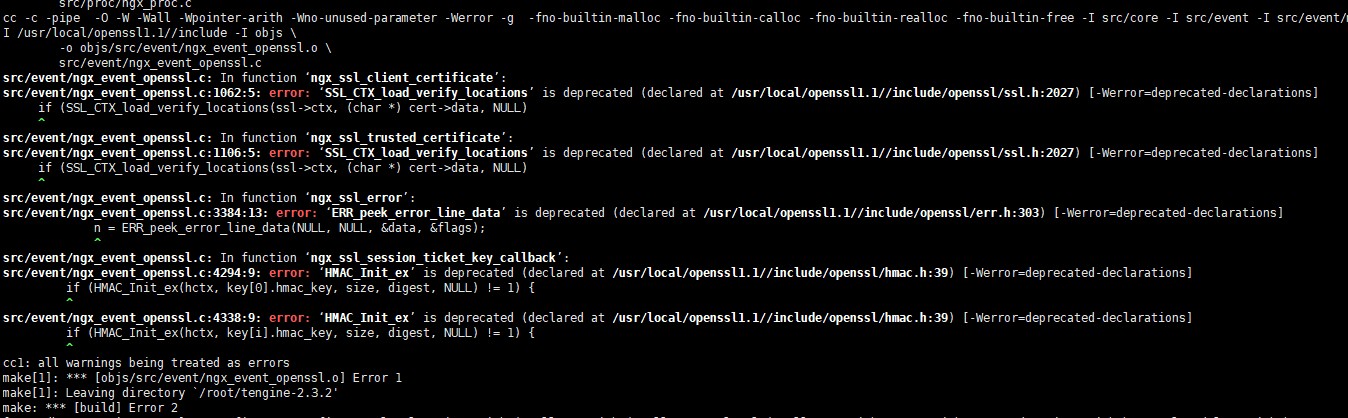
但和openssl-OpenSSL_1_1_1-stable.zip 这个版本,可以编译通过,这里使用 openssl-OpenSSL_1_1_1-stable.zip 的版本。
git clone https://github.com/openresty/luajit2 (注意不是,lua官方版本,那个版本缺少很多东西,需要安装openresty维护的版本才可以)
2,编译openssl,这里下载的是openssl的源码,不是二进制,所以需要编译
./config --prefix=/webdata/opt/local/openssl;make;make install
然后 vim /etc/ld.so.conf.d/openssl.conf 加入:/webdata/opt/local/openssl/lib 保存后,ldconfig 将openssl 库文件加入的 系统搜寻路径中
3,编译 openresty luajit2,下载的是源码,所以也需要编译安装,luajit安装的时候需要依赖,
只需要make; make install 就可以,默认安装在/usr/local 目录下。
4,编译安装tengine,jemalloc 直接是二进制目录,不需要安装。copy过来指定目录就可以了
cd tengine-2.3.2
./configure --prefix=/webdata/opt/local/tengine --with-jemalloc --with-jemalloc=/root/jemalloc --with-pcre --with-stream=dynamic --with-http_ssl_module --with-http_v2_module --with-http_realip_module --with-openssl=/webdata/opt/local/openssl --with-http_lua_module --with-luajit-lib=/usr/local/lib/ --with-luajit-inc=/usr/local/include/luajit-2.1/ --with-lua-inc=/usr/local/include/luajit-2.1/ --with-lua-lib=/usr/local/lib/
然后 make ;make install 就可以了
如果make 的时候报如下错误:
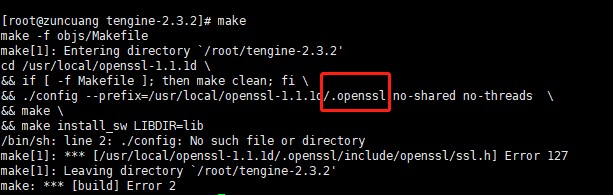
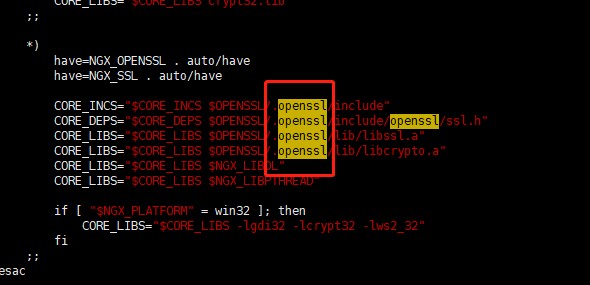
需要把 tengine-2.3.2 目录下的auto/lib/openssl/conf 文件中 .openssl/ 去掉,如下图:
编译完成后,可以通过,./sbin/nginx -m 查看支持的模块
如果运行上述命令报如下错误:
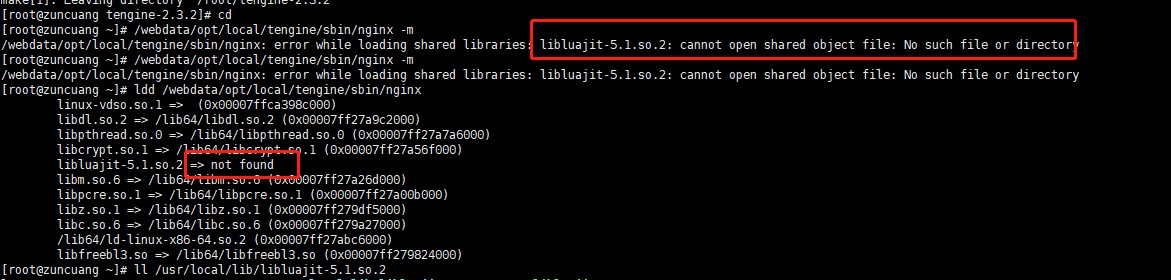
则是应为 luajit 库文件找不到,需要 vim /etc/ld.so.conf.d/luajit.conf 里面加入 /usr/local/lib 然后ldconfig即可。
下面是nginx 配置文件
- 发表于 2019-12-04 12:34
- 阅读 ( 171 )


