解决Nexus自启动JDK版本报错问题No suitable Java Virtual Machine could be found on your system
service nexus错误信息为:
No suitable Java Virtual Machine could be found on your system.
The version of the JVM must be at least 1.8 and at most 1.8.
Please define INSTALL4J_JAVA_HOME to point to a suitable JVM.

前提:nexus能正常启动。
解决Nexus自启动JDK版本报错方案:
修改在nexus对应的bin目录下的nexus文件:
加入参数:
#这里填写你安装jdk对应的路径
INSTALL4J_JAVA_HOME_OVERRIDE=/usr/local/soft/java/jdk1.8.0_171
填写java 根目录,bin目录的上层。修改后如下图:
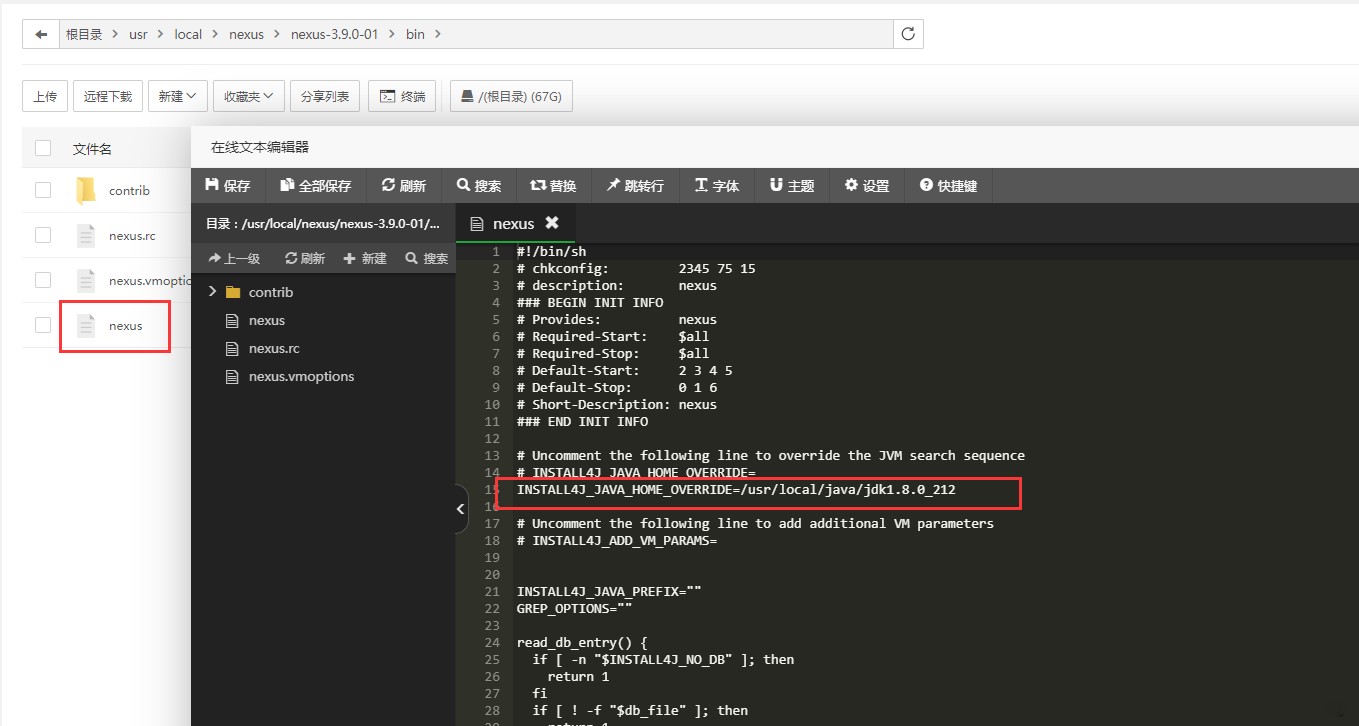
保存之后的对应的service nexus相关命令即可使用了。
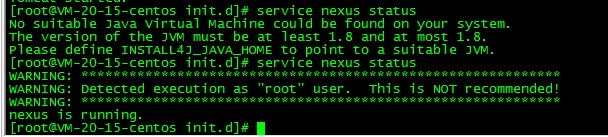
保存之后的对应的service nexus相关命令即可使用了。
如果是systemd风格脚本启动:
[Unit]
Description=nexus service
After=network.target
[Service]
Type=forking
LimitNOFILE=65536
ExecStart=/usr/local/soft/nexus/nexus-3.20.1-01/bin/nexus start
ExecStop=/usr/local/soft/nexus/nexus-3.20.1-01/bin/nexus stop
User=nexs
Restart=on-abort
[Install]
WantedBy=multi-user.target
如果使用默认的 nexus.vmoptions bin目录下,默认和启动文件 nexus 在一块,这个时候如果启动,会启动失败,默认什么错误也不显示,就是启动状态为main pid exited
导致这种情况原因是:数据文件加载的方式是 ../sonatype-work 意思数据文件是和程序文件目录平级目录,而启动的systemd风格配置文件是使用nexs用户启动,不是root用户,
所以此时,nexs用户寻找数据目录的时候 .. (即上层目录需要有执行权限[chmod +x])才可以,或则把数据目录放到绝对路径下。比如 /data/sonatype-work 直接给/data 目录属主为nexs即可。
此问题相关帖子:
I’m trying to run a Sonatype Nexus under the custom nexus user, because they recommend not running it not under the root user. I’m on an Amazon Linux 2 EC2 machine and it ran previously successfully under the root user.
I’ve added the nexus user and changed directory rights:
useradd --home-dir /opt/sonatype-work --no-create-home --uid 1001 nexus
chown -R nexus:nexus /opt/sonatype-work
chown -R nexus:nexus /opt/nexus
I changed the service file (/etc/systemd/system/nexus.service) to use the nexus user:
[Unit]
Description=nexus service
After=network.target

[Service]
Type=forking
LimitNOFILE=65536
ExecStart=/opt/nexus/bin/nexus start
ExecStop=/opt/nexus/bin/nexus stop
User=nexus
Restart=on-abort

[Install]
WantedBy=multi-user.target
Then I reloaded systemd and started it
$ systemctl daemon-reload
$ systemctl enable nexus
$ systemctl start nexus
$ systemctl status nexus
...
nexus[5838]: Starting nexus
systemd[1]: Started nexus service.
systemd[1]: nexus.service: main process exited, code=exited, status=255/n/a
nexus[6030]: Shutting down nexus
nexus[6030]: nexus is not running.
systemd[1]: Unit nexus.service entered failed state.
systemd[1]: nexus.service failed.
Nothing is happening. Same thing If switch to the nexus user and try to start it in that account. In the logs of the nexus service (tail -f /opt/sonatype-work/nexus3/log/nexus.log )nothing is happening. The systemd logs do not give a clue.
Where can I look what is actually happening and preventing my Sonatype Nexus to start?
P.S. Yes I searched here and Can't run nexus as nexus user 52 didn’t help.
I was able to fix it
The problem was that the root folder containing the folders which the nexus program needed to work also need to have the nexus user as owner. This is my working install script:
# install sonatype nexus
mkdir -pv /opt/efsfilesystem/sonatype-work
ln -sv /opt/efsfilesystem/sonatype-work /opt/sonatype-work
wget --output-document /tmp/nexus.tar.gz https://sonatype-download.global.ssl.fastly.net/nexus/3/nexus-3.22.1-02-unix.tar.gz
mkdir -p /opt/nexus
tar xf /tmp/nexus.tar.gz -C /opt/nexus --strip-components 1

# run as nexus user
useradd --home-dir /opt/nexus --no-create-home --uid 1001 nexus
chown -R nexus:nexus /opt/efsfilesystem
chown -R nexus:nexus /opt/nexus
chown -R nexus:nexus /opt/sonatype-work
- 发表于 2023-11-25 00:22
- 阅读 ( 458 )


