ubuntu 20.02上安装GlusteFS群集
准备三台服务器分别 mount -t glusterfs k8s-jundax-dev-worker-01:/mygluster /mnt安装,可以使用Xshell -工具-发送键输入到-已连接会话,把会话窗口的on 变成off,这样在一台机器上操作,其他机器可以执行相同的命令。
1,加glusterFS最新源
sudo add-apt...
准备三台服务器分别安装,可以使用Xshell -工具-发送键输入到-已连接会话,把会话窗口的on 变成off,这样在一台机器上操作,其他机器可以执行相同的命令。
1,加glusterFS最新源
sudo add-apt-repository ppa:gluster/glusterfs-11
sudo apt update
- 然后我们再安装依赖的软件
sudo apt install software-properties-common
- 接着我们执行GlusterFS服务的安装命令
sudo apt install glusterfs-server -y
- 等待数秒安装成功后我们可以通过如下命令查看状态
# 启动GlusterFS服务,安装完成后,可能没有自动运行,需要手动执行来启动服务.(所有节点均需启动)
sudo service glusterd start
# 查看服务运行状态
sudo service glusterd status
- 当输出如下内容,表示服务启动成功,正在运行:
● glusterd.service - GlusterFS, a clustered file-system server
     Loaded: loaded (/lib/systemd/system/glusterd.service; disabled; vendor preset: enabled)
     Active: active (running) since Fri 2022-06-17 13:38:07 CST; 5s ago
- 当服务启动成功后,还需要调整hosts文件,告诉每个服务器相互的IP和名称
sudo nano /etc/hosts
- 根据实际情况调整自己的内容,每一个节点均需要写入.我的内容如下
127.0.0.1 localhost
192.168.2.50 glusterfs-01
192.168.2.51 glusterfs-02
192.168.2.52 glusterfs-03
- 然后在我们所谓的"主"节点上执行如下命令,告诉他其他节点.(我是在01节点执行的)
sudo gluster peer probe glusterfs-02
sudo gluster peer probe glusterfs-03
- 当输出如下内容表示添加成功
Output
peer probe: success
- 你可以随时通过gluster peer status在任一节点上运行命令来检查节点是否正在通信.在这个例子中,它在glusterfs-01上运行:
sudo gluster peer status
- 他会输出类似内容
Number of Peers: 2

Hostname: glusterfs-02
Uuid: 3a619f9e-6eb6-47e7-9301-7866ca9cdb53
State: Peer in Cluster (Connected)

Hostname: glusterfs-03
Uuid: e843edad-7cd7-40b9-afe1-9e8d4824afd4
State: Peer in Cluster (Connected)
- 接下来我们需要创建存储卷,建立一个冗余的副本集.所以可以执行如下命令用来创建一个存储卷
要创建卷,您将使用gluster volume create具有以下通用语法的命令:
sudo gluster volume create volume_name replica number_of_servers domain1.com:/path/to/data/directory domain2.com:/path/to/data/directory force
以下是此gluster volume create命令的参数和选项的含义:

sudo gluster volume create gv0 replica 3 glusterfs-01:/glusterdata glusterfs-02:/glusterdata glusterfs-03:/glusterdata force
- 输出如下命令表示成功.
volume create: gv0: success: please start the volume to access data
- 接下来,检查卷是否在线.从任一节点运行以下命令:
sudo gluster volume status
Volume gv0 is not started
- 可以看到,我们的卷gv0没有启动,所以这里我们得启动他一下.执行如下命令:其中gv0根据自己的情况替换
sudo gluster volume start gv0
- 等待数秒,会收到启动成功的提示.再次输入查看卷状态的命令,我们可以看到一些信息,记住其中的端口号,接下来会使用到.
Status of volume: gv0
Gluster process                             TCP Port  RDMA Port  Online  Pid
------------------------------------------------------------------------------
Brick glusterfs-01:/glusterdata             56164     0          Y       3112
Brick glusterfs-02:/glusterdata             58153     0          Y       2897
Brick glusterfs-03:/glusterdata             60500     0          Y       2916
Self-heal Daemon on localhost               N/A       N/A        Y       3144
Self-heal Daemon on glusterfs-02            N/A       N/A        Y       2929
Self-heal Daemon on glusterfs-03            N/A       N/A        Y       2948

Task Status of Volume gv0
------------------------------------------------------------------------------
There are no active volume tasks
- 根据这个输出,服务器上的砖块都在线.
- 由于我装的最小化安装的操作系统,默认没有防火墙,所以这里的内容参考网络(所以端口号可能会对不上之前的内容),为了方便也可以关掉防火墙,但是这样会降低安全性.
- 作为配置卷的最后一步,还需要打开服务器上的防火墙,以便客户端计算机能够连接并安装卷.根据上一个命令的示例输出,gv0正在56164,58153,60500上运行,在glusterfs-01和glusterfs-02以及更多的节点上上运行以下命令,以允许通过各自的防火墙访问此端口:
sudo ufw allow from glusterfs-02_ip_address to any port 56164 58153 60500
然后,为了增加一层安全性,deny在gluster0 和 gluster1上为卷的端口添加另一个总规则。这将确保除了您的客户端之外的任何机器都无法访问任一服务器上的卷:
sudo ufw deny 56164 58153 60500
- 现在您的卷已启动并正在运行,您可以设置您的客户端机器并开始远程使用它
- 最后我们还需要将GlusterFS服务开机自启
# 注册开机自启(所有节点均需要开机自启,并且只需要执行一次就可以)
sudo systemctl enable glusterd.service
挂载:
mount -t glusterfs k8s-jundax-dev-worker-01:/mygluster /mnt
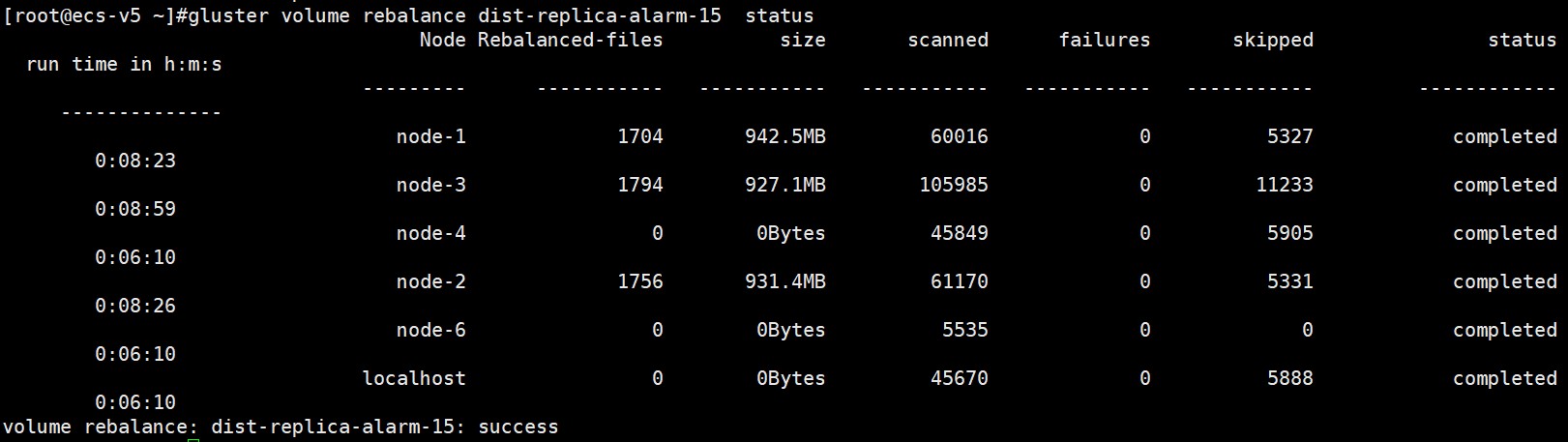
hash在平衡,用户新加节点
gluster volume rebalance dist-replica-alarm-15 start
查看状态
gluster volume rebalance dist-replica-alarm-15 status
- 发表于 2023-06-25 19:07
- 阅读 ( 32 )


