解决:error while loading shared libraries: libcrypto.so.1.1: cannot open shared object file: No file or directory
1、问题
源码安装完OpenSSL后,执行openssl version命令启动web服务器的时候,如nginx以上操作后可能会出现error while loading shared libraries: libcrypto.so.1.1: cannot open shared obje...
1、问题
- 源码安装完OpenSSL后,执行openssl version命令
- 启动web服务器的时候,如nginx
- 以上操作后可能会出现error while loading shared libraries: libcrypto.so.1.1: cannot open shared object file: No
2、原因
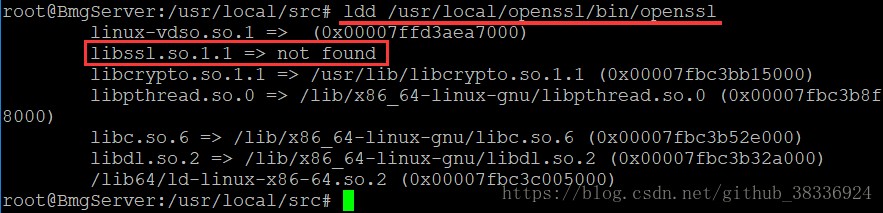
- 执行ldd + 程序、可执行文件的绝对路径命令,你就会发现,是因为找不到库的位置造成的
ldd /usr/local/openssl/bin/openssl
3、解决办法
- 使用root用户操作
- 可以通过 ldd /root/php-7.3.4/sapi/cli/php 查看下缺少的库是哪一个,然后通过软链,链接下即可
ln -s /usr/local/lib/libssl.so.1.1 /lib64/libssl.so.1.1
ln -s /usr/local/lib/libcrypto.so.1.1 /lib64/libcrypto.so.1.1
- 发表于 2022-06-07 15:17
- 阅读 ( 46 )


