当前有个需求:
1,vue前端在此项目打里程碑标签的时候触发执行一个脚本,脚本为docker 把编译好的vue文件打包进镜像,然后推送到自建的私有仓库。
2,这个需求在服务器的hook是不支持的,服...
当前有个需求:
1,vue前端在此项目打里程碑标签的时候触发执行一个脚本,脚本为docker 把编译好的vue文件打包进镜像,然后推送到自建的私有仓库。
2,这个需求在服务器的hook是不支持的,服务端只有post-receive pre-receive update 三个脚本,没有tag触发的机制。只能使用webhook,webhook有一个 “标签推送事件” 在tag push的时候触发,单这个是全局的的,虽然粒度比较粗,单总算满足需求了吧
3,webhook可以在任何机器上执行,不局限于gitlab服务器端。
4,触发的url连接需要编程,php,python或其他语言都可以,我只对php和python算了解点,单php脚本需要打开php_exec 执行脚本功能,这就比较危险,python是自带的这个比较好实现。
实现方式如下:首先登录gitlab,在“设置”---“系统钩子” 中设置出发在url和token,如下图:
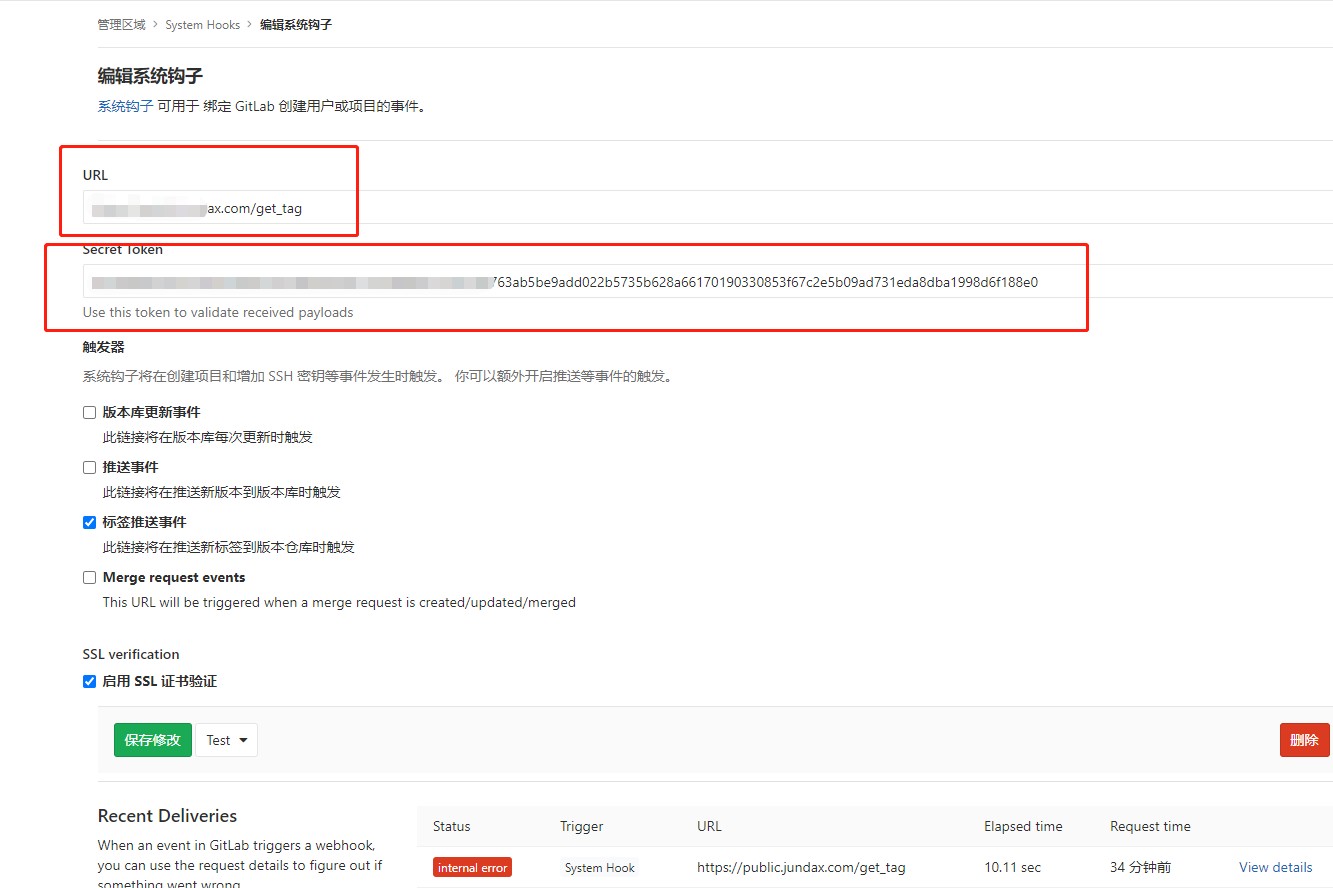
然后我通过python flask 编写了一个简单地脚本文件:
#!/usr/bin/python3.6
from flask import Flask,request, jsonify, abort
import subprocess
app = Flask(__name__)
WEBHOOK_VERIFY_TOKEN = "63ab5be9add022b5735b628a66170190330853f67c2e5b09ad731eda8dba1998d6f188e0"
@app.route('/webhook', methods=['GET', 'POST'])
def webhook():
if request.method == 'GET':
verify_token = request.headers.get('X-Gitlab-Token')
if verify_token == WEBHOOK_VERIFY_TOKEN:
return jsonify({'status': 'success'}), 200
else:
return jsonify({'status': 'bad token'}), 401
elif request.method == 'POST':
verify_token = request.headers.get('X-Gitlab-Token')
if verify_token == WEBHOOK_VERIFY_TOKEN:
# 进入到代码目录,拉取最新代码
retcode = subprocess.call("/etc/init.d/vue_docker_imgs.sh", shell=True)
if retcode == 0:
return jsonify({'status': 'success'}), 200
else:
return jsonify({'status': 'git pull error'}), 503
else:
return jsonify({'status': 'bad token'}), 401
else:
abort(400)
if __name__ == '__main__':
app.run(host='0.0.0.0', port='8442')
然后通过 guncorn 来配置app.py 在正式运行的环境,最后通过nginx简单代理出去
gunicorn_config.py 如下:
import logging
import logging.handlers
from logging.handlers import WatchedFileHandler
import os
import gevent.monkey
gevent.monkey.patch_all()
import multiprocessing
bind = '127.0.0.1:8835' # 绑定ip和端口号
backlog = 1024 # 监听队列
chdir = '/webdata/opt/local/webhook' # gunicorn要切换到的目的工作目录
timeout = 10 # 超时
worker_class = 'gevent' # 使用gevent模式,还可以使用sync 模式,默认的是sync模式
# workers = multiprocessing.cpu_count() * 2 + 1 # 进程数
# threads = 2 # 指定每个进程开启的线程数
workers = 1 # 进程数
threads = 1
#loglevel = 'info' # 日志级别,这个日志级别指的是错误日志的级别,而访问日志的级别无法设置
loglevel = 'info'
proc_name = 'gunicorn_ocr' # 进程名
access_log_format = '%(t)s %(p)s %(h)s "%(r)s" %(s)s %(L)s %(b)s %(f)s" "%(a)s"' # 设置gunicorn访问日志格式,错误日志无法设置
"""
其每个选项的含义如下:
h remote address
l '-'
u currently '-', may be user name in future releases
t date of the request
r status line (e.g. ``GET / HTTP/1.1``)
s status
b response length or '-'
f referer
a user agent
T request time in seconds
D request time in microseconds
L request time in decimal seconds
p process ID
"""
pidfile = "/webdata/opt/local/webhook/misc/pid/gunicorn.pid"
accesslog = "/webdata/opt/local/webhook/misc/log/gunicorn_access.log" # 访问日志文件
errorlog = "/webdata/opt/local/webhook/misc/log/gunicorn_error.log"
daemon = True
这连个文件放到一个文件夹中,然后通过
进入文件中然后:
nohup gunicorn -c gunicorn_config.py
app:app& 启动即可,如果缺少库依赖,根据提示通过 pip install xxx -i https://mirrors.aliyun.com/pypi/simple/ 安装即可
最后是打包docker 打包文件的脚本,脚本如下:
#!/bin/bash
#write by @jundax
#date:2020-09-12
#func:打包vue文件,然后将编译后的静态文件docker化
# yarn 设置淘宝的源,加快依赖库文件下载
dockerTag=$(md5sum <<<$(uuid)|awk '{print substr($1,0,10)}')
dockerHub=hub.xxx.com/houchu/omt_www
cd ~
yarn config set registry https://registry.npm.taobao.org/
#当前目录如果不存在项目,则从远程clone一份
if [ ! -d omt_www -a ! -d .git ];then
read -p "Input your git_user: " git_user
read -s -p "Input your git_pwd: " git_pwd
projectUrl="https://$git_user:$git_pwd@git.xxx.com/fws/houchu/omt_www.git"
git clone $projectUrl
cd omt_www
rm -rf ../vue_com/* && yarn && yarn build:prod
fi
cd ~/omt_www
rm -rf ../vue_com/* && yarn && yarn build:prod
## 开始构建docker镜像
cp -rp /etc/init.d/.dockerfile ~/vue_com/Dockerfile
sudo docker build -t $dockerHub:$dockerTag ~/vue_com
#登录镜像私服
sudo docker login --username yyy --password xxx $docker_private_hub 2>/dev/null
sudo docker push $dockerHub:$dockerTag
以上脚本文件other用户都有“执行” 的权限
最后可以在git项目中通过:
git tag -a v2.0.0 -m '里程碑2.0.0'
git push origin v2.0.0
执行完毕后,看看是否有私有仓库中是否有docker镜像出现。
webhook 请求的链接超时解决方法,超时的时候webhook会重试,进行docker构建的时候会多次触发。解决方法如下:
Receiving duplicate or multiple webhook requests triggered by one event
When GitLab sends a webhook it expects a response in 10 seconds (set default value). If it does not receive one, it'll retry the webhook.
If the endpoint doesn't send its HTTP response within those 10 seconds, GitLab may decide the hook failed and retry it.
If you are receiving multiple requests, you can try increasing the default value to wait for the HTTP response after sending the webhook
by uncommenting or adding the following setting to your /etc/gitlab/gitlab.rb:
gitlab_rails['webhook_timeout'] = 10


