harbor 镜像服务器前端通过nginx代理导致push的时候401未授权问题
一:安装harbor 私有镜像服务器
1,到https://github.com/goharbor/harbor/releases下载最新版的harbor
2,解压到指定目录,配置harbor.yml 文件,然后执行 ./install 即可使用绑定hostname访问
二,出现问题,及解决办法
1,如果直接使用harbor自带的nginx(docker启动) 启用ssl的话,会和现有的nginx端口冲突,所以开始的做法是,把hosname配置为内网ip,port使用80端口(80没有使用,当然其他端口也是可以的)harbor.yml 配置如下:
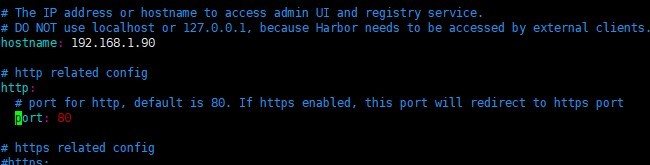
此时启动docker 的nginx镜像映射到本地端口为80-->8080
nginx代理配置为:
location / {
client_max_body_size 4000M;
proxy_pass https://localhost;
proxy_set_header X-Real-IP $remote_addr;
proxy_set_header Host $host;
proxy_set_header X-Forwarded-For $proxy_add_x_forwarded_for;
proxy_set_header X-Forwarded-Proto https;
proxy_redirect off;
}
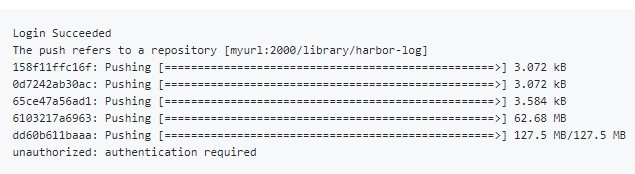
harbor action: push: unauthorized to access repository mydomain
docker 可以登陆,请求registry服务上传镜像的时候提示401(未授权)
根据官方文档提示,当harbor服务前端使用nginx代理的时候, common/config/nginx/nginx.conf 中的
proxy_set_header X-Forwarded-Proto $scheme; 要注释掉
注释掉后,然后
docker-compose stop ./prepare docker-compose up -d 重启镜像后,问题依然存在
我原先的请求拓扑如下:client--->https://mydomain--->http://localhost
经过查资料在stackoverflow 发现有个问答如下:
docker client-> nginx (https:443) -> harbor (http:localhost)
The "docker client -> nginx (https:443)" just handle the request from harbor components to self registry by 301 redirect, because the harbor deployed by http mode, the request from harbor itself is http as well.
It takes the disaster, because 30X redirect can not take the sentitive headers such as cookies and authentication. So the requests redirect to https indeed, never take any authentication token to the harbor, so the 401 error was raise when pulling image.
经过调整代理拓扑后,变成如下: docker client --->https://mydomain-->https//internal_ip
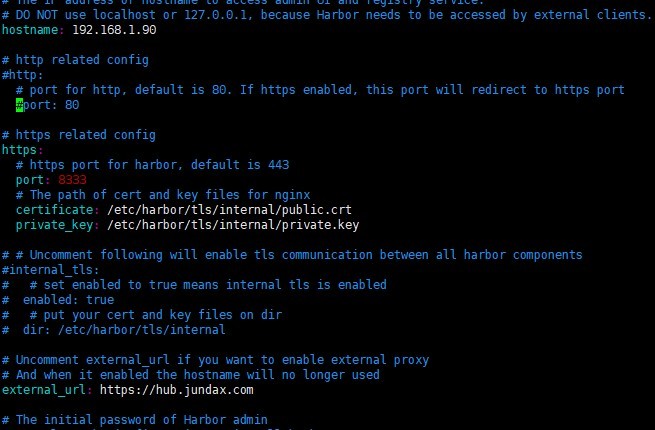
绑定在地址为:服务器内网ip地址,
此时需要生成内网ip地址在私有证书,
openssl genrsa -out private.key 4096
openssl req -new -x509 -key private.key -out public.crt -days 3650
生成公钥在时候,common name填写 192.168.1.90 就可以了。
生成个私有公约,在nginx中配置使用后,请求的时候系统是会报警的,为了让系统信任我们自己生成的证书,需要做如下处理:
Ubuntu上面:
cp yourdomain.com.crt /usr/local/share/ca-certificates/public.crt
update-ca-certificates
cp yourdomain.com.crt /etc/pki/ca-trust/source/anchors/public.crt
update-ca-trust
重新配置harbor,启动镜像正常后
然后nginx里面配置更改如下:
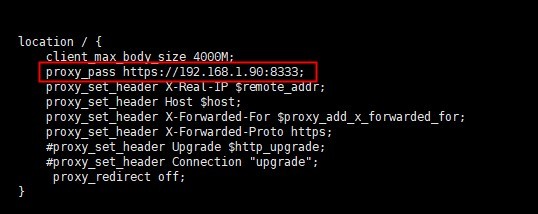
重新加载下nginx,然后再使用 docker push ........ 终于正常了。
2021-02-17 补充,
如果把https注释,使用nginx代理 harbor 的http端口,push的时候也是一直提示 push retrying..... 这说明nginx代理(443)-nginx container(http)是不行的,只能内部使用https才可以。
./prepare 脚本功能 使harbor.yml 配置更改生效,
docker-compose down 停止harbor 的各个container
docker-compose up -d 启动harbor 各个container
执行./prepare 会重新生成harbor.yml 定义的配置文件,也就是 common 目录,所以,一旦有 common 权限变动,直接重新执行./prepare 就会自动删除common 目录,并重新生成
- 发表于 2020-05-21 05:00
- 阅读 ( 82 )


