nexus的配置和mvn使用nexus及私有包上传问题
一, nexus创建仓库:
nexus启动后,登录可以创建user 和 blob stores
然后创建自己的 proxy repository ,host repository
代理仓库使用 阿里云的maven源来中继,有关阿里云的maven 仓库见如下地址:
https://help.aliyun.com/document_detail/102512.html
最后创建一个group 仓库关联以上仓库,见如下图:
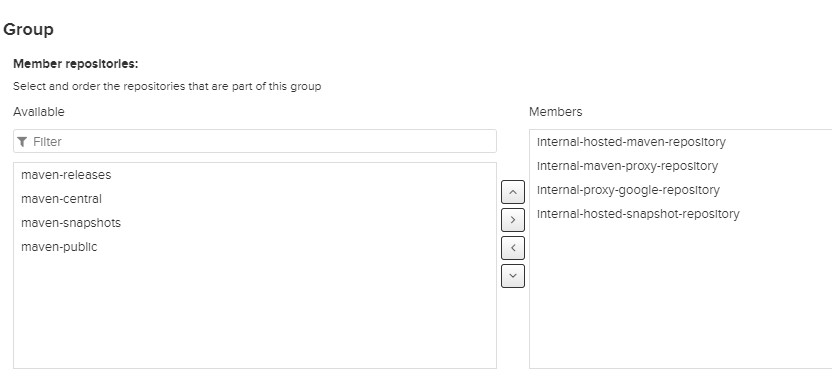
这里面注意下,创建 maven-snapshots 仓库的时候,type不要选 release,一定要选择snapshots类型可以,不让通过mvn clean deploy -Dmaven.test.skip=true 来上传 snapshot 的时候会出错
二:mvn设置使用nexus服务器
2.1 mvn的认证设置
maven 的config/settings.xml 文件中(或者单个用户目录下新建.m2 下放置 settings.xml 文件)
然后建立登录认证的账号和密码, 这里的id代表认证的条目,其他地方要使用此条目才认证,只需填入id对应的标志就可以了,如图:
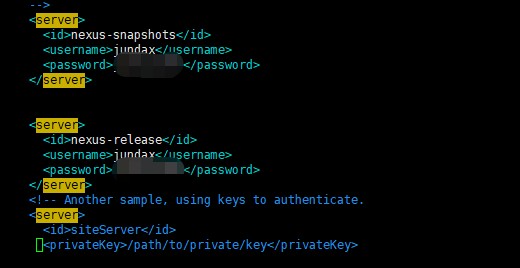
这里的认证条目可以使用多个
2.2 mvn的代理使用私服
这里主要设置mirror,可以使用多个。
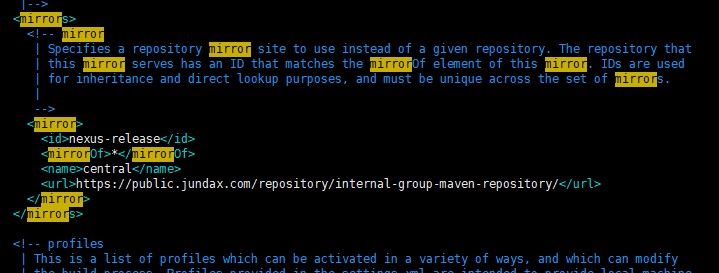
注意这里的 id 和上面server的中认证id保持一致,否则提示401 授权未通过
<mirrorOf>*</mirror> 的星号代表所有mvn的依赖包下载都需要通过url中指定的地址下载
2.3 项目生成的依赖包上传nexus的设置
在项目的pom.xml 文件中
添加如下设置:
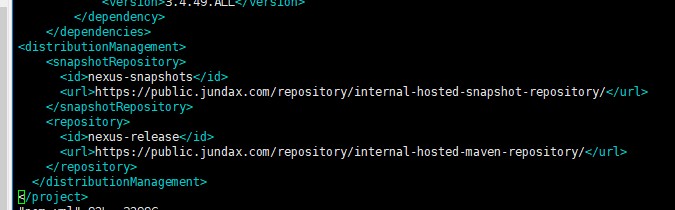
此时对于非snapshot包,可以使用 mvn clean deploy 来自动上传到项目的host release 仓库中,但对于snapshot包,上传到仓库的时候会自动加上时间戳,mvn使用私服打包的时候提示找不到依赖包而报错,如下图:
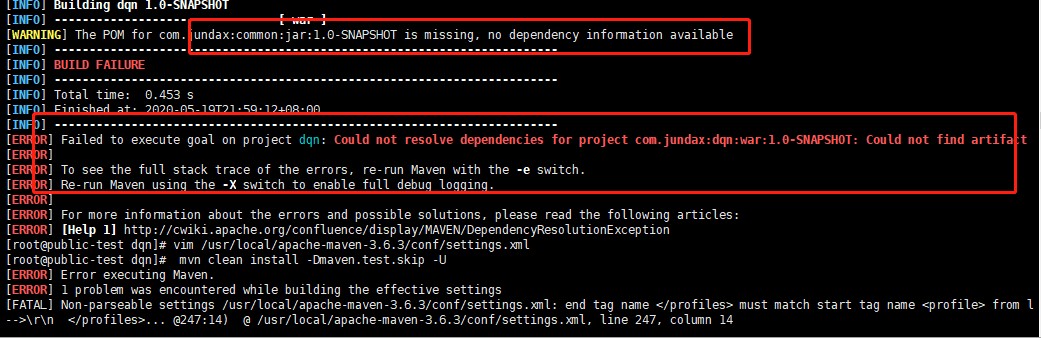
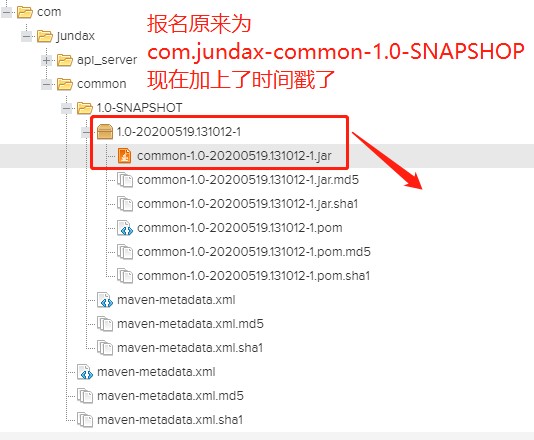
这是因为默认情况下,mvn不支持加载非稳定的包到项目中,需要专门设置才行。
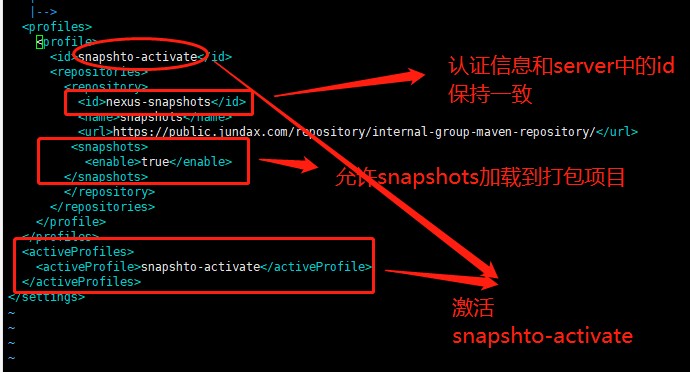
<profiles>
<profile>
<id>snapshto-activate</id>
<repositories>
<repository>
<id>nexus-snapshots</id>
<name>snapshots</name>
<url>https://public.jundax.com/repository/internal-group-maven-repository/</url>
<releases>
<enabled>true</enabled>
</releases>
<snapshots>
<enabled>true</enabled>
</snapshots>
</repository>
</repositories>
</profile>
</profiles>
<activeProfiles>
<activeProfile>snapshto-activate</activeProfile>
</activeProfiles>
</settings>
2.4 上传第三方私有包的方法
对于release仓库 可以通过nexus提供的上传页面完成如图:
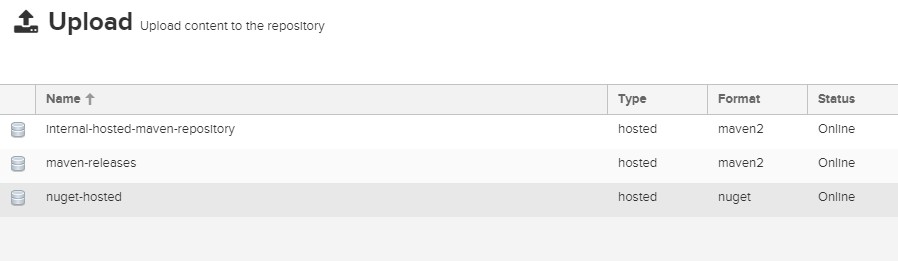
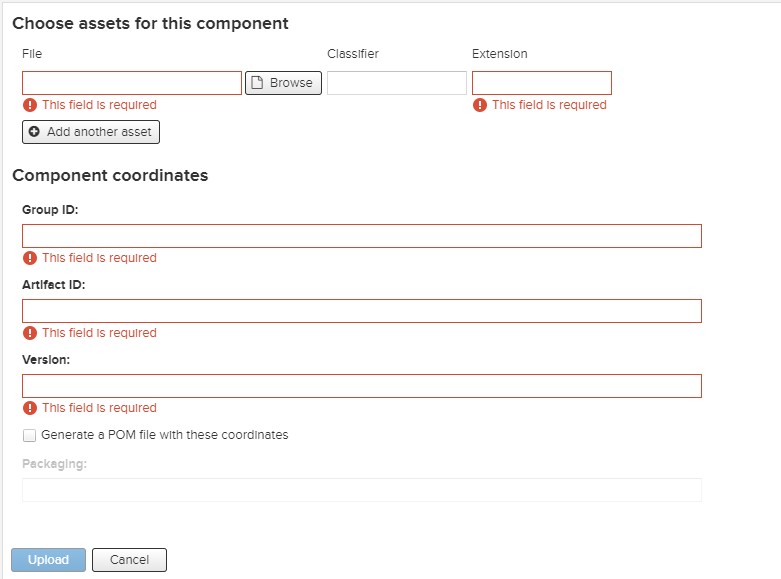
但对于snapshot的包则页面没有提供上传的地方,所以只用通过命令的方式才可以
示例:
对于 org.richard:oss-sdk:5.0.0-SNAPSHOT.jar 包,公共仓库下载不到,此时只能通过命令的方式上传
mvn deploy:deploy-file -DgroupId=org.richard -DartifactId=oss-sdk -Dversion=5.0.0-SNAPSHOT -Dpackaging=jar -Dfile=/root/oss-sdk-5.0.0-SNAPSHOT.jar -Durl=https://public.jundax.com/repository/internal-hosted-snapshot-repository/ -DrepositoryId=nexus-snapshots
其中:
-DgroupId
-DartifactId
-Dversion 对应pom.xml 文件中的的依赖配置。
-Dpackaging 对应文件后缀
-Dfile 对应文件位置,可以是相对路径或绝对路径
-Durl 上传私有仓库的的url
-DrepositoryId 和settings.xml 中server项id对应。
除了上传jar包外,也可以上传pom文件
如:
deploy:deploy-file -DgroupId=com.jundax -DartifactId=api_server -Dversion=1.0-SNAPSHOT -Dpackaging=pom -Dfile=./api_server-1.0-SNAPSHOT.pom -Durl=https://public.jundax.com/repository/internal-hosted-snapshot-repository/ -DrepositoryId=deployment -DrepositoryId=nexus-snapshots
通过jar 包生成对应的pom.xml 文件命令:
案例:这里一个支付sdk,三方给了一个jar包,然后上传到私库,找不到对应的pom.xml 文件,可以通过如下命令生成, -Dfile 后面路径不能有空格,否则会报:Caused by: org.apache.maven.artifact.installer.ArtifactInstallationException: Failed to install artifact cn.com.sand:hmpay-sdk:jar:1.1.4: /home/pos_sourcecode/server/pos-server (Is a directory)
mvn install:install-file -DgroupId=cn.com.sand -DartifactId=hmpay-sdk -Dversion=1.1.4 -Dfile=/root/repository/cn/com/sand/hmpay-sdk/1.1.4/hmpay-sdk-1.1.4.jar -Dpackaging=jar -DgeneratePom=true
- 发表于 2020-05-19 23:09
- 阅读 ( 75 )


