3查看 MySQL的响应时间
-rt
Print MySQL DB RT(us).
通过调用 tcprstat来监控 MySQL的响应时间。
rt中列的具体意义参考 http://www.percona.com/docs/wiki/tcprstat:start 中的
解释。
(
rt参数依赖:
1)需要安装 tcprstat
由于安装后运行 tcprstat需要 root用户,或者 sudo进行,可以通过如下命令来避免:
sudo chown root:root /usr/bin/tcprstat
sudo chmod u+s /usr/bin/tcprstat
ll /usr/bin/tcprstat
rwsr-xr-x 1 root root 1183465 May 28 15:38 /usr/bin/tcprstat
默认工具读取 tcprstat的代码如下:
$grep -n 'my $TCPRSTAT' orzdba
166:my $TCPRSTAT = "/usr/bin/tcprstat --no-header -t 1 -n 0 -p $port";
不同的路径可以自行修改。
(
2)需要安装 Perl的 File::Lockfile模块
File::Lockfile 模块同时要依赖 Module-Build/version/Class-Data-Inheritable
这 3个模块,可以通过下面方式进行安装:
安装 version模块
wget http://search.cpan.org/CPAN/authors/id/J/JP/JPEACOCK/version-0.99.tar.gz
tar -zxvf version-0.99.tar.gz
cd version-0.99
perl Makefile.PL
make
make test
sudo make install
安装 Class-Data-Inheritable模块:
$wget http://search.cpan.org/CPAN/authors/id/T/TM/TMTM/Class-Data-Inheritable-0.08.tar.gz
tar -zxvf Class-Data-Inheritable-0.08.tar.gz
cd Class-Data-Inheritable-0.08
perl Makefile.PL
make
make test
sudo make install
安装 Module-Build模块:
wget http://search.cpan.org/CPAN/authors/id/K/KW/KWILLIAMS/Module-Build-0.31.tar.gz
tar -zxvf Module-Build-0.31.tar.gz
cd Module-Build-0.31
perl Build.PL
./Build
./Build test
sudo ./Build install
安装安装 File::Lockfile模块:
wget http://search.cpan.org/CPAN/authors/id/G/GL/GLORYBOX/File-Lockfile-v1.0.5.tar.gz
tar -zxvf File-Lockfile-v1.0.5.tar.gz
cd File-Lockfile-v1.0.5
perl Build.PL
perl ./Build
perl ./Build test
sudo perl ./Build install
可以通过如下脚本,检查安装了哪些 perl模块的脚本:
$
cat check_module.pl
!/usr/bin/perl
#
use ExtUtils::Installed;
my $inst = ExtUtils::Installed->new();
print join "\n",$inst->modules();
print "\n";
4
其他
1)MySQL相关参数配置
(
P,--port
Port number to use for mysql connection(default 3306).
Socket file to use for mysql connection.
-S,--socket
用于指定端口或者 socket。
如果需要 MYSQL的其他参数要添加,直接改代码:
grep -n -A1 'my $MYSQL' orzdba
66:my $MYSQL
= qq{mysql -s --skip-column-names -uroot -P$port };
.= qq{-S$socket } if defined $socket;
67-$MYSQL
(
2)控制输出间隔和次数,以及是否输出颜色。
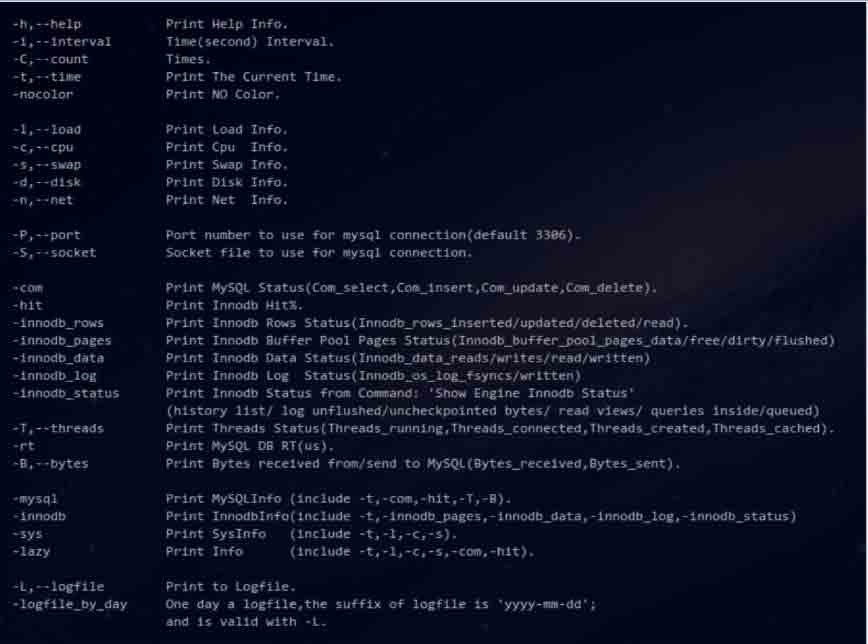
-h,--help
Print Help Info.
i,--interval
C,--count
t,--time
Time(second) Interval.
Times.
Print The Current Time.
Print NO Color.
nocolor
(
3)日志输出
-
L,--logfile
logfile_by_day
L.
Print to Logfile.
-
One day a logfile,the suffix of logfile is 'yyyy-mm-dd'; and is valid with
-
用于将数据输出到日志文件-L后面带输出的日志文件,另外如果加上-logfile_by_day参
数的话,将按天输出日志。