通过innodb 的 idb文件计算该表的space_id
Mysql 的数据表或表空间损坏,
特别是第一个页面的的 page_id(FIL header-->file header)(偏移量为:34-37字节) 和FSP (file space header)的space_id 偏移量为:38-41字节 出错的时候,mysql服务器是启动不了的,会包如下错误:
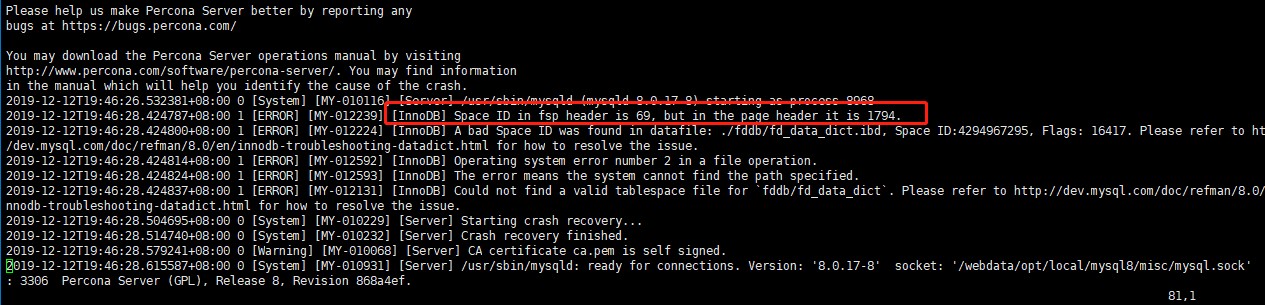
当然对mysql的 ibd 文件,里面包含很多页面(block),每页的开头 34-37 为Fl HEADER ID(page_id) ;38-31 为FSP ID (space_id)
对于一个mysql的数据文件.ibd, 存储的顺序为:tablespace->segment->extend->block(pages) mysql默认一页大小为16K
一个.ibd 有多少页(blocks)可以通过 echo "$(stat fd_member_coupons.ibd |awk '/Size/{print $2}')/(1024*16)"|bc 求出。
也可以通过 如下方式:
使用xxd 打开二进制表数据文件 xxd fd_member_coupons.ibd (也可以 vim fd_member_coupons.ibd 然后调用 % ! xxd)
定位到最后一行的行号:比如:001bff0
把它转换成10进制后为:echo "ibase=16;$(echo 001bff0|tr [a-z] [A-Z])"|bc
计算出值:114672,然后加上这行的字节数16 :114672+16=114688,然后除以每页的字节数:echo "(114672+16)/(1024*16)"|bc 也可以计算得到数据文件包含的页面数。
下面我们测试下,修改 第一个页面的space_id 和page_id 看看mysql启动时候导致的错误
下面会用到重庆八怪的几个工具,本文最后游下载:
1,修改 space id的值
./bctool c1.ibd 0 38 000000ee 把原来的space 从00000005 修改为:000000ee(十进制:238)
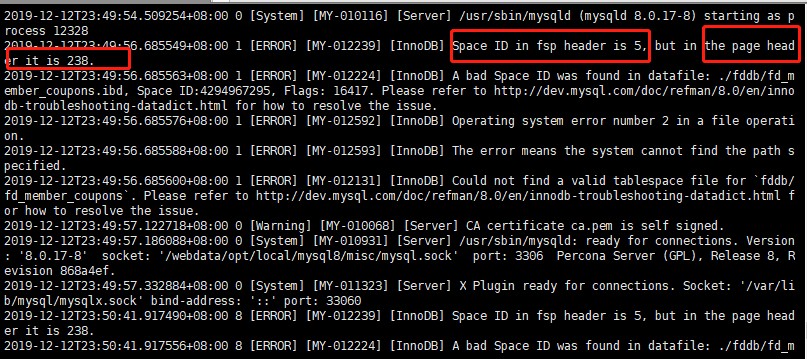
启动的时候数据库报错:如下(数据库能起来)
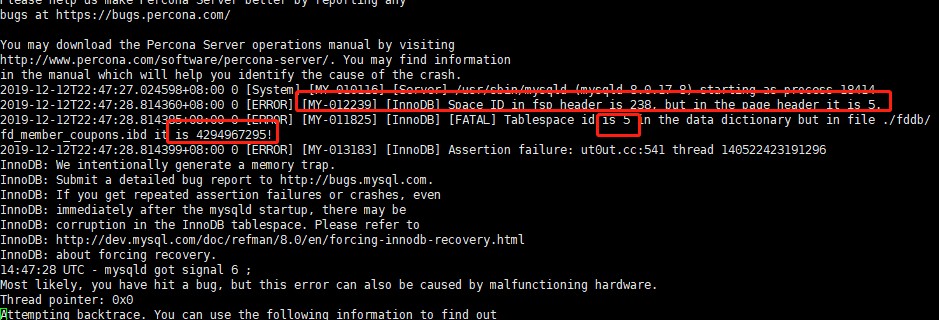
上面报错很明显,space id in fsp header 报错了 变成了我们修改的238 , page header 为5 ,是正常的,mysql8中的查看tablespace 和表对应关系的地方为:
select * from information_schema.innodb_tablespaces;
mysql 5.6和5.7 查询为:
修改回原来的值,重新启动mysql,则正常
2,修改 page id 的值。
/root/bctool fd_member_coupons.ibd 0 34 000000ee
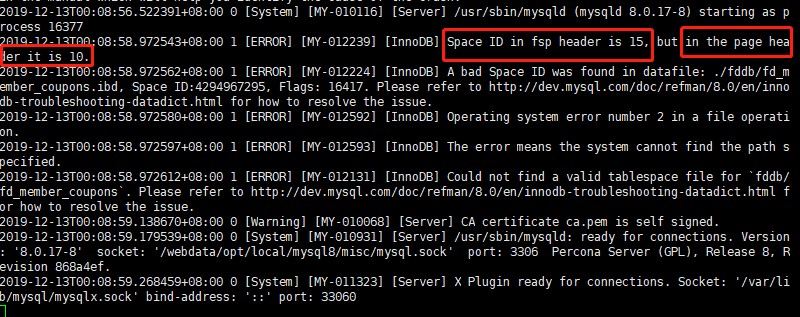
启动报错(进过一段时间检测,mysql能起来)
其中space id in fsp header 是正常的, page header是错的
3,同时更改 space id 和 page id 也是报错,经过更长时间mysql可以启动起来。
4,修改不同页的 space id
/root/bctool fd_member_coupons.ibd 7 38 002c3bcc
把第7页(block) 的space id从 002c3b98 修改为:002c3bcc mysql 启动报:
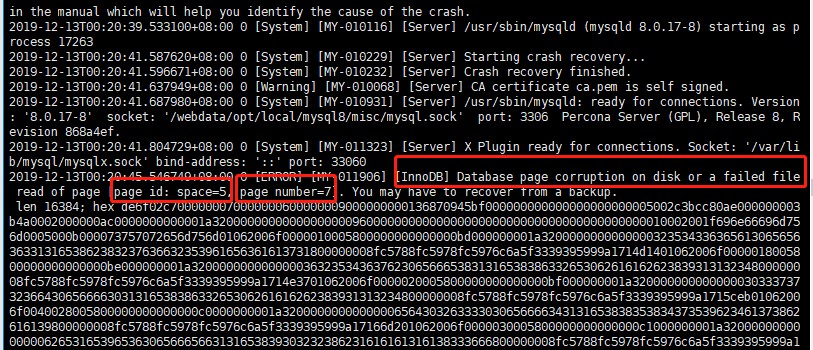
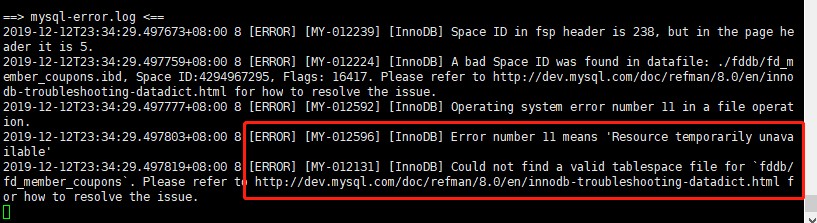
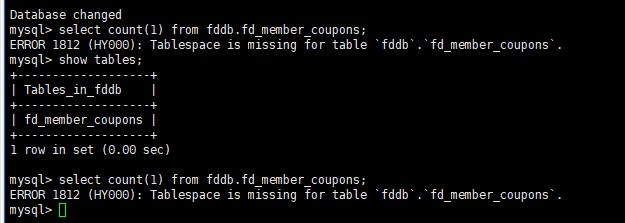
- 报错的信息 page_id 为5,页面(页面为7)上面报错,一个数据文件,只要有数据,page_id 都是相同的,空页为0,space id页面不同,space id也不同,报错长度为16384字节,也就是16k 的大小(1024*16)
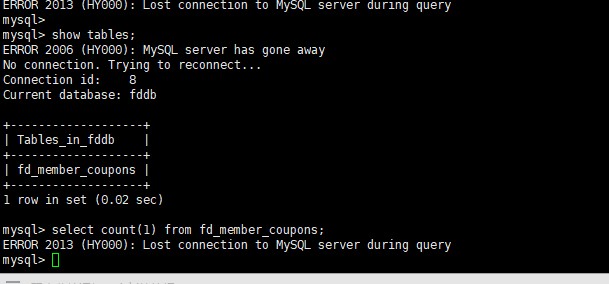
此时,执行select查询报:
使用工具下载
查看ibd文件block(页面数量和页面使用空间)
使用方式:./mysqlblock fd_member_coupons.ibd -t
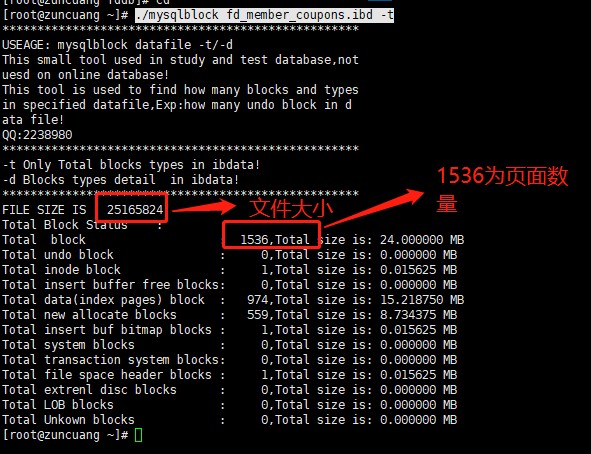
bcview (查看page_id和space_id)
/root/bcview fd_member_coupons.ibd 16 34 4 (block大小16k 从34偏移开始,取4字节,34,35,36,37 这四字节代表page 的space 也即是page_id,前面说过,一个ibd文件只要页面使用,page_id 都是一样的, 38,39,40,41为具体页面的space_id 这个随页面不同而不同)
使用示例:
/root/bctool fd_member_coupons.ibd 0 34 000000ee (把0 block【页】,也就是第一个页面的的page id修改为:000000ee,)
/root/bctool fd_member_coupons.ibd 5 34 000000ee (把5 block【页】,也就是第六个页面的的page id修改为:000000ee,)
MYSQL Space id in fsp header,but in the page header错误
今天启动MYSQL的时候发现如下问题:
2015-12-14 20:51:59 2098 [ERROR] InnoDB: Space id in fsp header 131225,but in the page header 65
2015-12-14 20:51:59 2098 [ERROR] InnoDB: inconsistent data in space header in tablespace ./test/oneblock.ibd (table test/oneblock)
innodb的存储包含
tablespace--segment--extent--block(pages)
而tablespace有一个space id 及用于描述表空间的唯一编号,ibdata的space id为0,这个ibdata为,
SYSTEM SPACE,其中会包含很多普通SPACE_ID 不包含的数据段,或者说数据块,如回滚段。
如果开启了innodb_file_per_table,每个innodb 表文件都有space id,其中文件包含了表的数据和索引数据。
而普通的space 包含的信息较少一些
我们这里主要分析这里也只要分析普通的space,也就是innodb_file_per_table建立的ibd文件。
使用工具(自己写的工具):
[root@hadoop1 test]# mysqlblock c1.ibd -t
***************************************************
USEAGE: mysqlblock datafile -t/-d
This small tool used in study and test database,not
uesd on online database!
This tool is used to find how many blocks and types
in specified datafile,Exp:how many undo block in d
ata file!
QQ:22389860
***************************************************
-t Only Total blocks types in ibdata!
-d Blocks types detail in ibdata!
***************************************************
FILE SIZE IS : 10485760
Total Block Status :
Total block : 640,Total size is: 10.000000 MB
Total undo block : 0,Total size is: 0.000000 MB
Total index node block : 1,Total size is: 0.015625 MB
Total insert buffer free blocks: 0,Total size is: 0.000000 MB
Total data(leaf node) block : 113,Total size is: 1.765625 MB
Total new allocate blocks : 524,Total size is: 8.187500 MB
Total insert buf bitmap blocks : 1,Total size is: 0.015625 MB
Total system blocks : 0,Total size is: 0.000000 MB
Total transaction system blocks: 0,Total size is: 0.000000 MB
Total file space header blocks : 1,Total size is: 0.015625 MB
Total extrenl disc blocks : 0,Total size is: 0.000000 MB
Total LOB blocks : 0,Total size is: 0.000000 MB
Total Unkown blocks : 0,Total size is: 0.000000 MB
这里我们可以清晰的看到每种块的数量,其中注意一个特殊的块
Total file space header blocks及FSP_HDR BLOCK,这个块是每个space 必须的,
即使SYSTEM SPACE也包含,他总是SPACE的第一个块。
而每个块同样包含了file header.
Space id in fsp header 131225,but in the page header 65
这里的fsp header就是 file space header ,及第一个块的后38到150字节,
而 page header这里实际上是file header 及 FIL header,这个是块固有的前38字节。
这里有点绕:
一个是file header(每个块固有的前38字节)
一个是file space header(space的第一个块的38-150字节)
file header(FIL header)
包含如下0-37字节
checksum(4) 0-3
offset(4) 4-7
previous page(4) 8-11
next page(4) 12-15
LSN for last page modification(8) 16-23
page type (2) 24-25
FLUSH LSN(8) 26-33
SPACE ID(4) 34-37
其中的每个值的意思有些是自解释的,而有些需要更深入的研究,但是一个块是一个双向指针的节点可以肯定。
并且记录每个块的LSN记录,应该用于块恢复。这部分是每个块都一样的。而这里SPCAE ID在
page header 中说明每个块中都会有个这个值。记录的就是SPACE_ID不用过多解释
接下来我们来看file space header block 特有的
38-150字节:file space header(FSP HEADER)
SPACE_ID (4)
unused(4)
highest page number in file(size)(4)
highest page number initialized (free limit)(4)
flags(4)
number of pages uesd in "free_frag" list(4)
list base node for "free" list(16)
list base node for "free_frag" list(16)
list base node for "full_frag" list(16)
nex unused segment id(8)
list base node for "full_nodes" list(16)
list base node for "free_nodes" list(16)
其中很多值还需要深入的研究 但是我们发现在38-41字节就包含了SPACE_ID。
那么我们就找到了
Space id in fsp header 131225,but in the page header 65
中的 fsp header 来自哪里 ,他来自FSP HEADER及ibd 文件的第一个块的第38-41字节
而page header 65,来自每个块的第34-37字节。
既然如此我们可以进行测试模拟这种现象,我们手动修改这4个字节。使用我自己写的工具,由于LINUX下没找到合适工具干脆自己写了两个。
bctool和bcview
bctool 用于修改
bcview 用于查看
主要测试方式
1、修改FSP HEADER的38-41字节查看MYSQL INNODB 报错,然后修改回去后是否能够顺利启动
2、修改第一个块file space header的34-37字节 查看看MYSQL INNODB 报错,然后修改回去后是否能够顺利启动
3、修改任意一个块的file space header的34-37字节 查看看MYSQL INNODB 报错,然后修改回去后是否能够顺利启动
我们依然使用test数据库下的c1 表其innodb 数据文件为c1.ibd
一、修改FSP HEADER的38-41字节查看MYSQL INNODB 报错,然后修改回去后是否能够顺利启动
通过bcview查看块的34-37字节
[root@hadoop1 test]# bcview c1.ibd 16 34 4|more
******************************************************************
This Tool Is Uesed For Find The Data In Binary format(Hexadecimal)
Usage:./bcview file blocksize offset cnt-bytes!
file: Is Your File Will To Find Data!
blocksize: Is N kb Block.Eg: 8 Is 8 Kb Blocksize(Oracle)!
Eg: 16 Is 16 Kb Blocksize(Innodb)!
offset:Is Every Block Offset Your Want Start!
cnt-bytes:Is After Offset,How Bytes Your Want Gets!
Edtor QQ:22389860!
Used gcc version 4.1.2 20080704 (Red Hat 4.1.2-46)
******************************************************************
----Current file size is :10.000000 Mb
----Current use set blockszie is 16 Kb
current block:00000000--Offset:00034--cnt bytes:04--data is:00000048
current block:00000001--Offset:00034--cnt bytes:04--data is:00000048
current block:00000002--Offset:00034--cnt bytes:04--data is:00000048
current block:00000003--Offset:00034--cnt bytes:04--data is:00000048
current block:00000004--Offset:00034--cnt bytes:04--data is:00000048
current block:00000005--Offset:00034--cnt bytes:04--data is:00000048
current block:00000006--Offset:00034--cnt bytes:04--data is:00000048
current block:00000007--Offset:00034--cnt bytes:04--data is:00000048
current block:00000008--Offset:00034--cnt bytes:04--data is:00000048
current block:00000009--Offset:00034--cnt bytes:04--data is:00000048
current block:00000010--Offset:00034--cnt bytes:04--data is:00000048
.......
当然后面还有很多块,但是这里bcview c1.ibd 16 34 4 就是16KB大小34字节开始,一共4个字节输出。
我们发现全是00000048,因为每个space_id在page header 都会记录,
那么他的space id 就是0X48 10进制就是72,我们在MYSQL中验证一下:
mysql> select * from INNODB_SYS_TABLESPACES where space=72;
+-------+---------+------+-------------+----------------------+-----------+---------------+
| SPACE | NAME | FLAG | FILE_FORMAT | ROW_FORMAT | PAGE_SIZE | ZIP_PAGE_SIZE |
+-------+---------+------+-------------+----------------------+-----------+---------------+
| 72 | test/c1 | 0 | Antelope | Compact or Redundant | 16384 | 0 |
+-------+---------+------+-------------+----------------------+-----------+---------------+
1 row in set (0.01 sec)
可以看到没有问题。
那么接下我们来看38到41字节,为了更好的说明我使用 mysqlblock c1.ibd -d|more的d选项查看详细块信息
并且使用bcview c1.ibd 16 38 4|more
current block:00000000--Offset:00038--cnt bytes:04--data is:00000048
current block:00000001--Offset:00038--cnt bytes:04--data is:00000000
current block:00000002--Offset:00038--cnt bytes:04--data is:ffffffff
current block:00000003--Offset:00038--cnt bytes:04--data is:000601c8
current block:00000004--Offset:00038--cnt bytes:04--data is:00343b26
current block:00000005--Offset:00038--cnt bytes:04--data is:00663b26
current block:00000006--Offset:00038--cnt bytes:04--data is:00663b26
current block:00000007--Offset:00038--cnt bytes:04--data is:00663b26
current block:00000008--Offset:00038--cnt bytes:04--data is:00663b26
current block:00000009--Offset:00038--cnt bytes:04--data is:00663b26
current block:00000010--Offset:00038--cnt bytes:04--data is:00663b26
current block:00000011--Offset:00038--cnt bytes:04--data is:00663b26
current block:00000012--Offset:00038--cnt bytes:04--data is:00663b26
current block:00000013--Offset:00038--cnt bytes:04--data is:00663b26
current read blocks is : 0 --This Block is file space header blocks!
current read blocks is : 1 --This Block is insert buffer bitmap blocks!
current read blocks is : 2 --This Block is index node blocks!
current read blocks is : 3 --This Block is data blocks(Tree leaf node)!
current read blocks is : 4 --This Block is data blocks(Tree leaf node)!
current read blocks is : 5 --This Block is data blocks(Tree leaf node)!
current read blocks is : 6 --This Block is data blocks(Tree leaf node)!
current read blocks is : 7 --This Block is data blocks(Tree leaf node)!
current read blocks is : 8 --This Block is data blocks(Tree leaf node)!
current read blocks is : 9 --This Block is data blocks(Tree leaf node)!
current read blocks is : 10 --This Block is data blocks(Tree leaf node)!
current read blocks is : 11 --This Block is data blocks(Tree leaf node)!
current read blocks is : 12 --This Block is data blocks(Tree leaf node)!
current read blocks is : 13 --This Block is data blocks(Tree leaf node)!
current read blocks is : 14 --This Block is data blocks(Tree leaf node)!
现在我们清楚的看到了38-41这4个字节只有fsp_header块是00000048就是space_id
其他类型的块并不是。
接下来我们使用bctool进行修改FSP HEADER的38-41字节。还是关闭数据库后进行更改
为了安全首先备份一下
[root@hadoop1 test]# cp c1.ibd c1.ibdbak
然后:
[root@hadoop1 test]# bctool c1.ibd 0 38 000000ee
******************************************************************
This tool is uesed to check data ues binary format,no Big-Endian
or Little-Endian diff,this tool is base one byte on byte to change
!block is 16k.if want change other block eg:8k! please set blocks
0 and offset blocks*8192+offset!
usage:./bctool yfile blocks offset yourdata(XX)!
Warings:backup file frist!!!!!!!!!
Editor QQ:22389860
Ues gcc version 4.1.2 20080704 (Red Hat 4.1.2-46)
******************************************************************
0-0-0-ee
再次查看:
bcview c1.ibd 16 38 4|more
current block:00000000--Offset:00038--cnt bytes:04--data is:000000ee
current block:00000001--Offset:00038--cnt bytes:04--data is:00000000
current block:00000002--Offset:00038--cnt bytes:04--data is:ffffffff
current block:00000003--Offset:00038--cnt bytes:04--data is:000601c8
已经被我更改为ee了
然后启动MYSQL,虽然数据库起来了但是
mysql> select count(*) from c1;
ERROR 2013 (HY000): Lost connection to MySQL server during query
数据库立即宕机
[root@hadoop1 test]# service mysqldefault start
Starting MySQL..The server quit without updating PID file (/mysql/data/hadoop1.pid).[FAILED]
再次启动已经无用,查看日志:
2015-12-26 01:05:38 5074 [ERROR] InnoDB: Space id in fsp header 238,but in the page header 72
2015-12-26 01:05:38 5074 [ERROR] InnoDB: checksum mismatch in tablespace ./test/c1.ibd (table test/c1)
2015-12-26 01:05:38 5074 [Note] InnoDB: Page size:1024 Pages to analyze:64
2015-12-26 01:05:38 5074 [Note] InnoDB: Page size: 1024, Possible space_id count:0
2015-12-26 01:05:38 5074 [Note] InnoDB: Page size:2048 Pages to analyze:64
2015-12-26 01:05:38 5074 [Note] InnoDB: Page size: 2048, Possible space_id count:0
2015-12-26 01:05:38 5074 [Note] InnoDB: Page size:4096 Pages to analyze:64
2015-12-26 01:05:38 5074 [Note] InnoDB: Page size: 4096, Possible space_id count:0
2015-12-26 01:05:38 5074 [Note] InnoDB: Page size:8192 Pages to analyze:64
2015-12-26 01:05:38 5074 [Note] InnoDB: Page size: 8192, Possible space_id count:0
2015-12-26 01:05:38 5074 [Note] InnoDB: Page size:16384 Pages to analyze:64
.....
我们发现错误重现238 换算为16进制就是我们修改的0XEE.
这种情况也许innodb_force_recovery > 0 有用,但是我没有试验。
接着我来将fsp header 的38-41字节改回0X48,然后启动。
[root@hadoop1 test]# bctool c1.ibd 0 38 00000048
再次查看
[root@hadoop1 test]# bcview c1.ibd 16 38 4|more
current block:00000000--Offset:00038--cnt bytes:04--data is:00000048
启动:
[root@hadoop1 test]# service mysqldefault start
Starting MySQL...[ OK ]
启动完成。
mysql> select count(*) from c1;
+----------+
| count(*) |
+----------+
| 8192 |
+----------+
1 row in set (0.01 sec)
查询没有问题。
二、修改第一个块file space header的34-37字节 查看看MYSQL INNODB 报错,然后修改回去后是否能够顺利启动
再次关闭数据,
使用bcview查看
[root@hadoop1 test]# bcview c1.ibd 16 34 4|more
current block:00000000--Offset:00034--cnt bytes:04--data is:00000048
修改:
[root@hadoop1 test]# bctool c1.ibd 0 34 00000099
查看
[root@hadoop1 test]# bcview c1.ibd 16 34 4|more
current block:00000000--Offset:00034--cnt bytes:04--data is:00000099
启动数据库,查看数据
mysql> select count(*) from c1;
ERROR 2013 (HY000): Lost connection to MySQL server during query
查看日志:
2015-12-26 01:17:46 6122 [ERROR] InnoDB: Space id in fsp header 72,but in the page header 153
这里的153就是0X99对比刚才的
2015-12-26 01:05:38 5074 [ERROR] InnoDB: Space id in fsp header 238,but in the page header 72
可以从日志中看出这次是fsp header正常,file header 错误。
那么我们同样修改回来:
[root@hadoop1 test]# bctool c1.ibd 0 34 00000048
查看
current block:00000000--Offset:00034--cnt bytes:04--data is:00000048
已经修改回来,接着启动
mysql> select count(*) from c1;
+----------+
| count(*) |
+----------+
| 8192 |
+----------+
1 row in set (0.01 sec)
没有问题可以查询
三、修改任意一个块的file space header的34-37字节 查看看MYSQL INNODB 报错,然后修改回去后是否能够顺利启动
既然每个数据块的file header都包含了space id,那么我们随意更改一个块的
current read blocks is : 0 --This Block is file space header blocks!
current read blocks is : 1 --This Block is insert buffer bitmap blocks!
current read blocks is : 2 --This Block is index node blocks!
current read blocks is : 3 --This Block is data blocks(Tree leaf node)!
current read blocks is : 4 --This Block is data blocks(Tree leaf node)!
current read blocks is : 5 --This Block is data blocks(Tree leaf node)!
这里就选择5号块(0开始实际是第6个),这个块为数据块。
具体过程不再给出,给出命令
[root@hadoop1 test]# bctool c1.ibd 5 34 00000088
[root@hadoop1 test]# bcview c1.ibd 16 34 4|more
current block:00000005--Offset:00034--cnt bytes:04--data is:00000088
查看数据没有问题,但是日志有报错
2015-12-26 01:25:58 403be940 InnoDB: Error: space id and page n:o stored in the page
InnoDB: read in are 136:5, should be 72:5!
可以看到innodb 说 5号块的space id是136 就是0X88,应该是72,虽然数据还能跑,这个错误到底
影响多大未知但是我们知道原因,修改回去
关闭数据库:
[root@hadoop1 test]# bctool c1.ibd 0 34 00000048
[root@hadoop1 test]# bcview c1.ibd 16 34 4|more
current block:00000005--Offset:00034--cnt bytes:04--data is:00000048
错误消失
总结:
1、我们可以知道什么是space id,space id 就是表空间的唯一标识
2、我们可以知道什么是FSP HEADER BLOCK 及每个space 文件第一个块,
而FSP HEADER 存放在每一个SPACE文件的第一个块的38-150字节,实际这个块还会存放XDS信息就是EXTENTS的信息这里不
再介绍
3、我们可以知道访问表的时候如果第一个块的FIL HEADER的34-37字节的SPCAE_ID和FSP HEADER的38-41字节对应不上数据库会
立即宕机。
报错:
2015-12-26 01:05:38 5074 [ERROR] InnoDB: Space id in fsp header 238,but in the page header 72
4、我们还知道了如果不是第一个块的FIL HEADER 34-37字节 space id出现问题,日志只会报错,但是不影响使用
报错:
2015-12-26 01:25:58 403be940 InnoDB: Error: space id and page n:o stored in the page
InnoDB: read in are 136:5, should be 72:5!
5、为了完成这个实验,我使用了3个工具,均为自己写的,如果没有这3个工具这个实验无法完成,或者很困难
---mysqlblock :用于查看数据文件中块的类型
***************************************************
USEAGE: mysqlblock datafile -t/-d
This small tool used in study and test database,not
uesd on online database!
This tool is used to find how many blocks and types
in specified datafile,Exp:how many undo block in d
ata file!
QQ:22389860
***************************************************
-t Only Total blocks types in ibdata!
-d Blocks types detail in ibdata!
***************************************************
USEAGE: mysqlblock datafile -t/-d
---bcview:用于查看块的固定字节输出
******************************************************************
This Tool Is Uesed For Find The Data In Binary format(Hexadecimal)
Usage:./bcview file blocksize offset cnt-bytes!
file: Is Your File Will To Find Data!
blocksize: Is N kb Block.Eg: 8 Is 8 Kb Blocksize(Oracle)!
Eg: 16 Is 16 Kb Blocksize(Innodb)!
offset:Is Every Block Offset Your Want Start!
cnt-bytes:Is After Offset,How Bytes Your Want Gets!
Edtor QQ:22389860!
Used gcc version 4.1.2 20080704 (Red Hat 4.1.2-46)
******************************************************************
usage:./bcview file blocksize offset cnt-bytes!
---bctool:用于修改某个块的某个字节的数据(现支持16K)
******************************************************************
This tool is uesed to check data ues binary format,no Big-Endian
or Little-Endian diff,this tool is base one byte on byte to change
!block is 16k.if want change other block eg:8k! please set blocks
0 and offset blocks*8192+offset!
usage:./bctool yfile blocks offset yourdata(XX)!
Warings:backup file frist!!!!!!!!!
Editor QQ:22389860
Ues gcc version 4.1.2 20080704 (Red Hat 4.1.2-46)
******************************************************************
usage:./bctool file block offset yourdata(XX)!
当然bctool和bcview 可以修改和查看任何文件,不光是INNODB BLOCK。
本三个工具均上传到了百度云盘
http://pan.baidu.com/s/1num76RJ
InnoDB: Error: space id and page n:o stored in the page?
2016-06-08 04:38:11 7fa7ddd86700 InnoDB: Error: space id and page n:o stored in the page
InnoDB: read in are 4294967295:4294967295, should be 22291:4096!
InnoDB: Database page corruption on disk or a failed
InnoDB: file read of page 4096.
InnoDB: You may have to recover from a backup.
2016-06-08 04:38:11 7fa7ddd86700 InnoDB: Page dump in ascii and hex (16384 bytes):
所用到的工具是自己写的mysqlblock和bcview,
我放到了百度云盘
http://pan.baidu.com/s/1num76RJ
供大家下载和使用
今天MYSQL遇到上面的错误:
显然
InnoDB: read in are 4294967295:4294967295, should be 22291:4096!
这里抛出了出错信息,结合前面的提示翻译为,
在space id 22291的4096块上出现了问题,读到的信息为4294967295:4294967295
显现SPACE ID 读到的信息有误 4294967295
那么这第一个4294967295 是怎么来的呢。
首先我们要找到SPACEID 是22291是什么表
select * from INNODB_SYS_TABLESPACES where space = 22291;
然后取出他的ibd文件如果是单独的表空间就非常简单了,目的在于分析原因确定确实是这个表的问题。
然后使用工具查看二进制文件我使用的是自己编写的bcview工具。
******************************************************************
This Tool Is Uesed For Find The Data In Binary format(Hexadecimal)
Usage:./bcview file blocksize offset cnt-bytes!
file: Is Your File Will To Find Data!
blocksize: Is N kb Block.Eg: 8 Is 8 Kb Blocksize(Oracle)!
Eg: 16 Is 16 Kb Blocksize(Innodb)!
offset:Is Every Block Offset Your Want Start!
cnt-bytes:Is After Offset,How Bytes Your Want Gets!
Edtor QQ:22389860!
Used gcc version 4.1.2 20080704 (Red Hat 4.1.2-46)
******************************************************************
usage:./bcview file blocksize offset cnt-bytes!
其实这个4294967295来自于块的34-37 的4个字节,
如果我们打开2进制文件使用工具bcview(自己编写的)
./bcview product_info_snapshot.ibd 16 34 4|more
current block:00004096--Offset:00034--cnt bytes:04--data is:ffffffff
我们很清楚看到了这里4个字节全是ffffffff,实际上正常的块是
current block:00000085--Offset:00034--cnt bytes:04--data is:00005713
那么第二个4294967295也就是块号来自哪里呢?
其实这个块号我也占时没有找到他来自哪里,
但是他为什么能读取到正确的4096块呢?
肯能的原意你是每个块的 4-11 8个字节是当前的块号和上一个块的块号
我们来看看
current block:00004090--Offset:00004--cnt bytes:08--data is:00000ffa00000ff9
current block:00004091--Offset:00004--cnt bytes:08--data is:00000ffb00000ffa
current block:00004092--Offset:00004--cnt bytes:08--data is:00000ffc00000ffb
current block:00004093--Offset:00004--cnt bytes:08--data is:00000ffd00000ffc
current block:00004094--Offset:00004--cnt bytes:08--data is:00000ffe00000ffd
current block:00004095--Offset:00004--cnt bytes:08--data is:00000fff00000ffe
current block:00004096--Offset:00004--cnt bytes:08--data is:0000100000000fff
current block:00004097--Offset:00004--cnt bytes:08--data is:0000100100001000
current block:00004098--Offset:00004--cnt bytes:08--data is:0000100200001001
很明显的这里看到了0000100000000fff 当前块号4096 上一个块是4095
这里就确定了确实是这个块出现了问题。那么怎么恢复呢?
当然有从库直接删除导入即可。
如果没有从库没有备份,那么准备好丢数据的可能。
我们可以create table t_bak as select * from t;
这个肯定报错 报错就是读取到了出问题的块,但是t_bak出来了,这个时候我们取自增主键,试着向后推移一部分
如果报错在推 比如一次主键+10 这个还是和你的行大小有关。如果1K的行一个块大约也就10来条数据左右,
我们只要跳过了出错的块,读取应该会正常。但是肯定会丢一些数据,丢的就是坏块的数据。
如果死马当活马医,可以改一下34-37字节为正常的值。再试试。
当然也可以通过mysqlblock工具看一下是否有异常的块
异常:
[root@bak tmp]# ./mysqlblock product_info_snapshotbak.ibd -t
FILE SIZE IS : 1589641216
Total Block Status :
Total block : 97024,Total size is: 1516.000000 MB
Total undo block : 0,Total size is: 0.000000 MB
Total inode block : 1,Total size is: 0.015625 MB
Total insert buffer free blocks: 0,Total size is: 0.000000 MB
Total data(index pages) block : 92434,Total size is: 1444.281250 MB
Total new allocate blocks : 4540,Total size is: 70.937500 MB
Total insert buf bitmap blocks : 6,Total size is: 0.093750 MB
Total system blocks : 0,Total size is: 0.000000 MB
Total transaction system blocks: 0,Total size is: 0.000000 MB
Total file space header blocks : 1,Total size is: 0.015625 MB
Total extrenl disc blocks : 5,Total size is: 0.078125 MB
Total LOB blocks : 24,Total size is: 0.375000 MB
Total Unkown blocks : 13,Total size is: 0.203125 MB
正常:
[root@bak tmp]# ./mysqlblock product_info_snapshot.ibd -t
FILE SIZE IS : 1589641216
Total Block Status :
Total block : 97024,Total size is: 1516.000000 MB
Total undo block : 0,Total size is: 0.000000 MB
Total inode block : 1,Total size is: 0.015625 MB
Total insert buffer free blocks: 0,Total size is: 0.000000 MB
Total data(index pages) block : 92449,Total size is: 1444.515625 MB
Total new allocate blocks : 4538,Total size is: 70.906250 MB
Total insert buf bitmap blocks : 6,Total size is: 0.093750 MB
Total system blocks : 0,Total size is: 0.000000 MB
Total transaction system blocks: 0,Total size is: 0.000000 MB
Total file space header blocks : 1,Total size is: 0.015625 MB
Total extrenl disc blocks : 5,Total size is: 0.078125 MB
Total LOB blocks : 24,Total size is: 0.375000 MB
Total Unkown blocks : 0,Total size is: 0.000000 MB
- 发表于 2019-12-11 20:16
- 阅读 ( 62 )


