ES内存持续上升问题定位
https://discuss.elastic.co/t/memory-usage-of-the-machine-with-es-is-continuously-increasing/23537/7 里提到ES内存缓慢上升可能是因为小文件过多(ES本身会在index时候建立大量的小文件),linux dentry 和 inode cache会增加。可以通过设置vfs_cache_pressure 让操作系统进行高优先级回收。
当然,还可能是因为ES lucene自身内存泄漏bug导致。 Your bug description reminds me of https://issues.apache.org/jira/browse/LUCENE-7657 but this bug is expected to be fixed in 5.5.2.
https://discuss.elastic.co/t/es-vs-lucene-memory/20959
I've read the recommendations for ES_HEAP_SIZE
which
basically state to set -Xms and -Xmx to 50% physical RAM.
It says the rest should be left for Lucene to use (OS filesystem caching).
But I'm confused on how Lucene uses that. Doesn't Lucene run in the same
JVM as ES? So they would share the same max heap setting of 50%.
nik9000 Nik Everett Elastic Team Member
Nov '14
Lucene runs in the same JVM as Elasticsearch but (by default) it mmaps
files and then iterates over their content inteligently. That means most
of its actual storage is "off heap" (its a java buzz-phrase). Anyway,
Linux will serve reads from mmaped files from its page cache. That is why
you want to leave linux a whole bunch of unused memory.
Nik
就是官方人员建议预留一些空闲的内存给ES(lucene)的底层文件系统用于File cache。
pountz Adrien Grand Elastic Team Member
Nov '14
Indeed the behaviour is the same on Windows and Linux: memory that is not
used by processes is used by the operating system in order to cache the
hottest parts of the file system. The reason why the docs say that the rest
should be left to Lucene is that most disk accesses that elasticsearch
performs are done through Lucene.
I used procexp and VMMap to double check, ya, i think they are file system
cache.
Is there anyway to control the size of file system cache? Coz now it's
easily driving up OS memory consumption. When it's reaching 100%, the node
would fail to respond...
他们也遇到ES机器的内存(java heap+文件系统)使用达到了100%。
不过该帖子没有给出解决方案。
类似ES内存问题在:https://discuss.elastic.co/t/jvm-memory-increase-1-time-more-xmx16g-while-elasticsearch-heap-is-stable/55413/4
其操作是每天都定期查询。
Elasticsearch uses not only heap but also out-of-heap memory buffers because of Lucene.
I just read the Lucene blog post and I already know that Lucene/ES start to use the file system cache (with MMapDirectory).
That why in my graph memory you can see: Free (in green) + Used memory (in red) + cached memory (the FS cache in blue).
https://discuss.elastic.co/t/memory-usage-of-the-machine-with-es-is-continuously-increasing/23537/2
提到:ES内存每天都上升200MB,而重启ES则一切又正常了。
Note
that when I restart the ES it gets cleared(most of it, may be OS clears up
this cache once it sees that the parent process has been stopped).
When the underlying lucene engine interacts with a segment the OS will
leverage free system RAM and keep that segment in memory. However
Elasticsearch/lucene has no way to control of OS level caches.
这个是操作系统的cache,ES本身无法控制。
记一次内存使用率过高的报警
Linux Centos服务器内存使用率过高的报警, 最后得出结论是因为 nss-softokn的bug导致curl 大量请求后, dentry 缓存飙升.
问题的开始是收到云平台发过来的内存使用率平均值超过报警值的短信, 登录云监控后台查看发现从前两天开始内存使用曲线缓慢地呈非常有规律上升趋势.
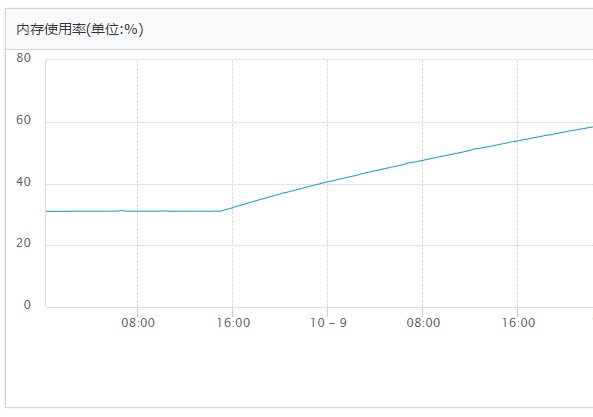
用top命令, 然后使用M按内存使用大小排序发现并没有特别消耗内存的进程在跑, 用H查询线程情况也正常. 最高的mysql占用6.9%内存. memcached进程telnet后stats并未发现有内存消耗过大等异常情况.
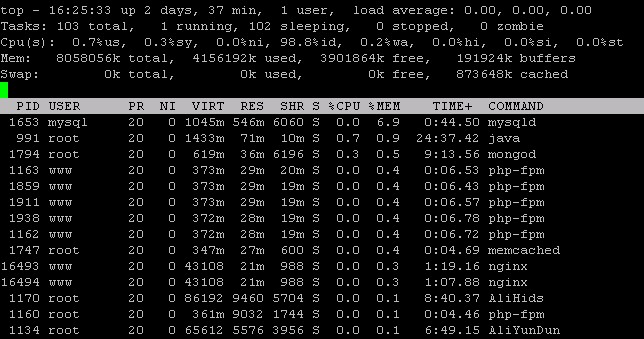
free -m 查看 -/+ buffers/cache used很高, 可用的free内存只剩下百分之十几, 那么内存消耗究其在哪里去了?
使用cat /proc/meminfo 查看内存分配更详细的信息: Slab 和 SReclaimable 达几个G, Slab内存分配管理, SReclaimable看字面意思是可回收内存.
MemTotal: 8058056 kB
MemFree: 3892464 kB
Buffers: 192016 kB
Cached: 873860 kB
SwapCached: 0 kB
Active: 1141088 kB
Inactive: 690580 kB
Active(anon): 765260 kB
Inactive(anon): 22220 kB
Active(file): 375828 kB
Inactive(file): 668360 kB
Unevictable: 0 kB
Mlocked: 0 kB
SwapTotal: 0 kB
SwapFree: 0 kB
Dirty: 24 kB
Writeback: 0 kB
AnonPages: 765784 kB
Mapped: 58648 kB
Shmem: 21696 kB
Slab: 2261236 kB
SReclaimable: 2236844 kB
SUnreclaim: 24392 kB
KernelStack: 1448 kB
PageTables: 8404 kB
NFS_Unstable: 0 kB
Bounce: 0 kB
WritebackTmp: 0 kB
CommitLimit: 4029028 kB
Committed_AS: 1500552 kB
VmallocTotal: 34359738367 kB
VmallocUsed: 25952 kB
VmallocChunk: 34359710076 kB
HardwareCorrupted: 0 kB
AnonHugePages: 673792 kB
HugePages_Total: 0
HugePages_Free: 0
HugePages_Rsvd: 0
HugePages_Surp: 0
Hugepagesize: 2048 kB
DirectMap4k: 6144 kB
DirectMap2M: 8382464 kB
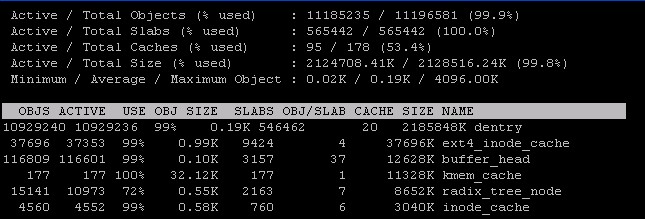
使用slabtop 命令按C按分配slab的size大小排列, dentry (directory entry cache)排最前面高其他很多, 其次是inode_cache 文件缓存. 一个Laravel队列引发的报警这篇文章提到laravel队列会生成和读写操作大量的小文件导致dentry cache 飙升, 超大目录(一个目录里含有上百万数量的文件)也有可能是原因之一.
因为最近并没有对服务器配置和程序代码进行变更, 所以第一反应是想是不是AliyunUpdate自动更新程序更改了什么. 但是 strace 依次监控Ali系列的进程并没有发现有大量的文件操作. crond也发现会读写少量的session等临时文件, 但数量少并不至于到这个程度.
ps aux | grep "Ali"
strace -fp {pid} -e trace=open,stat,close,unlink
官方的工单回复是可以考虑升级服务器内存,如果内存不足影响业务,需要临时释放一下slab占用的内存, 参考以下步骤:
回收dentry cache和inode cache占用的内存
#echo 2 > /proc/sys/vm/drop_caches
等内存回收完毕后再恢复:
#echo 0 > /proc/sys/vm/drop_caches

来自linux内核文档:
To free pagecache:
	echo 1 > /proc/sys/vm/drop_caches
To free reclaimable slab objects (includes dentries and inodes):
	echo 2 > /proc/sys/vm/drop_caches
To free slab objects and pagecache:
	echo 3 > /proc/sys/vm/drop_caches
只给了个临时解决方案, 总不能还要开个自动任务定时执行回收dentry cache的任务吧. 不过我们逐渐接近了事情的本质, 即目前看来是过高的slab内存无法回收导致内存不足. 那么我们可以提高slab内存释放的优先级, Linux 提供了 vfs_cache_pressure 这个参数, 默认为100, 设置为高于100的数, 数值越大slab回收优先级越高(root 身份运行):
echo 10000 > /proc/sys/vm/vfs_cache_pressure
注意有文章提到有时vfs_cache_pressure的设置并不会在系统中马上体现出来, dentry 和inode cache会有一个到高峰后突然下降,然后逐渐正常波动的过程. 因此需要运行个24小时再来下效果定论.
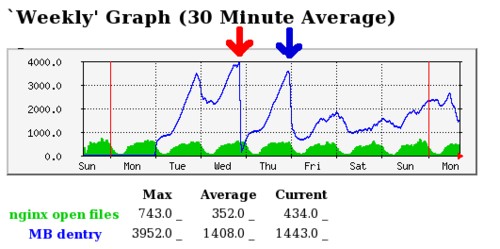
并不建议通过如上Laravel队列文章最后提到的使用min_free_kbytes 和 extra_free_kbytes参数来实现回收slab缓存的, 内核文档中比较明确地指明了vfs_cache_pressure 适合于控制directory 和inode 缓存的回收:
vfs_cache_pressure
------------------

This percentage value controls the tendency of the kernel to reclaim
the memory which is used for caching of directory and inode objects.

At the default value of vfs_cache_pressure=100 the kernel will attempt to
reclaim dentries and inodes at a "fair" rate with respect to pagecache and
swapcache reclaim.  Decreasing vfs_cache_pressure causes the kernel to prefer
to retain dentry and inode caches. When vfs_cache_pressure=0, the kernel will
never reclaim dentries and inodes due to memory pressure and this can easily
lead to out-of-memory conditions. Increasing vfs_cache_pressure beyond 100
causes the kernel to prefer to reclaim dentries and inodes.

Increasing vfs_cache_pressure significantly beyond 100 may have negative
performance impact. Reclaim code needs to take various locks to find freeable
directory and inode objects. With vfs_cache_pressure=1000, it will look for
ten times more freeable objects than there are.
虽然slab占用过多内存得到了有效控制和实时回收, 但实际上我们还是没有找到问题的本质, 按理来说默认的vfs_cache_pressure值应该是能够较好地实现可用内存和slab缓存之间的平衡的.
最后去查该时间节点的网站服务日志才发现, 内存使用率一直升的原因在于从这个时间开始, 有系统crontab任务一直在不断地通过curl请求外部资源api接口, 而他这个api基于https. 罪魁祸首就在于Libcurl附带的Mozilla网络安全服务库NSS(Network Security Services) 的bug, 只有curl请求ssl即https的资源才会引入NSS.
其内部机制是: NSS为了检测访问的临时目录是本地的还是网络资源, 它会访问数百个不存在的文件并统计所需要的时间, 在这过程就会为这些不存在的文件生成大量dentry cache. 当curl请求产生的dentry cache超过系统的内存回收能力时, 内存使用率自然会逐步攀升. 有篇外文blog有比较详细的介绍, 以及. NSS从后面的版本开始解决了这个bug: NSS now avoids calls to sdb_measureAccess in lib/softoken/sdb.c s_open if NSS_SDB_USE_CACHE is “yes”. 所以我们得到的最终解决办法是:
第一步: 确保nss-softokn是已经解决了bug的版本
查看是否大于等于3.16.0版本(根据上面的bug修复链接, 大于nss-softokn-3.14.3-12.el6 也可以):
yum list nss-softokn
若版本太低需要升级:
sudo yum update -y nss-softokn
Resolving Dependencies
 --> Running transaction check
 ---> Package nss-softokn.x86_64 0:3.14.3-10.el6_5 will be updated
 ---> Package nss-softokn.x86_64 0:3.14.3-23.3.el6_8 will be an update
 --> Processing Dependency: nss-softokn-freebl(x86-64) >= 3.14.3-23.3.el6_8 for package: nss-softokn-3.14.3-23.3.el6_8.x86_64
 --> Processing Dependency: libnssutil3.so(NSSUTIL_3.17.1)(64bit) for package: nss-softokn-3.14.3-23.3.el6_8.x86_64
 --> Running transaction check
 ---> Package nss-softokn-freebl.x86_64 0:3.14.3-10.el6_5 will be updated
 ---> Package nss-softokn-freebl.x86_64 0:3.14.3-23.3.el6_8 will be an update
 ---> Package nss-util.x86_64 0:3.16.1-1.el6_5 will be updated
 ---> Package nss-util.x86_64 0:3.21.0-2.el6 will be an update
 --> Processing Dependency: nspr >= 4.11.0-1 for package: nss-util-3.21.0-2.el6.x86_64
 --> Running transaction check
 ---> Package nspr.x86_64 0:4.10.6-1.el6_5 will be updated
 ---> Package nspr.x86_64 0:4.11.0-1.el6 will be an update
 --> Finished Dependency Resolution
第二步: 设置变量NSS_SDB_USE_CACHE=yes
Apache:
echo "export NSS_SDB_USE_CACHE=yes" >> /etc/sysconfig/httpd
service httpd restart
PHP:
putenv('NSS_SDB_USE_CACHE=yes');
//注php设置环境变量, 如果safe_mode开启的话, 会受 safe_mode_allowed_env_vars 和 safe_mode_protected_env_vars 指令配置的影响.
More
Nginx:
fastcgi_param NSS_SDB_USE_CACHE yes;
第三步: 重启Web服务器
重启Apache 或 重启Nginx和php-fpm. 否则curl_error可能出现 Problem with the SSL CA cert (path? access rights?) 的错误.
设置后dentry cache终于慢慢恢复正常.
问题描述
Linux服务器内存使用量超过阈值,触发报警。
问题排查
首先,通过free命令观察系统的内存使用情况,显示如下:
- total used free shared buffers cached
- Mem: 24675796 24587144 88652 0 357012 1612488
- -/+ buffers/cache: 22617644 2058152
- Swap: 2096472 108224 1988248
其中,可以看出内存总量为24675796KB,已使用22617644KB,只剩余2058152KB。
然后,接着通过top命令,shift + M按内存排序后,观察系统中使用内存最大的进程情况,发现只占用了18GB内存,其他进程均很小,可忽略。
因此,还有将近4GB内存(22617644KB-18GB,约4GB)用到什么地方了呢?
进一步,通过cat /proc/meminfo发现,其中有将近4GB(3688732 KB)的Slab内存:
- ......
- Mapped: 25212 kB
- Slab: 3688732 kB
- PageTables: 43524 kB
- ......
Slab是用于存放内核数据结构缓存,再通过slabtop命令查看这部分内存的使用情况:
- OBJS ACTIVE USE OBJ SIZE SLABS OBJ/SLAB CACHE SIZE NAME
- 13926348 13926348 100% 0.21K 773686 18 3494744K dentry_cache
- 334040 262056 78% 0.09K 8351 40 33404K buffer_head
- 151040 150537 99% 0.74K 30208 5 120832K ext3_inode_cache
发现其中大部分(大约3.5GB)都是用于了dentry_cache。
问题解决
1. 修改/proc/sys/vm/drop_caches,释放Slab占用的cache内存空间(参考drop_caches的官方文档):
- Writing to this will cause the kernel to drop clean caches, dentries and inodes from memory, causing that memory to become free.
- To free pagecache:
- * echo 1 > /proc/sys/vm/drop_caches
- To free dentries and inodes:
- * echo 2 > /proc/sys/vm/drop_caches
- To free pagecache, dentries and inodes:
- * echo 3 > /proc/sys/vm/drop_caches
- As this is a non-destructive operation, and dirty objects are notfreeable, the user should run "sync" first in order to make sure allcached objects are freed.
- This tunable was added in 2.6.16.
2. 方法1需要用户具有root权限,如果不是root,但有sudo权限,可以通过sysctl命令进行设置:
- $sync
- $sudo sysctl -w vm.drop_caches=3
- $sudo sysctl -w vm.drop_caches=0 #recovery drop_caches
内核2.6的版本执行上述的操作都没问题的,但是到了内核3系列,就不能执行echo 0 >/proc/sys/vm/drop_caches的操作了,这是一个坑,重启才能改回去
# echo 0 >/proc/sys/vm/drop_caches
-bash: echo: write error: Invalid argument
# sysctl -a|grep vm.drop_caches #内核中有这个参数
vm.drop_caches = 3
# sysctl -w vm.drop_caches=0 #也写不进去,这个在内核2.6系列上面可以的,这也是手工释放内存缓存的另一种形式(sysctl -w vm.drop_caches=3)
error: "Invalid argument" setting key "vm.drop_caches"
# sysctl -w vm.drop_caches=1 #执行其他的是没问题的,但是就是执行0的插入不可以,要重启服务器。
vm.drop_caches = 1
操作后可以通过sudo sysctl -a | grep drop_caches查看是否生效。
3. 修改/proc/sys/vm/vfs_cache_pressure,调整清理inode/dentry caches的优先级(默认为100),LinuxInsight中有相关的解释:
- At the default value of vfs_cache_pressure = 100 the kernel will attempt to reclaim dentries and inodes at a “fair” rate with respect to pagecache and swapcache reclaim. Decreasing vfs_cache_pressure causes the kernel to prefer to retain dentry and inode caches. Increasing vfs_cache_pressure beyond 100 causes the kernel to prefer to reclaim dentries and inodes.
具体的设置方法,可以参考方法1或者方法2均可。
- 发表于 2019-07-17 10:14
- 阅读 ( 54 )


