InnoDB Data Recovery
Quick review of InnoDB internals (B+Tree)
●Basics on InnoDB data recovery
●Data Recovery toolkit overview
●InnoDB Data Dictionary
●Recovering table with innodb_file_per_table=OFF
●Recovering table with innodb_file_per_table=ON
How InnoDB store data?
InnoDB B+Tree
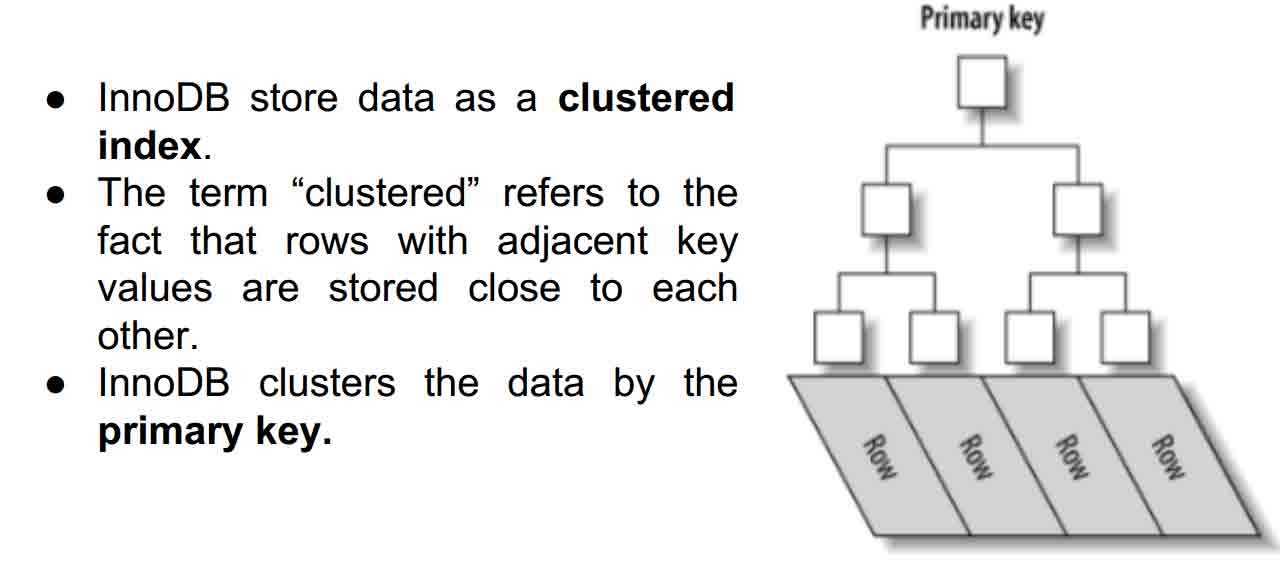
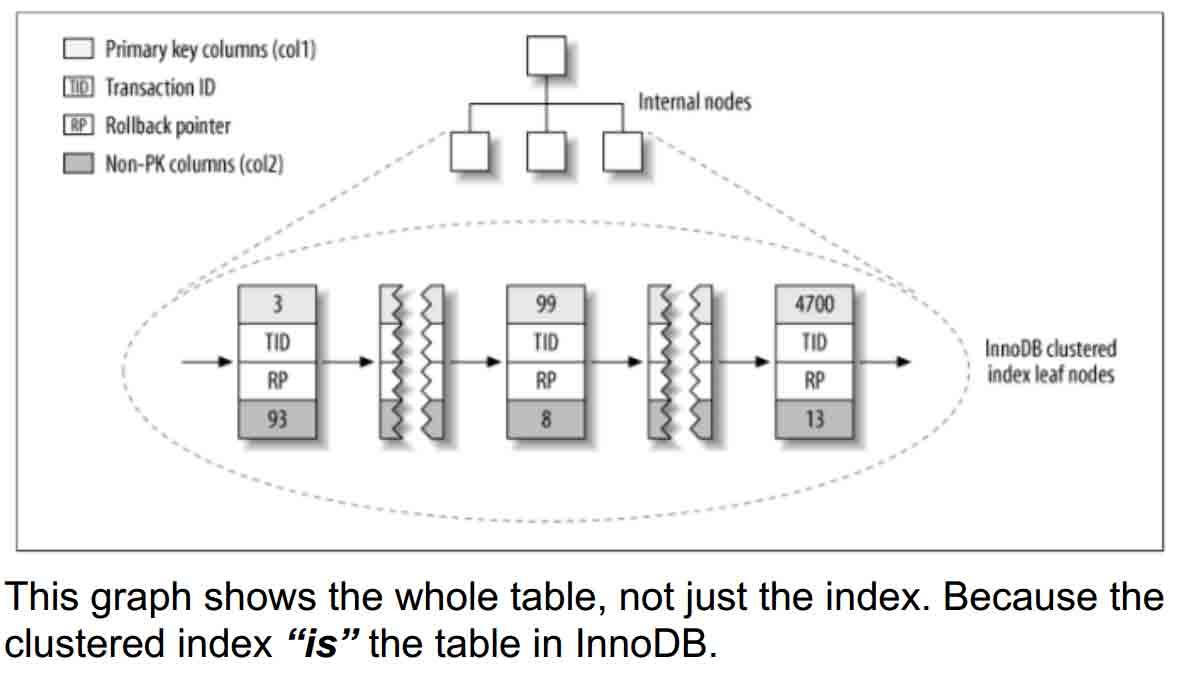
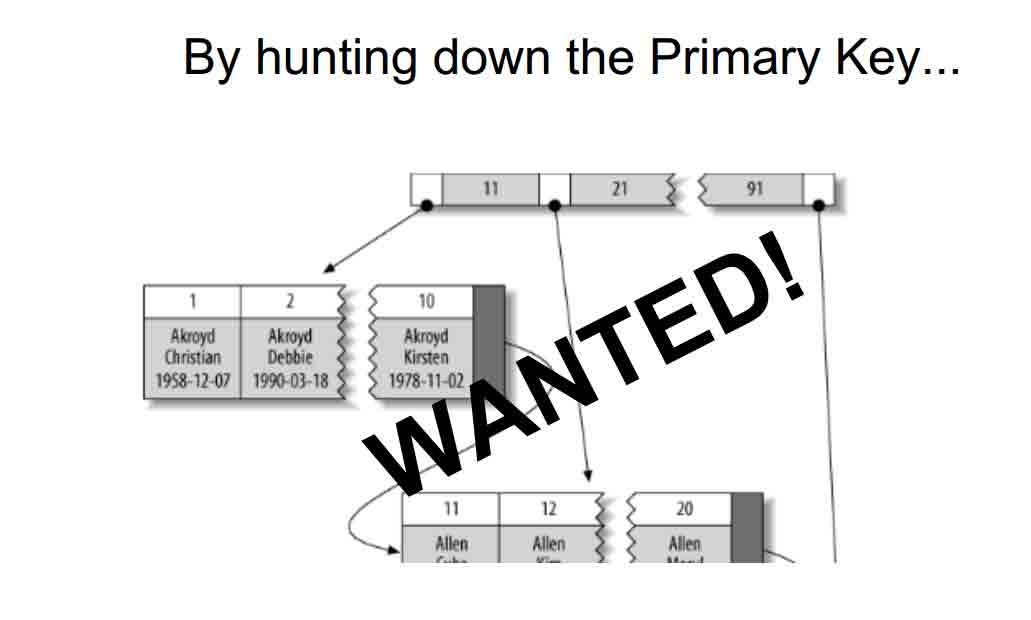
By hunting down the Primary Key...
● Use the innodb tablespaces at lowlevel.
● That means, working with the innodb files (ibdata/ .ibd).
● Find InnoDB pages as a stream of bytes.
● Read InnoDB pages and extract the records.
● Since the B+tree structure of InnoDB index doesn’t
contain any information about field types, you will need
the table structure to recover a dropped table from
InnoDB tablespace.
The InnoDB dictionary is a set of internal tables InnoDB uses to
maintain information about user tables. The dictionary stores
correspondence between table name and index_id.
● The dictionary is stored in the global tablespace i.e. ibdata1
(which id value is 0).
● The dictionary pages are in REDUNDANT format even if you
use MySQL 5.6.
● INNODB_SYS_TABLES
● INNODB_SYS_INDEXES
● And many others which you should look at ;)
INNODB_SYS_TABLES Info about InnoDB tables
CREATE TEMPORARY TABLE `INNODB_SYS_TABLES` (
`TABLE_ID` bigint(21) unsigned NOT NULL DEFAULT '0',
`SCHEMA` varchar(193) NOT NULL DEFAULT '',
`NAME` varchar(193) NOT NULL DEFAULT '',
`FLAG` int(11) NOT NULL DEFAULT '0',
`N_COLS` int(11) NOT NULL DEFAULT '0',
`SPACE` int(11) NOT NULL DEFAULT '0'
) ENGINE=MEMORY DEFAULT CHARSET=utf8
TABLE_ID is unique table identifier
SCHEMA is the schema name at which the table belongs
NAME is the table name.
FLAG Contains 0 if it is a system table or 1 it is a user table.
N_COLS is the number of columns in table.
SPACE is the tablespace ID.
INNODB_SYS_INDEXES Info about InnoDB indexes
CREATE TEMPORARY TABLE `INNODB_SYS_INDEXES` (
`INDEX_ID` bigint(21) unsigned NOT NULL DEFAULT '0',
`NAME` varchar(193) NOT NULL DEFAULT '',
`TABLE_ID` bigint(21) unsigned NOT NULL DEFAULT '0',
`TYPE` int(11) NOT NULL DEFAULT '0',
`N_FIELDS` int(11) NOT NULL DEFAULT '0',
`PAGE_NO` int(11) NOT NULL DEFAULT '0',
`SPACE` int(11) NOT NULL DEFAULT '0'
) ENGINE=MEMORY DEFAULT CHARSET=utf8;
INDEX_ID is index identifier.
NAME is the name of index.
TABLE_ID is the id from INNODB_SYS_TABLES.
TYPE is index type
N_FIELDS is the number of columns in the index.
PAGE_NO is the page offset within its tablespace
The undrop toolkit include this two tools (among others):
● stream_parser - Parse the ibdata1/*.ibd files and splits a stream of
bytes into InnoDB pages.
● c_parser - Reads the InnoDB pages and fetch records. It reads
table structure from a file with CREATE TABLE statement.
How does the stream_parser find and divide the pages?
→ By identifies both infimum and supremum records. (?)
Infimum and supremum are real English words but they are
found only in arcane mathematical treatises, and in InnoDB comments.
To InnoDB:
● An infimum is lower than the lowest possible real value
(negative infinity).
● And a supremum is greater than the greatest possible real
value (positive infinity).
● InnoDB sets up an infimum record and a supremum record
automatically at page-create time, and never deletes them. They make a useful barriers!
The toolkit is tested on following systems:
● CentOS release 5.10 (Final) x86_64
● CentOS release 6.5 (Final) x86_64
● CentOS Linux release 7.0.1406 (Core) x86_64
● Fedora release 20 (Heisenbug) x86_64
● Ubuntu 10.04.4 LTS (lucid) x86_64
● Ubuntu 12.04.4 LTS (precise) x86_64
● Ubuntu 14.04 LTS (trusty) x86_64
● Debian GNU/Linux 7.5 (wheezy) x86_64
32 bit operating systems wasn’t supported by the time this presentation was made.
Compiling TwinDB Data Recovery Toolkit
The source code is hosted on launchpad (git clone https://github.com/chhabhaiya/undrop-for-innodb.git).
Installing prerequisites
Centos
# yum install -u gcc bison flex
Deb
# apt-get install flex bison gcc bzr
# make
If there are no errors, we are ready to proceed.
Recovering InnoDB Data Dictionary
The InnoDB dictionary is stored in ibdata1 so we need to parse it
and get the pages that stores the data dictionary.
# ./stream_parser -f /var/lib/mysql/ibdata1
Opening file: /var/lib/mysql/ibdata1
[………………]
Size to process: 27262976 (26.000 MiB)
All workers finished in 0 sec
stream_parser find InnoDB pages and stored them in
FIL_PAGE_INDEX & FIL_PAGE_TYPE_BLOB sorted by index_id.
# cd pages-ibdata1/FIL_PAGE_INDEX/ && ls -lh
total 6.8M
-rw-r--r--. 1 root root 16K Sep 11 18:27 0000000000000001.page
-rw-r--r--. 1 root root 16K Sep 11 18:27 0000000000000003.page
SYS_TABLES
-rw-r--r--. 1 root root 16K Sep 11 18:27 0000000000000001.page
SYS_INDEXES
-rw-r--r--. 1 root root 16K Sep 11 18:27 0000000000000003.page
InnoDB row format for data dictionary is always REDUNDANT, so use
-4 is mandatory. (more options on ./c_parser --help)
● It will read pages and fetch records.
● Data will be stored in SYS_TABLES file
● LOAD DATA command will be output through stderr
# ./c_parser -D -4f pages-ibdata1/FIL_PAGE_INDEX/0000000000000001.page -t dictionary/SYS_TABLES.sql > dumps/default/SYS_TABLES 2>dumps/default/SYS_TABLES.sql
# cat dumps/default/SYS_TABLES | grep -i sakila | head -n2
000000000303 .. SYS_TABLES "sakila/actor" 32 4 1 0 0 "" 0
000000000304 .. SYS_TABLES "sakila/address" 14 8 1 0 0 "" 0
Let’s dump the SYS_INDEXES the same way:
# ./c_parser -D -4f pages-ibdata1/FIL_PAGE_INDEX/0000000000000003.page -t dictionary/SYS_INDEXES.sql > dumps/default/SYS_INDEXES 2>dumps/default/SYS_INDEXES.sql
Remember to use the -D options so the deleted records are the one recovered.
Now we can work with dictionary, but it would be better if tables are in MySQL.
Create empty tables in test database.
# mysql test < dictionary/SYS_TABLES.sql
# mysql test < dictionary/SYS_INDEXES.sql
# mysql test < dumps/default/SYS_TABLES.sql
# mysql test < dumps/default/SYS_INDEXES.sql
mysql_dr [test]> select * from SYS_TABLES where NAME='sakila/actor';
+--------------+----+--------+------+--------+---------+--------------+-------------------------+
| NAME | ID | N_COLS | TYPE | MIX_ID | MIX_LEN | CLUSTER_NAME | SPACE |
+--------------+----+--------+------+--------+---------+--------------+-------------------------+
| sakila/actor | 32 | 4 | 1 | 0 | 0 | 0 |
+--------------+----+--------+------+--------+---------+--------------+-------------------------+
1 row in set (0.00 sec)
mysql_dr [test]> select * from SYS_INDEXES where TABLE_ID=13;
+----------+----+---------------------+----------+------+-------+-----------------+
| TABLE_ID | ID | NAME | N_FIELDS | TYPE | SPACE | PAGE_NO |
+----------+----+---------------------+----------+------+-------+-----------------+
| 32 |58 | PRIMARY | 1 | 3 | 0 | 307 |
| 32 | 59 | idx_actor_last_name | 1 | 0 | 0 | 308 |
+----------+----+---------------------+----------+------+-------+-----------------+
2 rows in set (0.00 sec)
Recovering table with innodb_file_per_table=OFF
The recovery plan depends on if InnoDB stores all the data in global
tablespace (i.e. ibdata1) or each if table has its own tablespace.
In this case we assume that innodb_file_per_table=OFF and all data is
in /var/lib/mysql/ibdata1.
mysql_dr [sakila]> checksum table actor;
+--------------+---------------+
| Table | Checksum |
+--------------+----------------+
| sakila.actor | 1140643526 |
+--------------+-----------------+
mysql_dr [sakila]> set foreign_key_checks=0;
mysql_dr [sakila]> drop table actor;
If we want to recover a table we have to find all pages that belong to
particular index_id.stream_parser reads InnoDB tablespace and sorts InnoDB pages per
type and per index_id.
# ./stream_parser -f /var/lib/mysql/ibdata1
…… Size to process: 27262976 (26.000 MiB)
All workers finished in 0 sec
# ls -lh pages-ibdata1/FIL_PAGE_INDEX/ | grep -i page | head -n2
-rw-r--r--. 1 root root 32K Sep 14 19:45 0000000000000001.page
-rw-r--r--. 1 root root 48K Sep 14 19:45 0000000000000002.page
Each index_id is saved in a separate file. We can use c_parser to fetch records from the pages. But we need to know what index_id
corresponds to table sakila/actor. We can acquire that information we from the dictionary – SYS_TABLES and SYS_INDEXES.
# ./c_parser -4Df pages-ibdata1/FIL_PAGE_INDEX/0000000000000001.page
-t dictionary/SYS_TABLES.sql | grep sakila/actor
00000000038B 7D0000022E02C8 SYS_TABLES "sakila/actor" 32 4 1 0 0 "" 0
32 after the table name is table_id.
./c_parser -4Df pages-ibdata1/FIL_PAGE_INDEX/0000000000000003.page -t dictionary/SYS_INDEXES.sql | grep 32 | grep -i PRIMARY
00000000038B 7D0000022E0145 SYS_INDEXES 32 58 "PRIMARY" 1 3 0 4294967295
32 is table_id and 58 is the index_id of PRIMARY KEY.
# ./c_parser -5f pages-ibdata1/FIL_PAGE_INDEX/0000000000000058.page -t sakila/actor.sql | head -n 4
-- Page id: 321, Format: COMPACT, Records list: Valid, Expected records: (200 200)
.. .. actor 1 "PENELOPE" "GUINESS" "2006-02-15 04:34:33"
.. .. actor 2 "NICK" "WAHLBERG" "2006-02-15 04:34:33"
.. .. actor 3 "ED" "CHASE" "2006-02-15 04:34:33
Output looks good so let’s dump it in a file.
# ./c_parser -5f ./pages-ibdata1/FIL_PAGE_INDEX/0000000000000058.page -t sakila/actor.sql > dumps/default/actor 2>dumps/default/actor_load.sql
# ls -lh dumps/default/actor*
-rw-r--r--. 1 root root 31K Sep 14 20:21 dumps/default/actor
-rw-r--r--. 1 root root 259 Sep 14 20:21 dumps/default/actor_load.sql
# cat dumps/default/actor_load.sql
SET FOREIGN_KEY_CHECKS=0;
LOAD DATA LOCAL INFILE '/root/undrop-for-innodb/dumps/default/actor' REPLACE INTO TABLE `actor` FIELDS TERMINATED BY '\t' OPTIONALLY
ENCLOSED BY '"' LINES STARTING BY 'actor\t' (`actor_id`,`first_name`, `last_name`, `last_update`);
Restoring data in MySQL
# mysql sakila < sakila/actor.sql
# mysql sakila
mysql_dr [sakila]> source dumps/default/actor_load.sql
Query OK, 0 rows affected (0.00 sec)
Query OK, 600 rows affected (0.02 sec)
Records: 400 Deleted: 200 Skipped: 0 Warnings: 0
mysql_dr [sakila]> checksum table actor;
+--------------+-----------------+
| Table | Checksum |
+--------------+-----------------+
| sakila.actor | 1140643526 |
+--------------+-----------------+
1 row in set (0.00 sec)
Recovering table with innodb_file_per_table=ON
In this case we assume that innodb_file_per_table=ON and each table
is stored in its own tablespace.
mysql_dr [sakila]> checksum table city;
+-------------+----------------+
| Table | Checksum |
+-------------+----------------+
| sakila.city | 1381456718 |
+-------------+----------------+
mysql_dr [sakila]> set foreign_key_checks=0;
Query OK, 0 rows affected (0.00 sec)
mysql_dr [sakila]> drop table city;
Query OK, 0 rows affected (0.00 sec)
In this situation a file is deleted and we need to recover the deleted file. It is important to stop the server and mount the partition as readonly.
# /etc/init.d/mysqld stop
Stopping mysqld: [ OK ]
Data dictionary is still in ibdata1, so we can get the table_id and
Primary Key index_id from SYS tables.
# ./c_parser -4Df pages-ibdata1/FIL_PAGE_INDEX/0000000000000001.page -t dictionary/SYS_TABLES.sql | grep -i 'sakila/city'
SYS_TABLES "sakila/city" 48 4 1 0 0 "" 1
# ./c_parser -4Df pages-ibdata1/FIL_PAGE_INDEX/0000000000000003.page
-t dictionary/SYS_INDEXES.sql | grep -i 48 | grep -i PRIMARY
.. .. SYS_INDEXES 48 99 "PRIMARY" 1 3 1 4294967295
The table_id is 48 and index_id for Primary Key is 99. Since there is no file available, we will scan through the storage
device as a raw device and look for data that fits the expected tructure of the database pages.
./stream_parser -f /dev/sda2 -t 28311552k
Opening file: /dev/sda2
Size to process: 28991029248 (27.000 GiB)
… Processing speed: 93.333 MiB/sec
All workers finished in 281 sec
ls -lh pages-sda2/FIL_PAGE_INDEX/ | grep -i 99.page
-rw-r--r--. 1 root root 112K Sep 15 09:32 0000000000000099.page
Run c_parser on the above page to verify data.
# ./c_parser -5f pages-sda2/FIL_PAGE_INDEX/0000000000000099.page -t sakila/city.sql | head -n 4
-- Page id: 6, Format: COMPACT, Records list: Valid, Expected records: (387 387)
.. .. city 214 "Hunuco" 74 "2006-02-15 04:45:25"
.. .. city 215 "Ibirit" 15 "2006-02-15 04:45:25"
.. .. city 216 "Idfu" 29 "2006-02-15 04:45:25"
Data looks good, so lets dump to files and load back to MySQL
# ./c_parser -5f pages-sda2/FIL_PAGE_INDEX/0000000000000099.page -t sakila/city.sql > dumps/default/city 2> dumps/default/city_load.sql
# ls -lh dumps/default/city*
-rw-r--r--. 1 root root 130K Sep 15 09:47 dumps/default/city
-rw-r--r--. 1 root root 250 Sep 15 09:47 dumps/default/city_load.sql
# /etc/init.d/mysqld start
#mysql sakila < sakila/city.sql
#mysql sakila
source dumps/default/city_load.sql
Query OK, 3000 rows affected (0.08 sec)
Records: 1800 Deleted: 1200 Skipped: 0 Warnings: 0
mysql_dr [sakila]> checksum table city;
+-------------+-----------------+
| Table | Checksum |
+-------------+-----------------+
| sakila.city | 1381456718 |
+-------------+----------------+
Calculated checksum after the recovery (1381456718) is equal to the
checksum taken before the drop (1381456718).
- 发表于 2017-01-13 01:49
- 阅读 ( 319 )


