MySQL8.4 InnoDB Cluster高可用集群使用指南
简介
高可用方案
- Orchestrator: 可视化 Web 界面管理 MySQL 拓扑结构,并且兼容多种复制架构(异步、半同步、GTID),提供自动和手动的故障转移。但是8.0.21后 MySQL 更新了主从复制相关命令,Orchestrator无法支持以后的版本。适用于大规模 MySQL 复制拓扑管理。
- MHA:主要用于传统一主多从结构,提供较快的故障切换时间, 具备Binlog差异合并功能,能减少数据丢失。对5.7 版本支持较好。适用于小规模主从复制,并且希望低成本实现高可用。
- InnoDB Cluster: MySQL 官方提供的高可用集群解决方案,基于Group Replication组件,实现多主同步复制,并结合 MySQL Router 提供连接路由。官方维护,对新版本支持较好。适用于高一致性、自动故障恢复的高可用需求。
InnoDB Cluster简介
InnoDB Cluster至少由三个MySQL Server实例组成,它提供高可用性和扩展功能。 InnoDB Cluster 使用以下 MySQL 技术:
MySQL Shell,它是 MySQL 的高级客户端和代码编辑器。 通过 MySQL Shell 提供的 AdminAPI 来管理MGR集群 , 它封装了MGR 的创建、启动和管理 过程,简化了手动配置。
MySQL server 和 Group Replication,,使一组MySQL实例能够提供高可用性。 InnoDB Cluster 提供了一种替代的、易于使用的编程方式来使用组复制。
MySQL Router,一种轻量级中间件,可在应用程序和 InnoDB Cluster 之间提供透明路由。
下图显示了这些技术如何协同工作的概述:
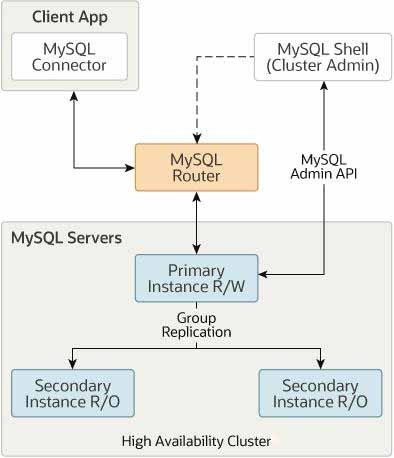
基于MySQL Group Replication 构建,提供自动成员管理、容错、自动故障转移等功能。 InnoDB Cluster通常以单主模式运行,具有一个主实例(读写)和多个辅助实例(只读)。高级用户还可以利用多主模式,其中所有实例都是主实例。您甚至可以在 InnoDB Cluster 在线时更改集群的拓扑,以确保尽可能高的可用性。
集群角色规划
集群架构
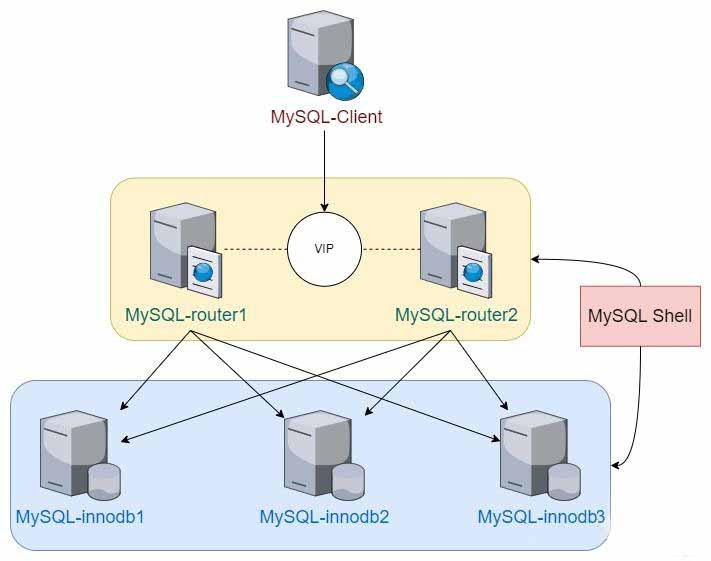
节点规划
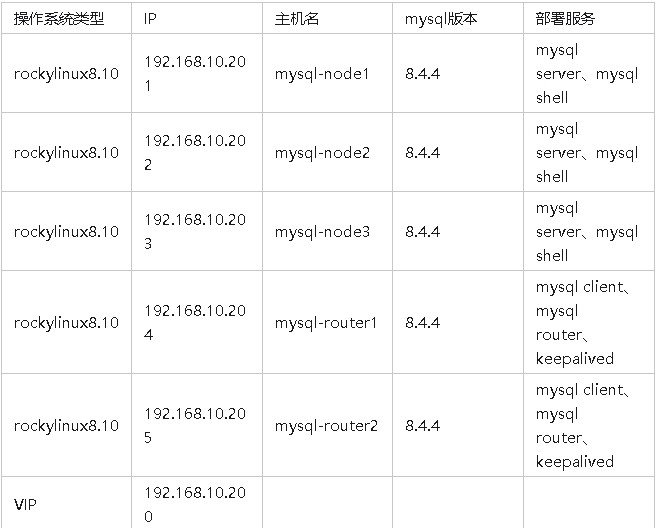
高可用架构配置
准备工作
部署 Mysql
以下操作在mysql-node1、2、3 执行section/31461021
添加 hosts
每个节点添加 hosts 解析,否则会导致 mysql 节点间通信异常。
# vim /etc/hosts
192.168.10.201  mysql-node1
192.168.10.202  mysql-node2
192.168.10.203  mysql-node3
192.168.10.204  mysql-router1
192.168.10.205  mysql-router2
确保实例uuid唯一
[root@mysql-node1 ~]# cat /data/mysql/auto.cnf
[auto]
server-uuid=08e9b249-0780-11f0-ba9b-000c29935ee4
如果克隆的虚拟机,实例 id 一致,可删除该文件后重启 mysql 服务,会生成新的 uuid 文件。
使用 MySQL Shell
以下操作在mysql-node1、2、3 执行
安装 MySQL Shell
[root@mysql-node1 ~]# wget https://repo.mysql.com//mysql84-community-release-el8-1.noarch.rpm
[root@mysql-node1 ~]# rpm -ivh mysql84-community-release-el8-1.noarch.rpm
[root@mysql-node1 ~]# dnf search mysql-shell
MySQL 8.4 LTS Community Server                                                                                                                            252 kB/s | 844 kB     00:03
MySQL Connectors Community                                                                                                                                105 kB/s | 150 kB     00:01
MySQL Tools 8.4 LTS Community                                                                                                                             211 kB/s | 414 kB     00:01
=============================================================================== 名称 精准匹配:mysql-shell ===============================================================================
mysql-shell.x86_64 : Command line shell and scripting environment for MySQL
============================================================================= 名称 和 概况 匹配:mysql-shell =============================================================================
mysql-shell-debugsource.x86_64 : Debug sources for package mysql-shell
[root@mysql-node1 ~]# dnf install -y mysql-shell
[root@mysql-node1 ~]# mysqlsh --version
mysqlsh   Ver 8.4.4 for Linux on x86_64 - for MySQL 8.4.4 (MySQL Community Server (GPL))
mysqlsh 登录节点
方式一:交互模式连接
[root@mysql-node1 ~]# mysqlsh
MySQL Shell 8.4.4

Copyright (c) 2016, 2025, Oracle and/or its affiliates.
Oracle is a registered trademark of Oracle Corporation and/or its affiliates.
Other names may be trademarks of their respective owners.

Type '\help' or '\?' for help; '\quit' to exit.

 MySQL  SQL > \connect root@127.0.0.1
Creating a session to 'root@127.0.0.1'
Please provide the password for 'root@127.0.0.1': *******
Save password for 'root@127.0.0.1'? [Y]es/[N]o/Ne[v]er (default No): y
Fetching global names for auto-completion... Press ^C to stop.
Your MySQL connection id is 8 (X protocol)
Server version: 8.4.4 MySQL Community Server - GPL
No default schema selected; type \use <schema> to set one.

 MySQL  127.0.0.1:33060+ ssl  SQL > show databases;
+--------------------+
| Database           |
+--------------------+
| information_schema |
| mysql              |
| performance_schema |
| sys                |
+--------------------+
4 rows in set (0.0007 sec)
方式二:命令行参数连接
[root@mysql-node1 ~]# mysqlsh -h127.0.0.1 -P3306 -uroot -p123.com
MySQL Shell 8.4.4

Copyright (c) 2016, 2025, Oracle and/or its affiliates.
Oracle is a registered trademark of Oracle Corporation and/or its affiliates.
Other names may be trademarks of their respective owners.

Type '\help' or '\?' for help; '\quit' to exit.
WARNING: Using a password on the command line interface can be insecure.
Creating a session to 'root@127.0.0.1:3306'
Fetching global names for auto-completion... Press ^C to stop.
Your MySQL connection id is 10
Server version: 8.4.4 MySQL Community Server - GPL
No default schema selected; type \use <schema> to set one.

 MySQL  127.0.0.1:3306 ssl  SQL > show databases;
+--------------------+
| Database           |
+--------------------+
| information_schema |
| mysql              |
| performance_schema |
| sys                |
+--------------------+
4 rows in set (0.0007 sec)
方式三:使用 python/JavaScript模式连接
[root@mysql-node1 ~]# mysqlsh --py root@127.0.0.1
MySQL Shell 8.4.4

Copyright (c) 2016, 2025, Oracle and/or its affiliates.
Oracle is a registered trademark of Oracle Corporation and/or its affiliates.
Other names may be trademarks of their respective owners.

Type '\help' or '\?' for help; '\quit' to exit.
Creating a session to 'root@127.0.0.1'
Fetching schema names for auto-completion... Press ^C to stop.
Your MySQL connection id is 11 (X protocol)
Server version: 8.4.4 MySQL Community Server - GPL
No default schema selected; type \use <schema> to set one.
 MySQL  127.0.0.1:33060+ ssl  Py > session = shell.get_session() # 获取当前会话
 MySQL  127.0.0.1:33060+ ssl  Py > schemas = session.get_schemas() # 获取数据库列表
 MySQL  127.0.0.1:33060+ ssl  Py > print(schemas) # 打印数据库列表
[<Schema:information_schema>, <Schema:mysql>, <Schema:performance_schema>, <Schema:sys>]
交互模式切换
MySQL  127.0.0.1:33060+ ssl  Py > \js
Switching to JavaScript mode...
 MySQL  127.0.0.1:33060+ ssl  JS > \py
Switching to Python mode...
 MySQL  127.0.0.1:33060+ ssl  Py > \sql
Switching to SQL mode... Commands end with ;
Fetching global names for auto-completion... Press ^C to stop.
 MySQL  127.0.0.1:33060+ ssl  SQL > \q
Bye!
创建 InnoDB Cluster
以下操作在mysql-node1、2、3 依次执行
修改 MySQL 配置(一主多从)
[root@mysql-node1 ~]# vim /etc/my.cnf
bind-address = 0.0.0.0
server-id = 1  #服务器的唯一 ID,其他两台依次设置为2和3
log_bin = mysql-bin # 开启binlog日志
binlog_expire_logs_seconds=604800 # [可选]设置日志文件保留的时长,单位是秒(默认不删除文件)
binlog_format = ROW # 指定 Binlog 的记录格式
gtid_mode = ON # 启用 GTID
enforce-gtid-consistency = ON # 强制所有事务使用 GTID
loose-group_replication_bootstrap_group = OFF # 是否 启动时自动引导 组复制
loose-group_replication_start_on_boot = ON # MySQL 启动时自动加入 组复制集群
loose-group_replication_recovery_get_public_key = 1 # 启用组复制的安全认证
loose-group_replication_ip_whitelist = 192.168.10.0/24 # 允许加入集群的 IP 地址段
loose-group_replication_local_address = "192.168.10.201:33061" # 本机ip地址
loose-group_replication_group_seeds = "192.168.10.201:33061,192.168.10.202:33061,192.168.10.203:33061" # 集群ip地址
loose-group_replication_single_primary_mode = ON # 是否启用 单主模式
loose-group_replication_enforce_update_everywhere_checks = OFF # 控制数据一致性检查,多主模式时开启
重启 mysql
[root@mysql-node1 ~]# systemctl restart mysqld
修改 MySQL 配置(多主模式)
[root@mysql-node1 ~]# vim /etc/my.cnf
bind-address = 0.0.0.0
server-id = 1  #服务器的唯一 ID,其他两台依次设置为2和3
log_bin = mysql-bin # 开启binlog日志
binlog_expire_logs_seconds=604800 # [可选]设置日志文件保留的时长,单位是秒(默认不删除文件)
binlog_format = ROW # 指定 Binlog 的记录格式
gtid_mode = ON # 启用 GTID
enforce-gtid-consistency = ON # 强制所有事务使用 GTID
loose-group_replication_bootstrap_group = OFF # 是否 启动时自动引导 组复制
loose-group_replication_start_on_boot = ON # MySQL 启动时自动加入 组复制集群
loose-group_replication_recovery_get_public_key = 1 # 启用组复制的安全认证
loose-group_replication_ip_whitelist = 192.168.10.0/24 # 允许加入集群的 IP 地址段
loose-group_replication_local_address = "192.168.10.201:33061" # 本机ip地址
loose-group_replication_group_seeds = "192.168.10.201:33061,192.168.10.202:33061,192.168.10.203:33061" # 集群ip地址
loose-group_replication_single_primary_mode = OFF # 是否启用 单主模式
loose-group_replication_enforce_update_everywhere_checks = ON # 多主模式,允许所有节点写入
检查并验证配置文件
[root@mysql-node1 ~]# mysqlsh -- dba configure-instance --host=localhost --user=root --password='123.com'
Configuring local MySQL instance listening at port 3306 for use in an InnoDB Cluster...

This instance reports its own address as mysql-node1:3306
Clients and other cluster members will communicate with it through this address by default. If this is not correct, the report_host MySQL system variable should be changed.

applierWorkerThreads will be set to the default value of 4.

The instance 'mysql-node1:3306' is valid for InnoDB Cluster usage.

Successfully enabled parallel appliers.
创建 MGR 集群
仅在 mysql-node1 节点执行既可
[root@mysql-node1 ~]# mysqlsh -h127.0.0.1 -P3306 -uroot -p123.com
MySQL Shell 8.4.4

Copyright (c) 2016, 2025, Oracle and/or its affiliates.
Oracle is a registered trademark of Oracle Corporation and/or its affiliates.
Other names may be trademarks of their respective owners.

Type '\help' or '\?' for help; '\quit' to exit.
WARNING: Using a password on the command line interface can be insecure.
Creating a session to 'root@127.0.0.1:3306'
Fetching global names for auto-completion... Press ^C to stop.
Your MySQL connection id is 17
Server version: 8.4.4 MySQL Community Server - GPL
No default schema selected; type \use <schema> to set one.
# 切换到js模式
 MySQL  127.0.0.1:3306 ssl  SQL > \js
Switching to JavaScript mode...
# 创建集群
 MySQL  127.0.0.1:3306 ssl  JS > dba.createCluster('myCluster')
A new InnoDB Cluster will be created on instance 'mysql-node1:3306'.

Validating instance configuration at 127.0.0.1:3306...

This instance reports its own address as mysql-node1:3306

Instance configuration is suitable.
NOTE: Group Replication will communicate with other members using 'mysql-node1:3306'. Use the localAddress option to override.

* Checking connectivity and SSL configuration...

Creating InnoDB Cluster 'myCluster' on 'mysql-node1:3306'...

Adding Seed Instance...
Cluster successfully created. Use Cluster.addInstance() to add MySQL instances.
At least 3 instances are needed for the cluster to be able to withstand up to
one server failure.

<Cluster:myCluster>
添加其他节点
依次添加 mysql-node2 和 mysql-node3 节点
MySQL  127.0.0.1:3306 ssl  JS > var cluster = dba.getCluster()
 MySQL  127.0.0.1:3306 ssl  JS > cluster.addInstance('root@192.168.10.202')

NOTE: The target instance 'mysql-node2:3306' has not been pre-provisioned (GTID set is empty). The Shell is unable to decide whether incremental state recovery can correctly provision it.
The safest and most convenient way to provision a new instance is through automatic clone provisioning, which will completely overwrite the state of 'mysql-node2:3306' with a physical snapshot from an existing cluster member. To use this method by default, set the 'recoveryMethod' option to 'clone'.

The incremental state recovery may be safely used if you are sure all updates ever executed in the cluster were done with GTIDs enabled, there are no purged transactions and the new instance contains the same GTID set as the cluster or a subset of it. To use this method by default, set the 'recoveryMethod' option to 'incremental'.


Please select a recovery method [C]lone/[I]ncremental recovery/[A]bort (default Clone):
Validating instance configuration at 192.168.10.202:3306...

This instance reports its own address as mysql-node2:3306

Instance configuration is suitable.
NOTE: Group Replication will communicate with other members using 'mysql-node2:3306'. Use the localAddress option to override.

* Checking connectivity and SSL configuration...

A new instance will be added to the InnoDB Cluster. Depending on the amount of
data on the cluster this might take from a few seconds to several hours.

Adding instance to the cluster...

Monitoring recovery process of the new cluster member. Press ^C to stop monitoring and let it continue in background.
Clone based state recovery is now in progress.

NOTE: A server restart is expected to happen as part of the clone process. If the
server does not support the RESTART command or does not come back after a
while, you may need to manually start it back.

* Waiting for clone to finish...
NOTE: mysql-node2:3306 is being cloned from mysql-node1:3306
** Stage DROP DATA: Completed
** Clone Transfer
    FILE COPY  ############################################################  100%  Completed
    PAGE COPY  ############################################################  100%  Completed
    REDO COPY  ############################################################  100%  Completed

NOTE: mysql-node2:3306 is shutting down...

* Waiting for server restart... ready
* mysql-node2:3306 has restarted, waiting for clone to finish...
** Stage RESTART: Completed
* Clone process has finished: 76.80 MB transferred in about 1 second (~76.80 MB/s)

State recovery already finished for 'mysql-node2:3306'

The instance 'mysql-node2:3306' was successfully added to the cluster.

 MySQL  127.0.0.1:3306 ssl  JS > cluster.addInstance('root@192.168.10.203')
查看集群状态
MySQL  127.0.0.1:3306 ssl  JS > cluster.status()
{
    "clusterName": "myCluster",
    "defaultReplicaSet": {
        "name": "default",
        "primary": "mysql-node1:3306",
        "ssl": "REQUIRED",
        "status": "OK",
        "statusText": "Cluster is ONLINE and can tolerate up to ONE failure.",
        "topology": {
            "mysql-node1:3306": {
                "address": "mysql-node1:3306",
                "memberRole": "PRIMARY",
                "mode": "R/W",
                "readReplicas": {},
                "replicationLag": "applier_queue_applied",
                "role": "HA",
                "status": "ONLINE",
                "version": "8.4.4"
            },
            "mysql-node2:3306": {
                "address": "mysql-node2:3306",
                "memberRole": "SECONDARY",
                "mode": "R/O",
                "readReplicas": {},
                "replicationLag": "applier_queue_applied",
                "role": "HA",
                "status": "ONLINE",
                "version": "8.4.4"
            },
            "mysql-node3:3306": {
                "address": "mysql-node3:3306",
                "memberRole": "SECONDARY",
                "mode": "R/O",
                "readReplicas": {},
                "replicationLag": "applier_queue_applied",
                "role": "HA",
                "status": "ONLINE",
                "version": "8.4.4"
            }
        },
        "topologyMode": "Single-Primary"
    },
    "groupInformationSourceMember": "mysql-node1:3306"
}
从集群状态信息可知:
- mysql-node1 是 主节点(PRIMARY),负责读写请求。
- mysql-node2 和 mysql-node3 是 从节点(SECONDARY),仅可读(R/O)。
- 复制延迟 (replicationLag: applier_queue_applied) 表示 数据复制正常,从库没有明显的同步延迟。
配置 MySQL Router
以下操作在mysql-router1、2 分别执行
安装 MySQL Router
[root@mysql-router1 ~]# wget https://repo.mysql.com//mysql84-community-release-el8-1.noarch.rpm
[root@mysql-router1 ~]# rpm -ivh mysql84-community-release-el8-1.noarch.rpm
[root@mysql-router1 ~]# dnf search mysql-router
上次元数据过期检查:0:23:55 前,执行于 2025年03月06日 星期四 00时02分05秒。
================================================================================ 名称 匹配:mysql-router =================================================================================
mysql-router-community.x86_64 : MySQL Router
[root@mysql-router1 ~]# dnf install -y mysql-router
[root@mysql-router1 ~]# mysqlrouter --version
MySQL Router  Ver 8.4.4 for Linux on x86_64 (MySQL Community - GPL)
初始化 MySQL Router
[root@mysql-router1 ~]# mysqlrouter --bootstrap root@192.168.10.201:3306 --user=mysqlrouter --directory=/etc/mysqlrouter
Please enter MySQL password for root:
# Bootstrapping system MySQL Router 8.4.4 (MySQL Community - GPL) instance...

- Creating account(s) (only those that are needed, if any)
- Verifying account (using it to run SQL queries that would be run by Router)
- Storing account in keyring
- Adjusting permissions of generated files
- Creating configuration /etc/mysqlrouter/mysqlrouter.conf

Existing configuration backed up to '/etc/mysqlrouter/mysqlrouter.conf.bak'

# MySQL Router configured for the InnoDB Cluster 'myCluster'

After this MySQL Router has been started with the generated configuration

    $ /etc/init.d/mysqlrouter restart
or
    $ systemctl start mysqlrouter
or
    $ mysqlrouter -c /etc/mysqlrouter/mysqlrouter.conf

InnoDB Cluster 'myCluster' can be reached by connecting to:

## MySQL Classic protocol

- Read/Write Connections: localhost:6446
- Read/Only Connections:  localhost:6447
- Read/Write Split Connections: localhost:6450

## MySQL X protocol

- Read/Write Connections: localhost:6448
- Read/Only Connections:  localhost:6449
Mysql Router 端口说明
- MySQL Classic Protocol(经典协议)
这是传统的 MySQL 客户端/服务器协议,用于 SQL 查询和事务处理,主要适用于:
- MySQL CLI (mysql 命令行工具)
- PHP、Python、Java 等使用 mysql 连接库的应用
- 传统的 MySQL 连接方式 (mysql_native_password 认证)
相关端口
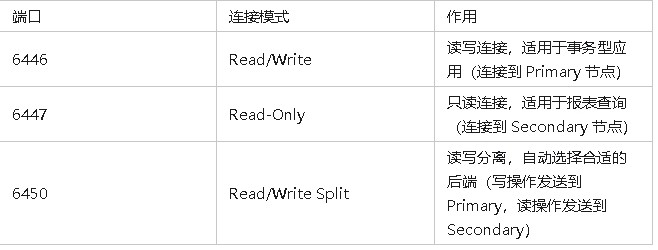
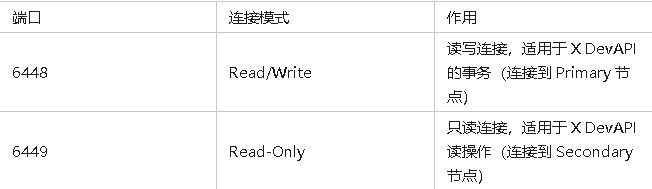
- MySQL X Protocol
MySQL X Protocol 是 MySQL 的新一代协议,支持 JSON 文档、NoSQL 查询和 CRUD API,主要适用于:
- MySQL Shell (mysqlsh)
- X DevAPI(面向文档存储)
- 适用于 MySQL 8.0 以上版本的新应用场景
相关端口
启动 MySQL Router
[root@mysql-router1 ~]# systemctl start mysqlrouter.service
[root@mysql-router1 ~]# systemctl enable mysqlrouter.service
Created symlink /etc/systemd/system/multi-user.target.wants/mysqlrouter.service → /usr/lib/systemd/system/mysqlrouter.service.
[root@mysql-router1 ~]# systemctl status mysqlrouter.service
配置 Keepalived
以下操作在mysql-router1、2 执行
安装 keeplived
[root@mysql-router1 ~]# dnf install -y keepalived
配置 Keepalived
在 mysql-router1 配置 /etc/keepalived/keepalived.conf:
global_defs {
  script_user root
  enable_script_security
}

vrrp_script chk_router {
    script "/etc/keepalived/check_router.sh"
    interval 1
    weight -2
}

vrrp_instance VI_1 {
    state MASTER
    interface ens160
    virtual_router_id 51
    priority 100
    advert_int 1
    authentication {
        auth_type PASS
        auth_pass mypassword
    }
    virtual_ipaddress {
        192.168.10.200
    }
    track_script {
        chk_router
    }
}
在 mysql-router2 配置 /etc/keepalived/keepalived.conf:
global_defs {
  script_user root
  enable_script_security
}

vrrp_script chk_router {
    script "/etc/keepalived/check_router.sh"
    interval 1
    weight -2
}

vrrp_instance VI_1 {
    state BACKUP # 改为备用
    interface ens160
    virtual_router_id 51
    priority 99 # 降低优先级
    advert_int 1
    authentication {
        auth_type PASS
        auth_pass mypassword
    }
    virtual_ipaddress {
        192.168.10.200
    }
    track_script {
        chk_router
    }
}
创建 MySQL Router 检测脚本
[root@mysql-router1 ~]# cat > /etc/keepalived/check_router.sh << EOF
#!/bin/bash
if pgrep mysqlrouter > /dev/null; then
    exit 0
else
    exit 1
fi
EOF
赋予执行权限:
[root@mysql-router1 ~]# chmod +x /etc/keepalived/check_router.sh
启动 Keepalived
[root@mysql-router1 ~]# systemctl enable keepalived
[root@mysql-router1 ~]# systemctl start keepalived
功能测试
测试MySQL Router高可用
在 mysql-router1 执行:
# 当前vip位于mysql-router1节点
[root@mysql-router1 ~]# ip a | grep 192.168.10
    inet 192.168.10.204/24 brd 192.168.10.255 scope global noprefixroute ens160
    inet 192.168.10.200/32 scope global ens160
# 停止mysqlrouter服务,模拟router1节点故障
[root@mysql-router1 ~]# systemctl stop mysqlrouter.service
# 当前vip已经从mysql-router1节点移除。
[root@mysql-router1 ~]# ip a | grep 192.168.10
    inet 192.168.10.204/24 brd 192.168.10.255 scope global noprefixroute ens160
在 mysql-router2 执行:
# 当前vip位于mysql-router2节点
[root@mysql-router2 ~]# ip a | grep 192.168.10
    inet 192.168.10.205/24 brd 192.168.10.255 scope global noprefixroute ens160
    inet 192.168.10.200/32 scope global ens160
在 mysql-router1 执行:
# mysql-router1节点启动服务,模拟故障恢复
[root@mysql-router1 ~]# systemctl start mysqlrouter.service
# 当前vip继续漂移到mysql-router1节点
[root@mysql-router1 ~]# ip a | grep 192.168.10
    inet 192.168.10.204/24 brd 192.168.10.255 scope global noprefixroute ens160
    inet 192.168.10.200/32 scope global ens160
测试MySQL高可用
使用客户机连接 vip 的 6450 端口测试。
[root@tiaoban ~]# mysql -h 192.168.10.200 -P6450 -u root -p
Enter password:
Welcome to the MySQL monitor.  Commands end with ; or \g.
Your MySQL connection id is 0
Server version: 8.4.4-router MySQL Community Server - GPL

Copyright (c) 2000, 2025, Oracle and/or its affiliates.

Oracle is a registered trademark of Oracle Corporation and/or its
affiliates. Other names may be trademarks of their respective
owners.

Type 'help;' or '\h' for help. Type '\c' to clear the current input statement.

mysql> show databases;
+-------------------------------+
| Database                      |
+-------------------------------+
| information_schema            |
| mysql                         |
| mysql_innodb_cluster_metadata |
| performance_schema            |
| sys                           |
+-------------------------------+
5 rows in set (0.00 sec)
停止 mysql-node1 节点,模拟主节点故障:
[root@mysql-node1 ~]# systemctl stop mysqld
查看集群状态,node1 离线,node3 提升为主节点。
MySQL  127.0.0.1:3306 ssl  JS > cluster.status()
{
    "clusterName": "myCluster",
    "defaultReplicaSet": {
        "name": "default",
        "primary": "mysql-node3:3306",
        "ssl": "REQUIRED",
        "status": "OK_NO_TOLERANCE_PARTIAL",
        "statusText": "Cluster is NOT tolerant to any failures. 1 member is not active.",
        "topology": {
            "mysql-node1:3306": {
                "address": "mysql-node1:3306",
                "memberRole": "SECONDARY",
                "mode": "n/a",
                "readReplicas": {},
                "role": "HA",
                "shellConnectError": "MySQL Error 2003: Could not open connection to 'mysql-node1:3306': Can't connect to MySQL server on 'mysql-node1:3306' (111)",
                "status": "(MISSING)"
            },
            "mysql-node2:3306": {
                "address": "mysql-node2:3306",
                "memberRole": "SECONDARY",
                "mode": "R/O",
                "readReplicas": {},
                "replicationLag": "applier_queue_applied",
                "role": "HA",
                "status": "ONLINE",
                "version": "8.4.4"
            },
            "mysql-node3:3306": {
                "address": "mysql-node3:3306",
                "memberRole": "PRIMARY",
                "mode": "R/W",
                "readReplicas": {},
                "replicationLag": "applier_queue_applied",
                "role": "HA",
                "status": "ONLINE",
                "version": "8.4.4"
            }
        },
        "topologyMode": "Single-Primary"
    },
    : "mysql-node3:3306"
}
客户端访问数据库服务未中断,可正常读写
mysql> show databases;
+-------------------------------+
| Database                      |
+-------------------------------+
| information_schema            |
| mysql                         |
| mysql_innodb_cluster_metadata |
| performance_schema            |
| sys                           |
+-------------------------------+
5 rows in set (0.00 sec)
测试主从同步
客户端连接主节点写入数据测试:
[root@tiaoban ~]# mysql -h 192.168.10.200 -P6450 -u root -p
# 创建数据库
mysql> create database test_db;
Query OK, 1 row affected (0.00 sec)
# 查看数据库
mysql> show databases;
+--------------------+
| Database           |
+--------------------+
| information_schema |
| mysql              |
| performance_schema |
| sys                |
| test_db            |
+--------------------+
# 切换数据库
mysql> use test_db;
Database changed
# 创建表
mysql> CREATE TABLE `t_test` (
 `id` int(11) NOT NULL,
 `age` int(11) DEFAULT NULL,
 `score` int(11) DEFAULT NULL,
 PRIMARY KEY (`id`)
) ENGINE=InnoDB DEFAULT CHARSET=utf8mb4 ROW_FORMAT=DYNAMIC;
Query OK, 0 rows affected, 3 warnings (0.01 sec)

# 插入表数据
mysql> INSERT INTO `t_test` VALUES (1, 2, 1);
Query OK, 1 row affected (0.01 sec)
# 查看表
mysql> show tables;
+-------------------+
| Tables_in_test_db |
+-------------------+
| t_test            |
+-------------------+
1 row in set (0.00 sec)
# 查看表数据
mysql> select * from t_test;
+-----+------+-------+
| id  | age  | score |
+-----+------+-------+
|   1 |    2 |     1 |
+-----+------+-------+
2 rows in set (0.00 sec)
检查从节点是否同步成功:
[root@mysql-node3 ~]# mysql -u root -p
mysql> show databases;
+--------------------+
| Database           |
+--------------------+
| information_schema |
| mysql              |
| performance_schema |
| sys                |
| test_db            |
+--------------------+
5 rows in set (0.00 sec)
# 切换数据库
mysql> use test_db;
Database changed
# 查看表
mysql> show tables;
+-------------------+
| Tables_in_test_db |
+-------------------+
| t_test            |
+-------------------+
1 row in set (0.00 sec)
# 查询表数据
mysql> select * from t_test;
+-----+------+-------+
| id  | age  | score |
+-----+------+-------+
|   1 |    2 |     1 |
+-----+------+-------+
2 rows in set (0.00 sec)
至此,主从同步验证完成
测试读写分离
客户端连接数据库 6446 读写端口测试
[root@tiaoban ~]# mysql -uroot -p123.com -h192.168.10.200 -P 6446 --protocol=TCP -N -r -B -e"select @@hostname, @@global.read_only;"
mysql: [Warning] Using a password on the command line interface can be insecure.
mysql-node1     0
[root@tiaoban ~]# mysql -uroot -p123.com -h192.168.10.200 -P 6446 --protocol=TCP -N -r -B -e"select @@hostname, @@global.read_only;"
mysql: [Warning] Using a password on the command line interface can be insecure.
mysql-node1     0
客户端连接数据库 6447 只读端口测试
[root@tiaoban ~]# mysql -uroot -p123.com -h192.168.10.200 -P 6447 --protocol=TCP -N -r -B -e"select @@hostname, @@global.read_only;"
mysql: [Warning] Using a password on the command line interface can be insecure.
mysql-node2     1
[root@tiaoban ~]# mysql -uroot -p123.com -h192.168.10.200 -P 6447 --protocol=TCP -N -r -B -e"select @@hostname, @@global.read_only;"
mysql: [Warning] Using a password on the command line interface can be insecure.
mysql-node3     1
客户端连接数据库 6450 读写分离端口测试
[root@tiaoban ~]# mysql -uroot -p123.com -h192.168.10.200 -P 6450 --protocol=TCP -N -r -B -e"select @@hostname, @@global.read_only;"
mysql: [Warning] Using a password on the command line interface can be insecure.
mysql-node2     1
[root@tiaoban ~]# mysql -uroot -p123.com -h192.168.10.200 -P 6450 --protocol=TCP -N -r -B -e"select @@hostname, @@global.read_only;"
mysql: [Warning] Using a password on the command line interface can be insecure.
mysql-node3     1
Mysql 集群维护
集群节点扩容
准备工作,具体可参考上文
- 部署MySQL
- 部署MySQL Shell
- 更新所有节点hosts
更新 mysql4 配置文件
[root@mysql-node4 ~]# vim /etc/my.cnf
[mysqld]
bind-address = 0.0.0.0
server_id=4                        # 唯一的服务器 ID,不能和现有节点冲突
log_bin=mysql-bin                  # 启用二进制日志
binlog_expire_logs_seconds=604800  # [可选]设置日志文件保留的时长,单位是秒(默认不删除文件)
binlog_format=ROW                  # 确保 binlog 使用 ROW 模式
gtid_mode=ON                       # 启用 GTID
enforce-gtid-consistency=ON        # 强制 GTID 一致性
[root@mysql-node4 ~]# systemctl restart mysqld
InnoDB Cluster 集群添加节点
[root@mysql-node1 ~]# mysqlsh -h127.0.0.1 -P3306 -uroot -p123.com
# 切换到js模式
MySQL  127.0.0.1:3306 ssl  SQL > \js
Switching to JavaScript mode...
# 获取集群
 MySQL  127.0.0.1:3306 ssl  JS > var cluster = dba.getCluster();
# 查看集群状态
 MySQL  127.0.0.1:3306 ssl  JS > cluster.status();
{
    "clusterName": "myCluster",
    "defaultReplicaSet": {
        "name": "default",
        "primary": "mysql-node2:3306",
        "ssl": "REQUIRED",
        "status": "OK",
        "statusText": "Cluster is ONLINE and can tolerate up to ONE failure.",
        "topology": {
            "mysql-node1:3306": {
                "address": "mysql-node1:3306",
                "memberRole": "SECONDARY",
                "mode": "R/O",
                "readReplicas": {},
                "replicationLag": "applier_queue_applied",
                "role": "HA",
                "status": "ONLINE",
                "version": "8.4.4"
            },
            "mysql-node2:3306": {
                "address": "mysql-node2:3306",
                "memberRole": "PRIMARY",
                "mode": "R/W",
                "readReplicas": {},
                "replicationLag": "applier_queue_applied",
                "role": "HA",
                "status": "ONLINE",
                "version": "8.4.4"
            },
            "mysql-node3:3306": {
                "address": "mysql-node3:3306",
                "memberRole": "SECONDARY",
                "mode": "R/O",
                "readReplicas": {},
                "replicationLag": "applier_queue_applied",
                "role": "HA",
                "status": "ONLINE",
                "version": "8.4.4"
            }
        },
        "topologyMode": "Single-Primary"
    },
    "groupInformationSourceMember": "mysql-node2:3306"
}
# 检查扩容机器是否符合加入,如果不符合根据提示修改配置。
 MySQL  127.0.0.1:3306 ssl  JS > dba.checkInstanceConfiguration('root@mysql-node4:3306');
Please provide the password for 'root@mysql-node4:3306': *******
Save password for 'root@mysql-node4:3306'? [Y]es/[N]o/Ne[v]er (default No): y
Validating MySQL instance at mysql-node4:3306 for use in an InnoDB Cluster...

This instance reports its own address as mysql-node4:3306
Clients and other cluster members will communicate with it through this address by default. If this is not correct, the report_host MySQL system variable should be changed.

Checking whether existing tables comply with Group Replication requirements...
No incompatible tables detected

Checking instance configuration...
Instance configuration is compatible with InnoDB cluster

The instance 'mysql-node4:3306' is valid for InnoDB Cluster usage.

{
    "status": "ok"
}
# 加入集群
 MySQL  127.0.0.1:3306 ssl  JS > cluster.addInstance('root@mysql-node4:3306');
# 查看集群状态
 MySQL  127.0.0.1:3306 ssl  JS > cluster.status();
{
    "clusterName": "myCluster",
    "defaultReplicaSet": {
        "name": "default",
        "primary": "mysql-node2:3306",
        "ssl": "REQUIRED",
        "status": "OK",
        "statusText": "Cluster is ONLINE and can tolerate up to ONE failure.",
        "topology": {
            "mysql-node1:3306": {
                "address": "mysql-node1:3306",
                "memberRole": "SECONDARY",
                "mode": "R/O",
                "readReplicas": {},
                "replicationLag": "applier_queue_applied",
                "role": "HA",
                "status": "ONLINE",
                "version": "8.4.4"
            },
            "mysql-node2:3306": {
                "address": "mysql-node2:3306",
                "memberRole": "PRIMARY",
                "mode": "R/W",
                "readReplicas": {},
                "replicationLag": "applier_queue_applied",
                "role": "HA",
                "status": "ONLINE",
                "version": "8.4.4"
            },
            "mysql-node3:3306": {
                "address": "mysql-node3:3306",
                "memberRole": "SECONDARY",
                "mode": "R/O",
                "readReplicas": {},
                "replicationLag": "applier_queue_applied",
                "role": "HA",
                "status": "ONLINE",
                "version": "8.4.4"
            },
            "mysql-node4:3306": {
                "address": "mysql-node4:3306",
                "memberRole": "SECONDARY",
                "mode": "R/O",
                "readReplicas": {},
                "replicationLag": "applier_queue_applied",
                "role": "HA",
                "status": "ONLINE",
                "version": "8.4.4"
            }
        },
        "topologyMode": "Single-Primary"
    },
    "groupInformationSourceMember": "mysql-node2:3306"
}
更新 MySQL Router
[root@mysql-router1 ~]# mysqlrouter --bootstrap root@192.168.10.201:3306 --user=mysqlrouter --directory=/etc/mysqlrouter
[root@mysql-router1 ~]# systemctl restart mysqlrouter
集群节点删除
[root@mysql-node1 ~]# mysqlsh -h127.0.0.1 -P3306 -uroot -p123.com
# 切换到js模式
MySQL  127.0.0.1:3306 ssl  SQL > \js
Switching to JavaScript mode...
# 获取集群
MySQL  127.0.0.1:3306 ssl  JS > var cluster = dba.getCluster();
# 查看集群状态
MySQL  127.0.0.1:3306 ssl  JS > cluster.status();
# 定义要移除的节点主机名
MySQL  127.0.0.1:3306 ssl  JS > var memberToBeRemoved = "mysql-node4";
# 删除节点
MySQL  127.0.0.1:3306 ssl  JS > cluster.removeInstance(memberToBeRemoved);
# 查看集群状态
MySQL  127.0.0.1:3306 ssl  JS > cluster.status()
{
    "clusterName": "myCluster",
    "defaultReplicaSet": {
        "name": "default",
        "primary": "mysql-node2:3306",
        "ssl": "REQUIRED",
        "status": "OK",
        "statusText": "Cluster is ONLINE and can tolerate up to ONE failure.",
        "topology": {
            "mysql-node1:3306": {
                "address": "mysql-node1:3306",
                "memberRole": "SECONDARY",
                "mode": "R/O",
                "readReplicas": {},
                "replicationLag": "applier_queue_applied",
                "role": "HA",
                "status": "ONLINE",
                "version": "8.4.4"
            },
            "mysql-node2:3306": {
                "address": "mysql-node2:3306",
                "memberRole": "PRIMARY",
                "mode": "R/W",
                "readReplicas": {},
                "replicationLag": "applier_queue_applied",
                "role": "HA",
                "status": "ONLINE",
                "version": "8.4.4"
            },
            "mysql-node3:3306": {
                "address": "mysql-node3:3306",
                "memberRole": "SECONDARY",
                "mode": "R/O",
                "readReplicas": {},
                "replicationLag": "applier_queue_applied",
                "role": "HA",
                "status": "ONLINE",
                "version": "8.4.4"
            }
        },
        "topologyMode": "Single-Primary"
    },
    "groupInformationSourceMember": "mysql-node2:3306"
}
集群角色与模式切换
连接集群
[root@mysql-node1 ~]# mysqlsh -h127.0.0.1 -P3306 -uroot -p123.com
# 切换到js模式
MySQL  127.0.0.1:3306 ssl  SQL > \js
Switching to JavaScript mode...
# 获取集群
MySQL  127.0.0.1:3306 ssl  JS > var cluster = dba.getCluster();
# 查看集群状态
MySQL  127.0.0.1:3306 ssl  JS > cluster.status();
切换为多个Primary模式
MySQL  127.0.0.1:3306 ssl  JS > cluster.switchToMultiPrimaryMode()
Switching cluster 'myCluster' to Multi-Primary mode...

Instance 'mysql-node2:3306' remains PRIMARY.
Instance 'mysql-node1:3306' was switched from SECONDARY to PRIMARY.
Instance 'mysql-node3:3306' was switched from SECONDARY to PRIMARY.

The cluster successfully switched to Multi-Primary mode.
# 查看集群状态
MySQL  127.0.0.1:3306 ssl  JS > cluster.status()
{
    "clusterName": "myCluster",
    "defaultReplicaSet": {
        "name": "default",
        "ssl": "REQUIRED",
        "status": "OK",
        "statusText": "Cluster is ONLINE and can tolerate up to ONE failure.",
        "topology": {
            "mysql-node1:3306": {
                "address": "mysql-node1:3306",
                "memberRole": "PRIMARY",
                "mode": "R/W",
                "readReplicas": {},
                "replicationLag": "applier_queue_applied",
                "role": "HA",
                "status": "ONLINE",
                "version": "8.4.4"
            },
            "mysql-node2:3306": {
                "address": "mysql-node2:3306",
                "memberRole": "PRIMARY",
                "mode": "R/W",
                "readReplicas": {},
                "replicationLag": "applier_queue_applied",
                "role": "HA",
                "status": "ONLINE",
                "version": "8.4.4"
            },
            "mysql-node3:3306": {
                "address": "mysql-node3:3306",
                "memberRole": "PRIMARY",
                "mode": "R/W",
                "readReplicas": {},
                "replicationLag": "applier_queue_applied",
                "role": "HA",
                "status": "ONLINE",
                "version": "8.4.4"
            }
        },
        "topologyMode": "Multi-Primary"
    },
    "groupInformationSourceMember": "mysql-node1:3306"
}
切换为单个Primary模式
MySQL  127.0.0.1:3306 ssl  JS > cluster.switchToSinglePrimaryMode()
Switching cluster 'myCluster' to Single-Primary mode...

Instance 'mysql-node1:3306' remains PRIMARY.
Instance 'mysql-node2:3306' was switched from PRIMARY to SECONDARY.
Instance 'mysql-node3:3306' was switched from PRIMARY to SECONDARY.

WARNING: Existing connections that expected a R/W connection must be disconnected, i.e. instances that became SECONDARY.

The cluster successfully switched to Single-Primary mode.
MySQL  127.0.0.1:3306 ssl  JS > cluster.status()
{
    "clusterName": "myCluster",
    "defaultReplicaSet": {
        "name": "default",
        "primary": "mysql-node1:3306",
        "ssl": "REQUIRED",
        "status": "OK",
        "statusText": "Cluster is ONLINE and can tolerate up to ONE failure.",
        "topology": {
            "mysql-node1:3306": {
                "address": "mysql-node1:3306",
                "memberRole": "PRIMARY",
                "mode": "R/W",
                "readReplicas": {},
                "replicationLag": "applier_queue_applied",
                "role": "HA",
                "status": "ONLINE",
                "version": "8.4.4"
            },
            "mysql-node2:3306": {
                "address": "mysql-node2:3306",
                "memberRole": "SECONDARY",
                "mode": "R/O",
                "readReplicas": {},
                "replicationLag": "applier_queue_applied",
                "role": "HA",
                "status": "ONLINE",
                "version": "8.4.4"
            },
            "mysql-node3:3306": {
                "address": "mysql-node3:3306",
                "memberRole": "SECONDARY",
                "mode": "R/O",
                "readReplicas": {},
                "replicationLag": "applier_queue_applied",
                "role": "HA",
                "status": "ONLINE",
                "version": "8.4.4"
            }
        },
        "topologyMode": "Single-Primary"
    },
    "groupInformationSourceMember": "mysql-node1:3306"
}
指定节点切换为Primary模式
MySQL  127.0.0.1:3306 ssl  JS > cluster.setPrimaryInstance('mysql-node2')
Setting instance 'mysql-node2' as the primary instance of cluster 'myCluster'...

Instance 'mysql-node3:3306' remains SECONDARY.
Instance 'mysql-node1:3306' was switched from PRIMARY to SECONDARY.
Instance 'mysql-node2:3306' was switched from SECONDARY to PRIMARY.

The instance 'mysql-node2' was successfully elected as primary.
# 查看集群状态
MySQL  127.0.0.1:3306 ssl  JS > cluster.status()
{
    "clusterName": "myCluster",
    "defaultReplicaSet": {
        "name": "default",
        "primary": "mysql-node2:3306",
        "ssl": "REQUIRED",
        "status": "OK",
        "statusText": "Cluster is ONLINE and can tolerate up to ONE failure.",
        "topology": {
            "mysql-node1:3306": {
                "address": "mysql-node1:3306",
                "memberRole": "SECONDARY",
                "mode": "R/O",
                "readReplicas": {},
                "replicationLag": "applier_queue_applied",
                "role": "HA",
                "status": "ONLINE",
                "version": "8.4.4"
            },
            "mysql-node2:3306": {
                "address": "mysql-node2:3306",
                "memberRole": "PRIMARY",
                "mode": "R/W",
                "readReplicas": {},
                "replicationLag": "applier_queue_applied",
                "role": "HA",
                "status": "ONLINE",
                "version": "8.4.4"
            },
            "mysql-node3:3306": {
                "address": "mysql-node3:3306",
                "memberRole": "SECONDARY",
                "mode": "R/O",
                "readReplicas": {},
                "replicationLag": "applier_queue_applied",
                "role": "HA",
                "status": "ONLINE",
                "version": "8.4.4"
            }
        },
        "topologyMode": "Single-Primary"
    },
    "groupInformationSourceMember": "mysql-node2:3306"
}- 发表于 2025-08-01 17:13
- 阅读 ( 15 )


