Certbot免费证书的安装·使用·自动续期
安装
(CentOS):
yum update
yum install certbot -y
(Debian):
apt update
apt install certbot -y
有的云服务器可能需要提前安装epel源:
yum install epel-release -y
使用
1.生成证书
输入:certbot certonly,出现如下两个选项:
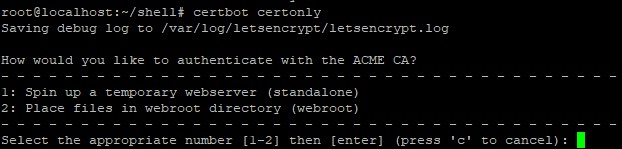
选项1适用于还没有搭建服务器的情况,因为默认采用80端口,如果有其他程序占用了,如nginx,需要先关闭。
选项2适用已搭建服务器的情况,可以根据网站目录验证后生成,不占用端口。
这里采用1方法,输入1回车。
第一次使用,需要输入邮箱,最好填真实邮箱,90天快到期了会有邮件提示。
其他的根据提示输入A或者Y,最后需要输入域名:

出现Congratulation就代表生成成功。生成的证书文件保存在/etc/letsencrypt/live/api.example.com/下,其实是软链,真实文件目录可自行查看,一般用软链就够了。
2.nginx配置ssl证书
打开nginx配置文件nginx.conf,添加443端口监听,http转https,配置证书目录
server{
listen 80;
listen 443 ssl http2;
server_name api.example.com;
index index.php index.html index.htm default.php default.htm default.html;
root /www/wwwroot/api.example.com;
#强制SSL
if ($server_port !~ 443){
rewrite ^(/.*)$ https://$host$1 permanent;
}
#SSL-START SSL相关配置
#error_page 404/404.html;
ssl_certificate /etc/letsencrypt/live/api.example.com/fullchain.pem;
ssl_certificate_key /etc/letsencrypt/live/api.example.com/privkey.pem;
ssl_protocols TLSv1.1 TLSv1.2 TLSv1.3;
ssl_ciphers EECDH+CHACHA20:EECDH+CHACHA20-draft:EECDH+AES128:RSA+AES128:EECDH+AES256:RSA+AES256:EECDH+3DES:RSA+3DES:!MD5;
ssl_prefer_server_ciphers on;
ssl_session_cache shared:SSL:10m;
ssl_session_timeout 10m;
add_header Strict-Transport-Security "max-age=31536000";
error_page 497 https://$host$request_uri;
#SSL-END
......
}
保存文件后重启nginx,就可以https访问了。云服务器注意安全组开放443端口,否则无法访问。
自动续期
certbot的证书有效期为90天,手动续期。
certbot renew
手动续期需要注意两点:
1.80端口没有被占用,因为更新证书需要用到80端口。
2.在到期前30天之内才能续期,否则certbot会判断没有必要进行续期。
可以写个定时脚本,自动续期:
#!/bin/bash
nginx -s quit
certbot renew --force-renewal --renew-hook "nginx" > /root/shell/ssl_update.log 2>&1 &
--force-renewal:强制更新证书,无视30天之内限制
--renew-hook:证书更新完毕后,将关闭的nginx启动。(没有加入系统路径的要带上路径,如:/usr/local/nginx/sbin/nginx)
脚本执行会有一段时间延迟:

编辑/etc/crontab文件,在文末添加命令,每个月1号和15号0点,执行一次更新脚本:
0 0 1,15 * * root /root/shell/renew_ssl.sh > /dev/null 2>&1 &
- 发表于 2024-08-20 13:10
- 阅读 ( 27 )


