Enabling TCP Fast Open for NGINX on CentOS 7
What is TCP Fast Open?
The TCP protocol underpins most application-layer protocols like HTTP, SSH, FTP, NFS, etc. In fact TCP sits in between the IP layer (IP address routing) and the Application layer (user data), and is responsible for guaranteed and ordered byte stream delivery. TCP is also the layer at which source and destination ports are indicated.
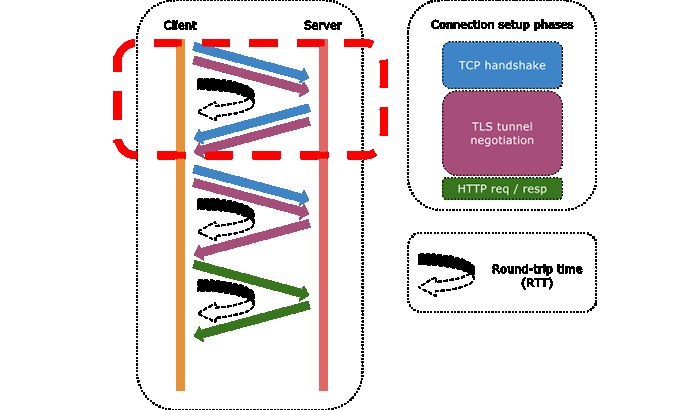
One of the reasons that applications are so sensitive to the distance between the sender and receiver, is that TCP requires a 3-way handshake before any user data is sent.
- The sender sends a TCP-synchronize (SYN) packet to the receiver, indicating its desire to transmit;
- The receiver responds with a TCP-SYN/ACK packet, simultaneously acknowledging the sender and opening up its own TX pipe (TCP is bidirectional);
- Finally, the sender sends a TCP-ACK packet to acknowledge the receiver’s transmission intentions.
It’s only after step 3 that the sender can actually start sending data. In fact, if you look at a Wiresharktrace, what you’ll typically see is the sender’s TCP-ACK packet being followed immediately by a bunch of data packets.
So the problem with distance between the sender and receiver, is that it creates a meaningful delay between step 1 and step 2. This delay is called the round-trip time (RTT, aka ping time) because the sender must wait for its packet to travel all the way to the receiver, and then wait for a reply to come back.
That’s where TCP Fast Open (TFO) comes in. TFO is an extension to the TCP protocol which allows connections to be started during the handshake, by allowing data in the payload of a TCP-SYN packet and hence triggering an immediate response from the server.
However, TFO is only possible after a normal, initial handshake has been performed. In other words, the TFO extension provides means by which a sender and receiver can save some data about each other, and recognize each other historically based on a TFO cookie.
TFO is quite useful because:
- TFO is a kernel setting, thus available to all applications that want to benefit from TFO;
- TFO can meaningfully accelerate applications that open-use-close connections during the lifetime of the app.
How meaningful is the acceleration? First, it’s meaningful if we consider the reduction of the response time. This is especially true if the sender and receiver are far apart from each other. For example, you may want your e-commerce site to load individual catalogue items faster, because every delay is an opportunity for the customer to think twice or go away. As another example, reducing the time between a user hitting the play button and the time the video actually starts, can significantly improve user experience. In terms of response time, it’s a function of the RTT.
Secondly, it can be very meaningful in terms of the turnaround time. If you consider the time spent in transferring smaller files, the initial delay is typically one or more orders of magnitude larger than the actual data transfer time. For example, if an application is synchronizing many small or medium files, eliminating the handshake delay can significantly improve the total transfer time.
Enabling TFO for NGINX
Ok let’s get to work, there are 3 tasks to complete:
- Update the kernel settings to support TFO;
- Compile NGINX from source with TFO support;
- Modify NGINX configuration to accept TFO connections.
Kernel support for TFO
The client and server support for IPv4 TFO was merged into the Linux kernel mainline as of 3.7 – you can check your kernel version with uname -r. If you’re running 3.13, chances are that TFO is already enabled by default. Otherwise, follow this procedure to turn it on.
- As root, create the file /etc/sysctl.d/tcp-fast-open.conf with the following content:1net.ipv4.tcp_fastopen=3
- Restart sysctl:1# systemctl restart systemd-sysctl
- Check the current setting:12# cat /proc/sys/net/ipv4/tcp_fastopen3
Compiling NGINX with TFO support
Most NGINX packages do not currently include TFO support. The minimum NGINX version required for TFO is 1.5.8. However that’s a pretty old version, as NGINX is now at 1.9.7. The procedure that follows will use 1.9.7 but will likely work with future NGINX versions. Check the NGINX News page to get the latest version.
- As a normal user (not root), download the NGINX source nginx-1.9.7.tar.gz, extract it and move into the nginx-1.9.7 directory.1234sudo yum install wget-ywget http://nginx.org/download/nginx-1.9.7.tar.gztar-xvf nginx-1.9.7.tar.gzcd nginx-1.9.7
- Install the Fedora EPEL repository (this must be done prior to the next yum install command):1sudo yum install-yepel-release
- Install prerequisite packages:1sudo yum install-ygcc zlib-devel libatomic_ops-devel pcre-devel openssl-devel libxml2-devel libxslt-devel gd-devel GeoIP-devel gperftools-devel
- Configure the build specifying the -DTCP_FASTOPEN=23 compiler flag. Also note that the --prefix=/usr/share/nginx configuration option specifies the installation root, and a few other directories need to be manually set as well. If you’re not worried about crushing an existing NGINX installation and/or you want to build a more standard installation, change the prefix option to /usr and remove the /usr/share/nginx prefix from the rest of the path specifications.
$ ./configure \
--prefix=/usr/share/nginx \
--conf-path=/usr/share/nginx/etc/nginx/nginx.conf \
--error-log-path=/usr/share/nginx/var/log/nginx/error.log \
--http-log-path=/usr/share/nginx/var/log/nginx/access.log \
--http-client-body-temp-path=/usr/share/nginx/var/lib/nginx/tmp/client_body \
--http-proxy-temp-path=/usr/share/nginx/var/lib/nginx/tmp/proxy \
--http-fastcgi-temp-path=/usr/share/nginx/var/lib/nginx/tmp/fastcgi \
--http-uwsgi-temp-path=/usr/share/nginx/var/lib/nginx/tmp/uwsgi \
--http-scgi-temp-path=/usr/share/nginx/var/lib/nginx/tmp/scgi \
--user=nginx \
--group=nginx \
--build="TFO custom build" \
--with-threads \
--with-file-aio \
--with-ipv6 \
\
--with-http_ssl_module \
--with-http_v2_module \
\
--with-http_realip_module \
--with-http_addition_module \
--with-http_xslt_module \
--with-http_image_filter_module \
--with-http_geoip_module \
--with-http_sub_module \
--with-http_dav_module \
--with-http_flv_module \
--with-http_mp4_module \
--with-http_gunzip_module \
--with-http_gzip_static_module \
--with-http_auth_request_module \
--with-http_random_index_module \
--with-http_secure_link_module \
--with-http_degradation_module \
--with-http_stub_status_module \
\
--with-mail \
--with-mail_ssl_module \
--with-stream \
--with-stream_ssl_module \
--with-google_perftools_module \
\
--with-pcre \
--with-pcre-jit \
--with-google_perftools_module \
--with-debug \
--with-cc-opt='-O2 -g -pipe -Wall -Wp,-D_FORTIFY_SOURCE=2 -fexceptions -fstack-protector-strong --param=ssp-buffer-size=4 -grecord-gcc-switches -m64 -mtune=generic -DTCP_FASTOPEN=23' \
--with-ld-opt='-Wl,-z,relro -Wl,-E' - Compile NGINX:1make-j4
- Check that NGINX was built correctly:
$ ./objs/nginx -V
nginx version: nginx/1.9.7 (TFO custom build)
built by gcc 4.8.3 20140911 (Red Hat 4.8.3-9) (GCC)
built with OpenSSL 1.0.1e-fips 11 Feb 2013
TLS SNI support enabled
configure arguments: --prefix=/usr/share/nginx --error-log-path=/usr/share/nginx/var/log/nginx/error.log --http-log-path=/usr/share/nginx/var/log/nginx/access.log --http-client-body-temp-path=/usr/share/nginx/var/lib/nginx/tmp/client_body --http-proxy-temp-path=/usr/share/nginx/var/lib/nginx/tmp/proxy --http-fastcgi-temp-path=/usr/share/nginx/var/lib/nginx/tmp/fastcgi --http-uwsgi-temp-path=/usr/share/nginx/var/lib/nginx/tmp/uwsgi --http-scgi-temp-path=/usr/share/nginx/var/lib/nginx/tmp/scgi --user=nginx --group=nginx --build='TFO custom build' --with-threads --with-file-aio --with-ipv6 --with-http_ssl_module --with-http_v2_module --with-http_realip_module --with-http_addition_module --with-http_xslt_module --with-http_image_filter_module --with-http_geoip_module --with-http_sub_module --with-http_dav_module --with-http_flv_module --with-http_mp4_module --with-http_gunzip_module --with-http_gzip_static_module --with-http_auth_request_module --with-http_random_index_module --with-http_secure_link_module --with-http_degradation_module --with-http_stub_status_module --with-mail --with-mail_ssl_module --with-stream --with-stream_ssl_module --with-google_perftools_module --with-pcre --with-pcre-jit --with-google_perftools_module --with-debug --with-cc-opt='-O2 -g -pipe -Wall -Wp,-D_FORTIFY_SOURCE=2 -fexceptions -fstack-protector-strong --param=ssp-buffer-size=4 -grecord-gcc-switches -m64 -mtune=generic -DTCP_FASTOPEN=23' --with-ld-opt='-Wl,-z,relro -Wl,-E' - Install NGINX to the prefix base directory:1sudo make install
- Create the nginx user/group along with the temporary file directory:
$ sudo groupadd -r nginx
$ sudo useradd -r -d /usr/share/nginx/var/lib/nginx -g nginx -s /sbin/nologin -c "Nginx web server" nginx
$ sudo mkdir -p /usr/share/nginx/var/lib/nginx/tmp
$ sudo chown -R nginx.wheel /usr/share/nginx/var/{log,lib}/nginx
NGINX configuration for TFO
Using TFO is as simple as adding the fastopen option to a server’s listen directive. From the NGINX docs:
1 2 3 | fastopen=number Enables“TCP Fast Open”forthe listening socket(1.5.8)andlimits the maximum length forthe queue of connections that have notyet completed the three-way handshake. |
Edit the /usr/share/nginx/etc/nginx/nginx.conf file and modify your listen directive as follows:
1 | listen80fastopen=256 |
Feel free to leave a comment to let me know how this played out for you – thanks and good luck.
- 发表于 2016-11-15 03:44
- 阅读 ( 53 )


